Omada Pro Logo official website Vigi Logo official website
Свържете се с нас
  • Свържете се с екип продажби
  • Свържете се с екип поддръжка
Log In
avatar

    Съобщения Съобщения Отметки Отметки Настройки на профила Настройки на профила
    Bulgaria / Български език
    Omada logo
    • Продукти

      Продукти

      • Fusion рутери
        • Fusion серия
          Fusion серия
        • Fusion Pro
          Fusion Pro
        • Fusion Max
          Fusion Max
        • Вижте всички
          Вижте всички
      • WiFi продукти
        • WiFi 7
          WiFi 7
        • За окачване на таван
          За окачване на таван
        • За стена
          За стена
        • Desktop
          Desktop
        • Външни
          Външни
        • Wireless Bridge
          Wireless Bridge
        • GPON
          GPON
        • Вижте всички
          Вижте всички
      • Комутатори
        • Campus
          Campus
        • Aggregation
          Aggregation
        • Access Max
          Access Max
        • Access Pro
          Access Pro
        • Access Plus
          Access Plus
        • Access
          Access
        • Agile
          Agile
        • Вижте всички
          Вижте всички
      • Стандартни рутери
        • Кабелни рутери
          Кабелни рутери
        • WiFi рутери
          WiFi рутери
        • 4G WiFi рутери
          4G WiFi рутери
        • Интегрирани рутери
          Интегрирани рутери
        • DSL рутери
          DSL рутери
        • Вижте всички
          Вижте всички
      • Контролери
        • Облачни
          Облачни
        • Хардуер
          Хардуер
        • Софтуер
          Софтуер
        • Вижте всички
          Вижте всички
      • Аксесоари
        • Монтаж и скоби
          Монтаж и скоби
        • Медийни конвертори
          Медийни конвертори
        • Модули и кабели
          Модули и кабели
        • Монтаж и скоби
          Монтаж и скоби
        • Вижте всички
          Вижте всички

      Платформи за управление

      • Системи за управление
        • Fusion рутери
          Fusion рутери
        • Облачни
          Облачни
        • Хардуер
          Хардуер
        • Софтуер
          Софтуер
        • Вижте всички
          Вижте всички
      • Облачен портал

      Софтуерни инструменти

      • Omada Design Hub
      • Omada WiFi Navi App
      • Omada App
    • Решения
      Решения

      По сценарии

      • WiFi за хотели
      • Малки и средни офиси
      • Малки вериги ресторанти/магазини
      • Складове
      • WiFi за ферми/паркинги
      • WiFi за външни пространства
      • 4G за отдалечени локации
      • WiFi с висока плътност

      По технология

      • Обединено решение за мрежа и видеонаблюдение
      • Безплатно облачно управление чрез Omada Central Essentials
      • WiFi 7
      • PPSK решение
      • PtP & PtMP Wireless Bridges
      • Multi-Gigabit решение
      • PoE комутатори за видеонаблюдение

      Практически казуси

      Практически казуси

      Прегледайте
    • Обучение

      Полезни материали

      • Често задавани въпроси
      • Видеа
      • Наръчници за конфигуриране
      • Практически казуси

      Курсове

      • Представяне на обученията
      • За курсисти
      • За инструктори
    • Поддръжка
      Поддръжка

      Документи

      • Наръчник за инсталация на хардуера
      • База знания
      • Datasheet
      • Справочник
      • Вижте всички

      За изтегляне

      • Изтегляне на софтуер
      • Изтегляне на фърмуеър
      • GPL код
      • MIBs файлове
      • Вижте всички

      Бюлетини

      • Уязвимост в сигурността
      • EOL/EOM/EOS известия
      • Вижте всички

      Поддръжка

      • Поддръжка по имейл
      • Поддръжка по телефон
      • Гаранция

      Инструменти

      • Omada емулатори
      • Omada App
      • Omada Wi-Fi Navi App
      • Списък за съвместимост
    • Партньори

      Намерете дистрибутор

      • Намерете сега
    • Общност
    • Къде да купя
    Търсене
    1. Начална страница>
    2. Продуктова поддръжка>
    3. ER7212PC>
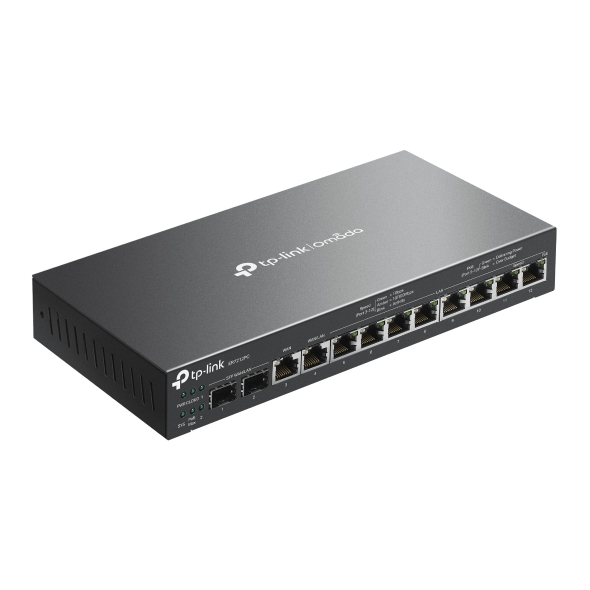
    Omada 3-in-1 Gigabit VPN Router
    Omada 3-in-1 Gigabit VPN Router
    Omada 3-in-1 Gigabit VPN Router
    Omada 3-in-1 Gigabit VPN Router
    Omada 3-in-1 Gigabit VPN Router
    Omada 3-in-1 Gigabit VPN Router
    Omada 3-in-1 Gigabit VPN Router
    Omada 3-in-1 Gigabit VPN Router
    Omada 3-in-1 Gigabit VPN Router
    Omada 3-in-1 Gigabit VPN Router
    Omada 3-in-1 Gigabit VPN Router
    Omada 3-in-1 Gigabit VPN Router
    Omada 3-in-1 Gigabit VPN Router
    Omada 3-in-1 Gigabit VPN Router
    Omada 3-in-1 Gigabit VPN Router

    /5Изтеглете

    ER7212PC

    V1

    Omada 3-in-1 Gigabit VPN Router

    • 3-in-1 Router with fanless and compact design
    • 12× Gigabit ports
    •  2× Gigabit SFP WAN/LAN ports, 1× Gigabit RJ45 WAN port, and 1× Gigabit RJ45 WAN/LAN port
    • 110W PoE Budget
    • Highly Secure VPN
    • Centralized Management
    • 3-in-1 Router with fanless and compact design
    • 12× Gigabit ports
    •  2× Gigabit SFP WAN/LAN ports, 1× Gigabit RJ45 WAN port, and 1× Gigabit RJ45 WAN/LAN port
    • 110W PoE Budget
    • Highly Secure VPN
    • Centralized Management
    • Документи
    • Видеа
    • Изтегляния
    • Инструменти
    • Бюлетини
    • Общност

    Филтрирай по типРесет

    • checkbox

      Datasheet

    • checkbox

      Наръчник за инсталиране на хардуера

    • checkbox

      База знания

      checkbox
    • checkbox

      Release Note

    • checkbox

      Справочник

      checkbox
    • checkbox

      Други

    Филтрирай по тагРесет

    • Контролер
    • Шлюз
    • Vlan
    • ACL
    • Standalone
    • Mesh
    • CLI
    • VPN
    • App
    • Онлайн
    • Ресет
    • Автентикация
    • Портал
    • Безжично
    • API

    How to Allow Specific Public IPs to Access an Internal Server on Omada Gateways

    When hosting an internal server behind an Omada Gateway, such as a web server, exposing it to the Internet can pose security risks. This guide demonstrates how to allow only specific public IP addresses to access an internal server, while blocking all other public traffic.

    Ръководство за конфигуриране
    06-19-2026
    4189

    How to Utilize Link Backup and Policy Routing to Keep Critical Devices Online and Conserve Data

    In dual-WAN environments where one WAN connection is designated as a backup link, it is often necessary to control which devices and networks are permitted to use the backup connection during a failover event. This guide demonstrates how to use Policy Routing to allow only specific devices, networks, or IP addresses to route traffic through the backup WAN.

    Ръководство за конфигуриране
    06-10-2026
    5259

    How to configure Port Mirror on Omada Gateways?

    This article describes how to configure port mirroring for Gateways on Omada Controller and Standalone Mode. Port Mirroring is a feature that copies network traffic from one or more ports and sends it to another port for monitoring or analysis. This is commonly used for troubleshooting network issues, monitoring traffic, or performing traffic analysis using packet capture tools.

    Ръководство за конфигуриране
    06-02-2026
    7517

    How to Use an Omada Controller to Manage Omada Devices Across Different Subnets Over the Internet

    In enterprise networks, devices are often deployed across different subnets, making it common for Omada devices and the Omada Controller to reside in separate network segments. Supporting device adoption and management across subnets enables centralized control without changing existing network designs. This article introduces different methods for adopting devices across subnets using Omada products.

    Ръководство за конфигуриране
    05-28-2026
    19566

    How to configure IPsec VPN on Omada Gateway in Controller Mode (Controller v6.2 and above)

    IPsec Site-to-Site VPN enables the connection of geographically separated networks. Large enterprises commonly use it to establish secure VPN connections between branch offices and headquarters. The IPsec VPN connects branch routers over the public network, ensuring secure transmission of private network data.

    Ръководство за конфигуриране
    04-29-2026
    10310

    How to configure IPsec VPN on Omada Gateway in Standalone Mode

    With the Site-to-Site VPN function, different private networks can be connected over the internet.

    Ръководство за конфигуриране
    04-20-2026
    10323

    How to use an Omada gateway to restrict specific clients from visiting specific URLs

    Sometimes, we may need to restrict certain clients behind the gateway from accessing specific URLs. Omada gateways provide a feature called URL Filtering to help manage and control web access in such cases.

    Ръководство за конфигуриране
    04-08-2026
    10190

    How to Configure SD-WAN via Omada Controller v6.2

    This article provides a comprehensive walkthrough for configuring the SD-WAN function on the Omada Controller, enabling enterprises to centralize network management, optimize traffic routing, and establish secure hub-spoke connectivity across distributed sites in one Controller. The guide covers prerequisites, gateway adoption, IP range allocation, and post-configuration verification to ensure reliable WAN performance.

    Ръководство за конфигуриране
    04-02-2026
    14167

    How to Configure Remote Access for Omada Devices Using Omada Controller and Omada App

    When you use the Omada Controller today, troubleshooting issues like device disconnections can be a bit tedious—you often need to export logs, configuration files, and other data, which takes time and slows you down. To make this easier for you, we’ve added a remote access feature. With it, you can set up a reverse tunnel that lets you remotely reach local services inside your network—like the device’s web interface or SSH.

    Ръководство за конфигуриране
    03-17-2026
    19172

    How to configure the Session Limit and Bandwidth Control to control traffic on Omada Gateways

    Omada gateways support Session Limit and Bandwidth Control to address this; the former prevents connection table exhaustion by constraining the maximum concurrent sessions per user, while the latter avoids bandwidth monopolization by limiting upstream and downstream rates. Together, they resolve issues such as uneven network resource allocation, degraded critical services, and unstable device performance, ensuring fairness, stability, and high-quality network service in multi-user environments. 

    Ръководство за конфигуриране
    03-07-2026
    12413
    • Общо 64 продукта
    • 1
    • 2
    • 3
    • 4
    • 5
    • 6
    • 7
    • 10 / страница

    Няма намерени резултати.

    Филтрирай по типРесет

    • checkbox

      Firmware

    • checkbox

      Software

      checkbox
    • checkbox

      MIBs файлове

    • checkbox

      GPL код

    • checkbox

      Декларация за съответствие

      checkbox

    Други инструменти

    Omada App

    Omada App

    Филтрирай по типРесет

    • checkbox

      Уязвимост в сигурността

    • checkbox

      EOL/EOM/EOS известие

    • checkbox

      Други

    Няма намерени резултати.

    • Общо 178 продукта
    • 1
    • 2
    • 3
    • 4
    • 5
    • •••
    • 18
    • 10 / страница

    Присъединете се към TP-Link общносттаTP-Link се отнася сериозно към вашата поверителност. За повече подробности относно практиките за поверителност на TP-Link вижте Политиката за поверителност на TP-Link..

    Email Error

    I would like to be kept up to date with TP-Link news, product updates and promotions.

    By completing this form you confirm that you understand and agree to our Privacy Policy.

    reCaptcha not verified

    Следвайте ни

    • TP-Link Omada facebook
    • TP-Link Omada youtube
    • TP-Link Omada linkedin
    • TP-Link Omada twitter
    За нас
    • Корпоративен профил
    • Свържете се с нас
    • Условия за поверителност
    За медии
    • Новини
    • Блог
    • Съвети за сигурност
    Партньори
    • Партньорска програма
    Обучителен център
    • Технологични тенденции
    TP-Link Omada Omada Pro VIGI
    Bulgaria / Български език

    ©2026 TP-Link Bulgaria EOOD and its affiliated companies. All rights reserved.

    This website uses cookies to improve website navigation, analyze online activities and have the best possible user experience on our website. You can object to the use of cookies at any time. You can find more information in our privacy policy .

    Your Privacy Choices

    This website uses cookies to improve website navigation, analyze online activities and have the best possible user experience on our website. You can object to the use of cookies at any time. You can find more information in our privacy policy .

    Basic Cookies

    These cookies are necessary for the website to function and cannot be deactivated in your systems.

    TP-Link

    SESSION, JSESSIONID, accepted_local_switcher, tp_privacy_banner, tp_privacy_base, tp_privacy_marketing, tp_top-banner, tp_popup-bottom, tp_popup-center, tp_popup-right-middle, tp_popup-right-bottom, tp_productCategoryType

    Youtube

    id, VISITOR_INFO1_LIVE, LOGIN_INFO, SIDCC, SAPISID, APISID, SSID, SID, YSC, __Secure-1PSID, __Secure-1PAPISID, __Secure-1PSIDCC, __Secure-3PSID, __Secure-3PAPISID, __Secure-3PSIDCC, 1P_JAR, AEC, NID, OTZ

    Zendesk

    OptanonConsent, __cf_bm, __cfruid, _cfuvid, _help_center_session, _pendo___sg__.<container-id>, _pendo_meta.<container-id>, _pendo_visitorId.<container-id>, _zendesk_authenticated, _zendesk_cookie, _zendesk_session, _zendesk_shared_session, ajs_anonymous_id, cf_clearance

    Analysis and Marketing Cookies

    Analysis cookies enable us to analyze your activities on our website in order to improve and adapt the functionality of our website.

    The marketing cookies can be set through our website by our advertising partners in order to create a profile of your interests and to show you relevant advertisements on other websites.

    Google Analytics & Google Tag Manager

    _gid, _ga_<container-id>, _ga, _gat_gtag_<container-id>

    Google Ads & DoubleClick

    test_cookie, _gcl_au