

Omada Pro Logo official website Vigi Logo official website
Свържете се с нас
  • Свържете се с екип продажби
  • Свържете се с екип поддръжка
Log In
avatar

    Съобщения Съобщения Отметки Отметки Настройки на профила Настройки на профила
    Bulgaria / Български език
    Omada logo
    • Продукти

      Продукти

      • Fusion рутери
        • Fusion серия
          Fusion серия
        • Fusion Pro
          Fusion Pro
        • Fusion Max
          Fusion Max
        • Вижте всички
          Вижте всички
      • WiFi продукти
        • WiFi 7
          WiFi 7
        • За окачване на таван
          За окачване на таван
        • За стена
          За стена
        • Desktop
          Desktop
        • Външни
          Външни
        • Wireless Bridge
          Wireless Bridge
        • GPON
          GPON
        • Вижте всички
          Вижте всички
      • Комутатори
        • Campus
          Campus
        • Aggregation
          Aggregation
        • Access Max
          Access Max
        • Access Pro
          Access Pro
        • Access Plus
          Access Plus
        • Access
          Access
        • Agile
          Agile
        • Вижте всички
          Вижте всички
      • Стандартни рутери
        • Кабелни рутери
          Кабелни рутери
        • WiFi рутери
          WiFi рутери
        • 4G WiFi рутери
          4G WiFi рутери
        • Интегрирани рутери
          Интегрирани рутери
        • DSL рутери
          DSL рутери
        • Вижте всички
          Вижте всички
      • Контролери
        • Облачни
          Облачни
        • Хардуер
          Хардуер
        • Софтуер
          Софтуер
        • Вижте всички
          Вижте всички
      • Аксесоари
        • Монтаж и скоби
          Монтаж и скоби
        • Медийни конвертори
          Медийни конвертори
        • Модули и кабели
          Модули и кабели
        • Монтаж и скоби
          Монтаж и скоби
        • Вижте всички
          Вижте всички

      Платформи за управление

      • Системи за управление
        • Fusion рутери
          Fusion рутери
        • Облачни
          Облачни
        • Хардуер
          Хардуер
        • Софтуер
          Софтуер
        • Вижте всички
          Вижте всички
      • Облачен портал

      Софтуерни инструменти

      • Omada Design Hub
      • Omada WiFi Navi App
      • Omada App
    • Решения
      Решения

      По сценарии

      • WiFi за хотели
      • Малки и средни офиси
      • Малки вериги ресторанти/магазини
      • Складове
      • WiFi за ферми/паркинги
      • WiFi за външни пространства
      • 4G за отдалечени локации
      • WiFi с висока плътност

      По технология

      • Обединено решение за мрежа и видеонаблюдение
      • Безплатно облачно управление чрез Omada Central Essentials
      • WiFi 7
      • PPSK решение
      • PtP & PtMP Wireless Bridges
      • Multi-Gigabit решение
      • PoE комутатори за видеонаблюдение

      Практически казуси

      Практически казуси

      Прегледайте
    • Обучение

      Полезни материали

      • Често задавани въпроси
      • Видеа
      • Наръчници за конфигуриране
      • Практически казуси

      Курсове

      • Представяне на обученията
      • За курсисти
      • За инструктори
    • Поддръжка
      Поддръжка

      Документи

      • Наръчник за инсталация на хардуера
      • База знания
      • Datasheet
      • Справочник
      • Вижте всички

      За изтегляне

      • Изтегляне на софтуер
      • Изтегляне на фърмуеър
      • GPL код
      • MIBs файлове
      • Вижте всички

      Бюлетини

      • Уязвимост в сигурността
      • EOL/EOM/EOS известия
      • Вижте всички

      Поддръжка

      • Поддръжка по имейл
      • Поддръжка по телефон
      • Гаранция

      Инструменти

      • Omada емулатори
      • Omada App
      • Omada Wi-Fi Navi App
      • Списък за съвместимост
    • Партньори

      Намерете дистрибутор

      • Намерете сега
    • Общност
    • Къде да купя
    Търсене
    1. Начална страница>
    2. Продуктова поддръжка>
    3. Omada Cloud Essentials>
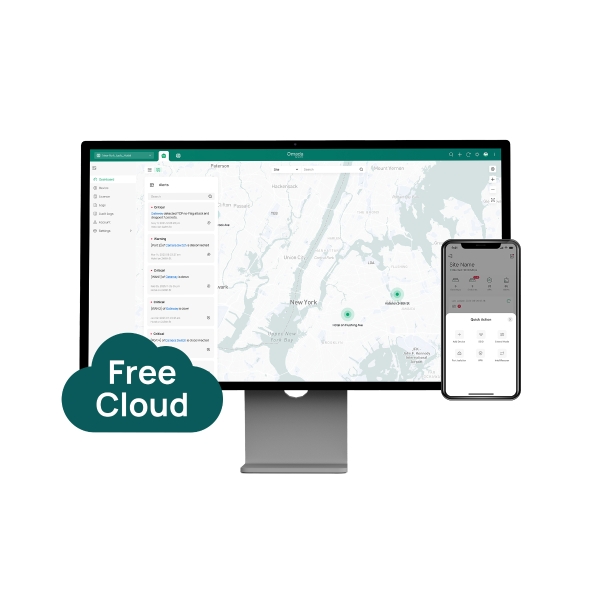
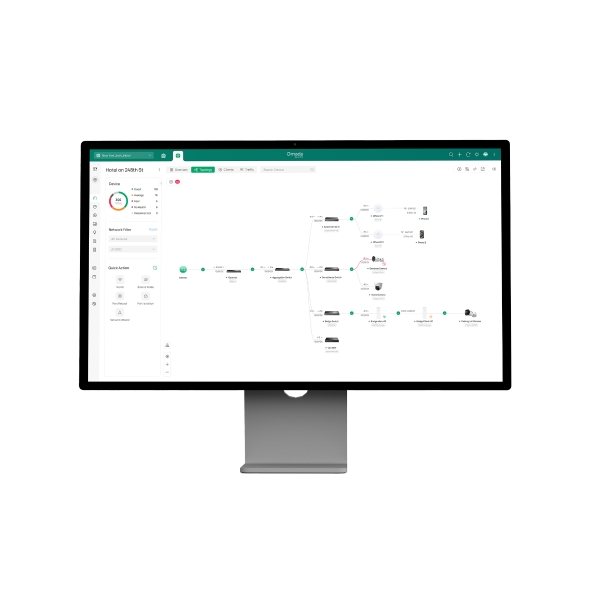
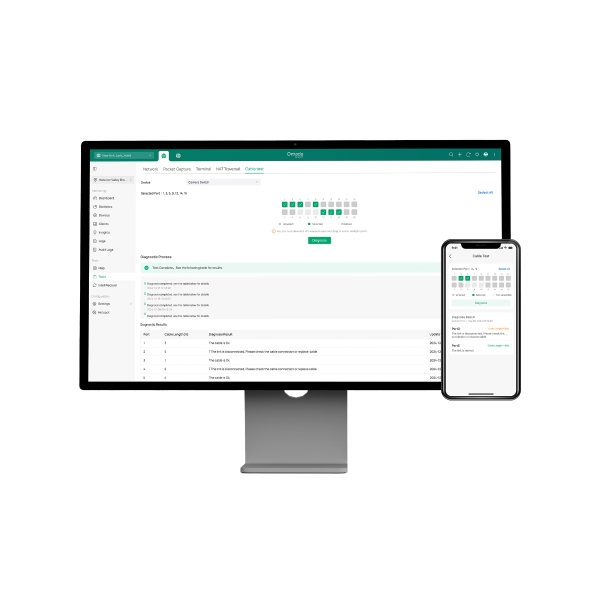
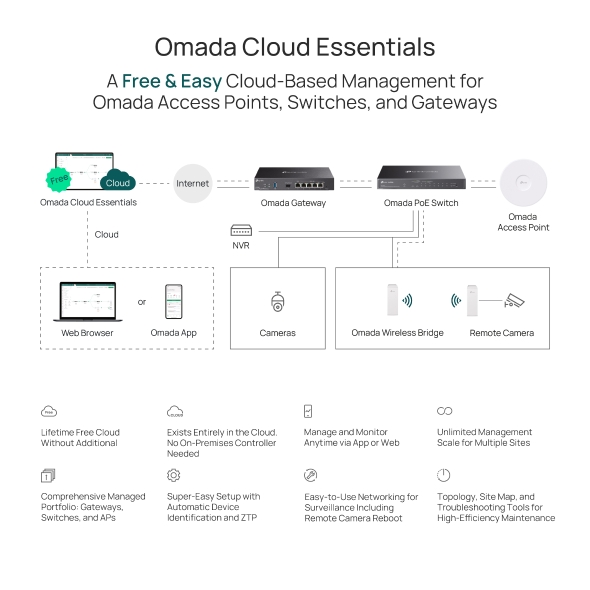
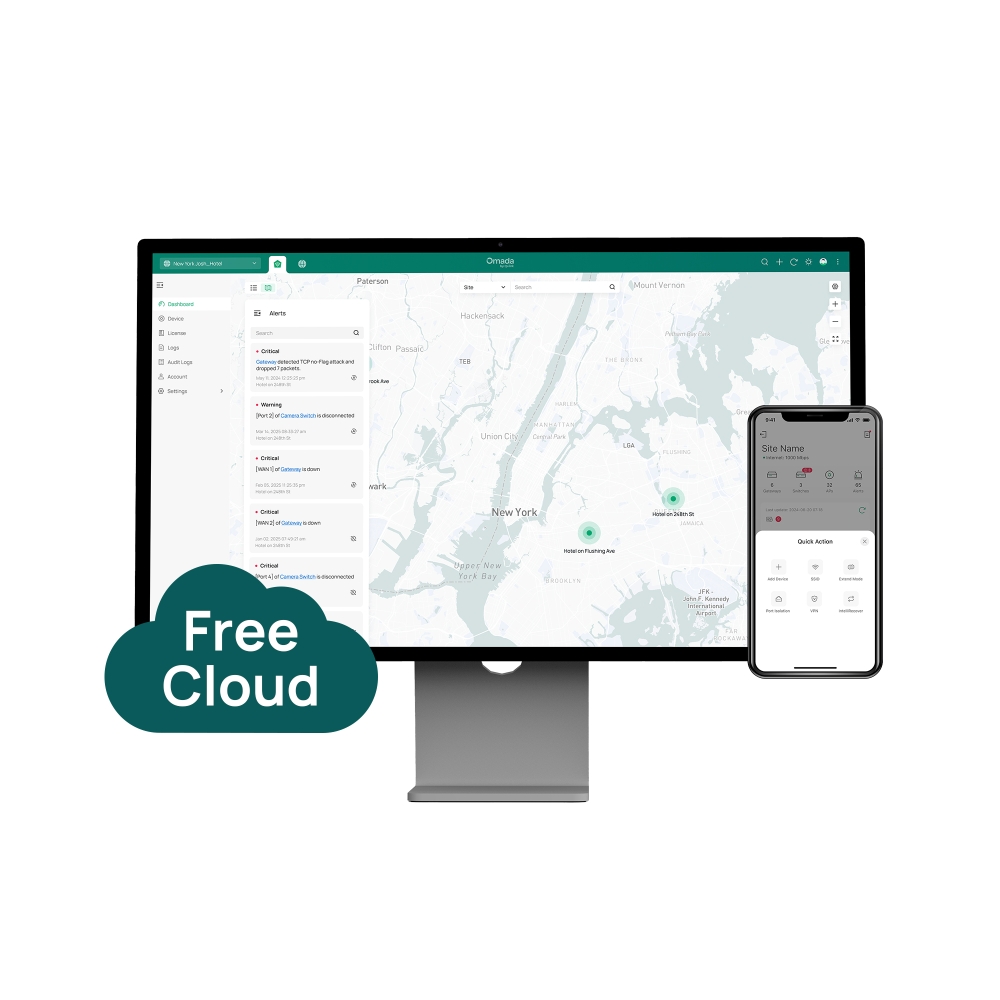
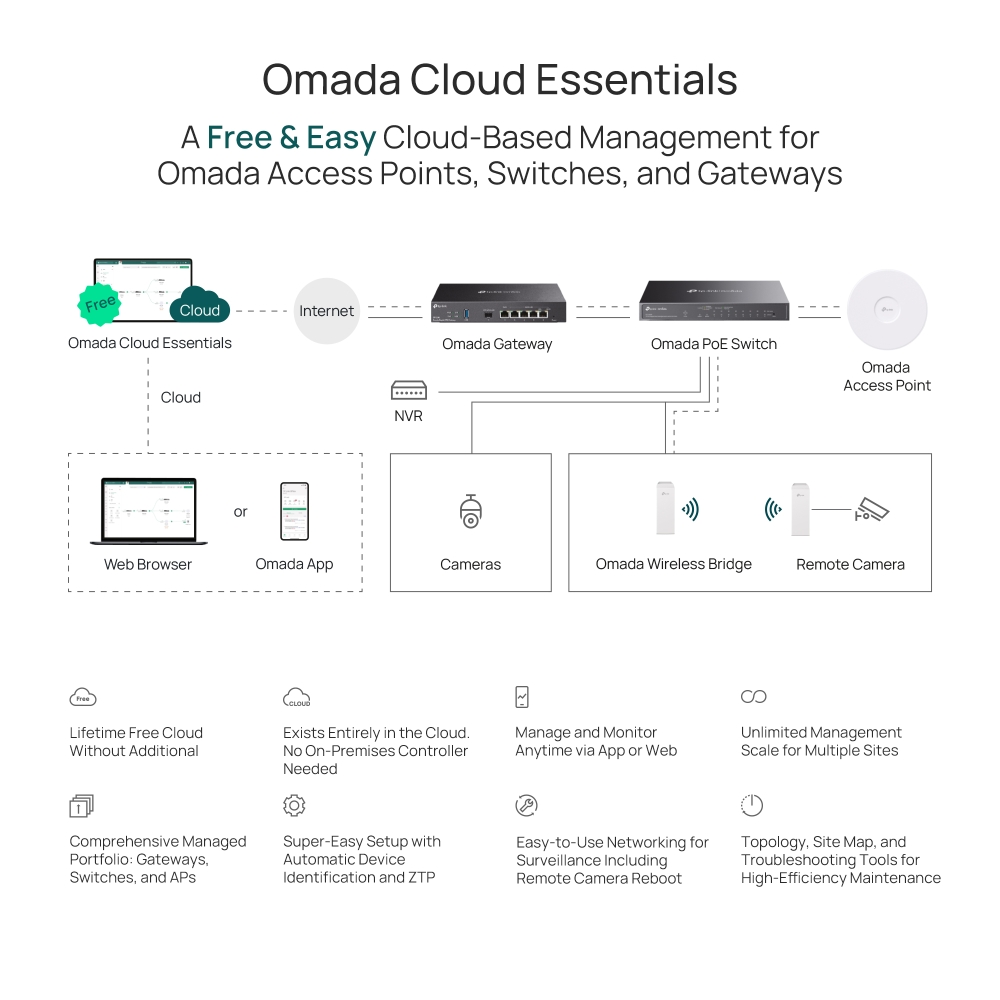
    A Free Cloud Networking Management Platform (The Networking Module of Omada Central Essentials)
    A Free Cloud Networking Management Platform (The Networking Module of Omada Central Essentials)
    A Free Cloud Networking Management Platform (The Networking Module of Omada Central Essentials)
    A Free Cloud Networking Management Platform (The Networking Module of Omada Central Essentials)
    A Free Cloud Networking Management Platform (The Networking Module of Omada Central Essentials)
    A Free Cloud Networking Management Platform (The Networking Module of Omada Central Essentials)
    A Free Cloud Networking Management Platform (The Networking Module of Omada Central Essentials)
    A Free Cloud Networking Management Platform (The Networking Module of Omada Central Essentials)
    A Free Cloud Networking Management Platform (The Networking Module of Omada Central Essentials)
    A Free Cloud Networking Management Platform (The Networking Module of Omada Central Essentials)
    A Free Cloud Networking Management Platform (The Networking Module of Omada Central Essentials)
    A Free Cloud Networking Management Platform (The Networking Module of Omada Central Essentials)
    A Free Cloud Networking Management Platform (The Networking Module of Omada Central Essentials)
    A Free Cloud Networking Management Platform (The Networking Module of Omada Central Essentials)
    A Free Cloud Networking Management Platform (The Networking Module of Omada Central Essentials)
    A Free Cloud Networking Management Platform (The Networking Module of Omada Central Essentials)
    A Free Cloud Networking Management Platform (The Networking Module of Omada Central Essentials)
    A Free Cloud Networking Management Platform (The Networking Module of Omada Central Essentials)

    /6Изтеглете

    Omada Cloud Essentials

    A Free Cloud Networking Management Platform (The Networking Module of Omada Central Essentials)

    How to Find the Hardware Version on Your TP-Link Device
    IMPORTANT:  Model and hardware version availability varies by region. Please refer to your TP-Link regional website to determine product availability.
    Vx.0 = Vx.6/Vx.8/Vx.9(eg:V1.0=V1.6/V1.8/V1.9)
    Vx.x0 = Vx.x6/Vx.x8/Vx.x9 (eg:V1.20=V1.26/V1.28/V1.29)
    Vx.30 = Vx.32/Vx.33 (eg:V3.30=V3.32/V3.33)
    • Lifetime Free Cloud Management
    • Super-Easy Setup
    • Zero-Touch Provisioning
    • Existing Entirely in the Cloud
    • No Additional Hardware Controller Investment
    • Lifetime Free Cloud Management
    • Super-Easy Setup
    • Zero-Touch Provisioning
    • Existing Entirely in the Cloud
    • No Additional Hardware Controller Investment
    • Документи
    • Видеа
    • Изтегляния
    • Инструменти
    • Бюлетини
    • Общност

    Филтрирай по типРесет

    • checkbox

      Datasheet

    • checkbox

      Наръчник за инсталиране на хардуера

    • checkbox

      База знания

      checkbox
    • checkbox

      Release Note

    • checkbox

      Справочник

      checkbox
    • checkbox

      Други

    Филтрирай по тагРесет

    • Контролер
    • Шлюз
    • Vlan
    • ACL
    • Standalone
    • Mesh
    • CLI
    • VPN
    • App
    • Онлайн
    • Ресет
    • Автентикация
    • Портал
    • Безжично
    • API

    How to Configure Root Node Feature on an Omada Controller

    Configure the Root Node in Omada Controller to correct topology relationships on sites without an Omada gateway and identify device uplinks more accurately.

    Ръководство за конфигуриране
    09-24-2026
    8766

    How to Prepare for the End of ECSP v1 Support in Omada Controller

    Learn how to identify ECSP v1 devices, upgrade to ECSP v2-compatible firmware, and prepare Local or Cloud-Based Controllers for v6.4 and later.

    Ръководство за конфигуриране
    09-04-2026
    7257

    How to Use an Omada Controller to Manage Omada Devices Across Different Subnets Over the Internet

    In enterprise networks, devices are often deployed across different subnets, making it common for Omada devices and the Omada Controller to reside in separate network segments. Supporting device adoption and management across subnets enables centralized control without changing existing network designs. This article introduces different methods for adopting devices across subnets using Omada products.

    Ръководство за конфигуриране
    06-23-2026
    67073

    How to Configure Spanning Tree on Omada Controller

    Spanning Tree Protocol (STP) is a Layer 2 Protocol that prevents loops in the network.

    Ръководство за конфигуриране
    07-30-2026
    54741

    How to Enable PWA to Improve Page Load Performance

    In weak or unstable network conditions, pages may load slowly or experience noticeable delays during access.Omada Controller supports PWA capabilities to improve performance and stability:

    Ръководство за конфигуриране
    07-15-2026
    31938

    What Is the Difference in Client Health Behavior Across Controllers

    Client Health is a new monitoring feature introduced in Omada Controller 6.1 that evaluates and tracks the connection quality and experience of all wireless client devices on your network. By enabling this feature, the system continuously collects and calculates wireless client-level health data, helping network administrators quickly identify wireless client connectivity issues and optimize network performance.

    FAQ
    08-24-2026
    27423

    How to Configure WireGuard VPN in Controller Mode Using Omada App

    This article demonstrates how to configure a WireGuard VPN between Site HQ and Site STA, where each site is equipped with its own Omada Gateway. By following the configuration steps in Controller mode using the Omada App, administrators can quickly establish a secure and reliable VPN tunnel to connect distributed networks.

    Ръководство за конфигуриране
    08-18-2026
    38815

    How to Configure Bluetooth on Omada Controller

    This article details the principle and advantages of Bluetooth IoT technology and provides specific configuration guidelines and application strategies for Bluetooth IoT.

    Ръководство за конфигуриране
    08-18-2026
    32416

    How to Configure VLAN in Omada Network v6

    We are aware that significant changes regarding LAN settings have been made from Omada Controller v5 to Omada Network v6. This article introduces how to configure the VLAN feature with newest Omada Network v6 to help you establish a better understanding of the workflow of how to configure VLAN with Omada Network v6.

    Ръководство за конфигуриране
    08-18-2026
    138506

    How to Separate Large Numbers of VLANs via Bridge VLAN and SSID VLAN (with VLAN Pool)

    Bridge VLAN is a feature that allows multiple VLANs to share a single Layer 3 interface and DHCP pool to reduce gateway resource usage. SSID VLAN binds a specific SSID to one or multiple VLANs for straightforward traffic isolation. By combining Bridge VLAN and SSID VLAN, you can meet the requirements of the apartment or hotel room network design without creating a large number of Layer 3 interfaces.

    Ръководство за конфигуриране
    08-19-2026
    35044

    Няма намерени резултати.

    Филтрирай по типРесет

    • checkbox

      Firmware

    • checkbox

      Software

      checkbox
    • checkbox

      MIBs файлове

    • checkbox

      GPL код

    • checkbox

      Декларация за съответствие

      checkbox

    Няма намерени резултати.

    Други инструменти

    Филтрирай по типРесет

    • checkbox

      Уязвимост в сигурността

    • checkbox

      EOL/EOM/EOS известие

    • checkbox

      Други

    Няма намерени резултати.

    Присъединете се към TP-Link общносттаTP-Link се отнася сериозно към вашата поверителност. За повече подробности относно практиките за поверителност на TP-Link вижте Политиката за поверителност на TP-Link..

    Email Error

    I would like to be kept up to date with TP-Link news, product updates and promotions.

    By completing this form you confirm that you understand and agree to our Privacy Policy.

    reCaptcha not verified

    Следвайте ни

    За нас
    • Корпоративен профил
    • Свържете се с нас
    • Условия за поверителност
    За медии
    • Новини
    • Блог
    • Съвети за сигурност
    Партньори
    • Партньорска програма
    Обучителен център
    • Технологични тенденции
    TP-Link Omada Omada Pro VIGI
    Bulgaria / Български език

    ©2026 TP-Link Bulgaria EOOD and its affiliated companies. All rights reserved.

    This website uses cookies to improve website navigation, analyze online activities and have the best possible user experience on our website. You can object to the use of cookies at any time. You can find more information in our privacy policy .

    Your Privacy Choices

    This website uses cookies to improve website navigation, analyze online activities and have the best possible user experience on our website. You can object to the use of cookies at any time. You can find more information in our privacy policy .

    Basic Cookies

    These cookies are necessary for the website to function and cannot be deactivated in your systems.

    TP-Link

    SESSION, JSESSIONID, accepted_local_switcher, tp_privacy_banner, tp_privacy_base, tp_privacy_marketing, tp_top-banner, tp_popup-bottom, tp_popup-center, tp_popup-right-middle, tp_popup-right-bottom, tp_productCategoryType

    Youtube

    id, VISITOR_INFO1_LIVE, LOGIN_INFO, SIDCC, SAPISID, APISID, SSID, SID, YSC, __Secure-1PSID, __Secure-1PAPISID, __Secure-1PSIDCC, __Secure-3PSID, __Secure-3PAPISID, __Secure-3PSIDCC, 1P_JAR, AEC, NID, OTZ

    Zendesk

    OptanonConsent, __cf_bm, __cfruid, _cfuvid, _help_center_session, _pendo___sg__.<container-id>, _pendo_meta.<container-id>, _pendo_visitorId.<container-id>, _zendesk_authenticated, _zendesk_cookie, _zendesk_session, _zendesk_shared_session, ajs_anonymous_id, cf_clearance

    Analysis and Marketing Cookies

    Analysis cookies enable us to analyze your activities on our website in order to improve and adapt the functionality of our website.

    The marketing cookies can be set through our website by our advertising partners in order to create a profile of your interests and to show you relevant advertisements on other websites.

    Google Analytics & Google Tag Manager

    _gid, _ga_<container-id>, _ga, _gat_gtag_<container-id>

    Google Ads & DoubleClick

    test_cookie, _gcl_au