Omada Pro Logo official website Vigi Logo official website
Свържете се с нас
  • Свържете се с екип продажби
  • Свържете се с екип поддръжка
Log In
avatar

    Съобщения Съобщения Отметки Отметки Настройки на профила Настройки на профила
    Bulgaria / Български език
    Omada logo
    • Продукти

      Продукти

      • Fusion рутери
        • Fusion серия
          Fusion серия
        • Fusion Pro
          Fusion Pro
        • Fusion Max
          Fusion Max
        • Вижте всички
          Вижте всички
      • WiFi продукти
        • WiFi 7
          WiFi 7
        • За окачване на таван
          За окачване на таван
        • За стена
          За стена
        • Desktop
          Desktop
        • Външни
          Външни
        • Wireless Bridge
          Wireless Bridge
        • GPON
          GPON
        • Вижте всички
          Вижте всички
      • Комутатори
        • Campus
          Campus
        • Aggregation
          Aggregation
        • Access Max
          Access Max
        • Access Pro
          Access Pro
        • Access Plus
          Access Plus
        • Access
          Access
        • Agile
          Agile
        • Вижте всички
          Вижте всички
      • Стандартни рутери
        • Кабелни рутери
          Кабелни рутери
        • WiFi рутери
          WiFi рутери
        • 4G WiFi рутери
          4G WiFi рутери
        • Интегрирани рутери
          Интегрирани рутери
        • DSL рутери
          DSL рутери
        • Вижте всички
          Вижте всички
      • Контролери
        • Облачни
          Облачни
        • Хардуер
          Хардуер
        • Софтуер
          Софтуер
        • Вижте всички
          Вижте всички
      • Аксесоари
        • Монтаж и скоби
          Монтаж и скоби
        • Медийни конвертори
          Медийни конвертори
        • Модули и кабели
          Модули и кабели
        • Монтаж и скоби
          Монтаж и скоби
        • Вижте всички
          Вижте всички

      Платформи за управление

      • Системи за управление
        • Fusion рутери
          Fusion рутери
        • Облачни
          Облачни
        • Хардуер
          Хардуер
        • Софтуер
          Софтуер
        • Вижте всички
          Вижте всички
      • Облачен портал

      Софтуерни инструменти

      • Omada Design Hub
      • Omada WiFi Navi App
      • Omada App
    • Решения
      Решения

      По сценарии

      • WiFi за хотели
      • Малки и средни офиси
      • Малки вериги ресторанти/магазини
      • Складове
      • WiFi за ферми/паркинги
      • WiFi за външни пространства
      • 4G за отдалечени локации
      • WiFi с висока плътност

      По технология

      • Обединено решение за мрежа и видеонаблюдение
      • Безплатно облачно управление чрез Omada Central Essentials
      • WiFi 7
      • PPSK решение
      • PtP & PtMP Wireless Bridges
      • Multi-Gigabit решение
      • PoE комутатори за видеонаблюдение

      Практически казуси

      Практически казуси

      Прегледайте
    • Обучение

      Полезни материали

      • Често задавани въпроси
      • Видеа
      • Наръчници за конфигуриране
      • Практически казуси

      Курсове

      • Представяне на обученията
      • За курсисти
      • За инструктори
    • Поддръжка
      Поддръжка

      Документи

      • Наръчник за инсталация на хардуера
      • База знания
      • Datasheet
      • Справочник
      • Вижте всички

      За изтегляне

      • Изтегляне на софтуер
      • Изтегляне на фърмуеър
      • GPL код
      • MIBs файлове
      • Вижте всички

      Бюлетини

      • Уязвимост в сигурността
      • EOL/EOM/EOS известия
      • Вижте всички

      Поддръжка

      • Поддръжка по имейл
      • Поддръжка по телефон
      • Гаранция

      Инструменти

      • Omada емулатори
      • Omada App
      • Omada Wi-Fi Navi App
      • Списък за съвместимост
    • Партньори

      Намерете дистрибутор

      • Намерете сега
    • Общност
    • Къде да купя
    Търсене
    1. Начална страница>
    2. Продуктова поддръжка>
    3. Omada Pro Software Controller>
    Omada Pro Software Controller
    Omada Pro Software Controller
    Omada Pro Software Controller

    /1Изтеглете

    Omada Pro Software Controller

    Omada Pro Software Controller

    How to Find the Hardware Version on Your TP-Link Device
    IMPORTANT:  Model and hardware version availability varies by region. Please refer to your TP-Link regional website to determine product availability.
    Vx.0 = Vx.6/Vx.8/Vx.9(eg:V1.0=V1.6/V1.8/V1.9)
    Vx.x0 = Vx.x6/Vx.x8/Vx.x9 (eg:V1.20=V1.26/V1.28/V1.29)
    Vx.30 = Vx.32/Vx.33 (eg:V3.30=V3.32/V3.33)
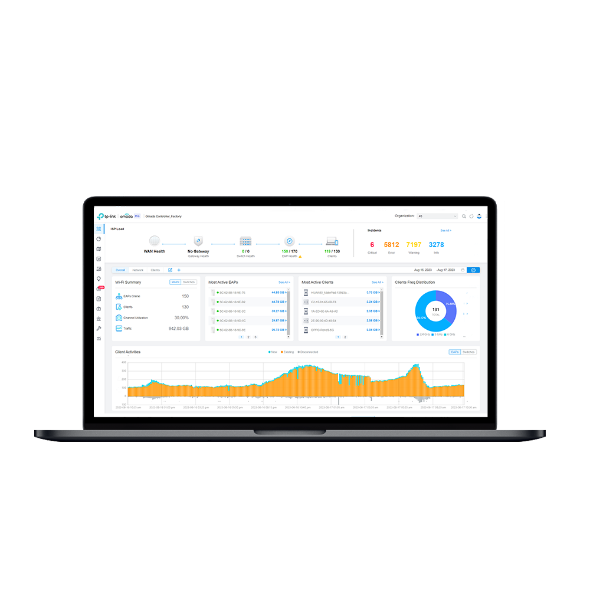
    • Centralized Management for Omada Pro access points, switches, and routers
    • On-premises Deployment
    • Cloud Access
    • Unlimited Managemnet Devices
    • Automated Radio Frequency Deployment
    • Intelligent Anomaly Detection and Analysis
    • Centralized Management for Omada Pro access points, switches, and routers
    • On-premises Deployment
    • Cloud Access
    • Unlimited Managemnet Devices
    • Automated Radio Frequency Deployment
    • Intelligent Anomaly Detection and Analysis
    • Документи
    • Видеа
    • Изтегляния
    • Инструменти
    • Бюлетини
    • Общност

    Филтрирай по типРесет

    • checkbox

      Datasheet

    • checkbox

      Наръчник за инсталиране на хардуера

    • checkbox

      База знания

      checkbox
    • checkbox

      Release Note

    • checkbox

      Справочник

      checkbox
    • checkbox

      Други

    Филтрирай по тагРесет

    • Контролер
    • Шлюз
    • Vlan
    • ACL
    • Standalone
    • Mesh
    • CLI
    • VPN
    • App
    • Онлайн
    • Ресет
    • Автентикация
    • Портал
    • Безжично
    • API

    API and Code Samples for External Portal Server (Omada Controller v6.2.10 or Above)

    Explore Omada Controller API documentation and code samples for External Portal Server integration, including hotspot authentication, client authorization, portal redirects, and session management.

    FAQ
    10-19-2026
    16395

    How to Prepare for the End of ECSP v1 Support in Omada Controller

    Learn how to identify ECSP v1 devices, upgrade to ECSP v2-compatible firmware, and prepare Local or Cloud-Based Controllers for v6.4 and later.

    Ръководство за конфигуриране
    09-04-2026
    7297

    What's New in Omada Network 6.3 Compared to 6.2

    This article outlines the key changes introduced in Omada Network 6.3 compared to 6.2. It is designed to help you quickly understand new features, enhancements, and structural updates in the latest version.

    Ръководство за конфигуриране
    07-23-2026
    17736

    How to Upgrade from Omada Pro Controller to Omada Controller v6.3

    Starting with Omada Controller v6.3, the Omada Controller platform no longer distinguishes between Pro and standard versions. This document explains the differences before and after the upgrade, as well as how to upgrade from the Pro version to v6.3.

    Ръководство за конфигуриране
    09-10-2026
    16784

    Support of Omada Pro Devices on Omada Controller V6.2

    Starting from Omada Controller V6.2, the Omada Pro devices can be adopted by Omada Controller, also supporting adopting both Omada and Omada Pro devices in the same site.

    Ръководство за конфигуриране
    08-28-2026
    22795

    Get Started with Omada Pro Controller

    There are three types of Omada Controllers: Software, Hardware, and Cloud-Based. Though being different in form, they share a similar browser-based management interface for convenient management. Consequently, they have nearly the same initial setup steps, including building your network topology, deploying your Controller, and logging in to the Controller. This guide will walk you through the basic steps to help you get started quickly with Omada Pro Controller.

    Ръководство за конфигуриране
    08-20-2026
    26202

    How to Find the IP Address of My Omada Devices

    By default, Omada devices use dynamic IP addresses. Whether connected to the internet or not, devices such as EAPs or switches should automatically obtain an IP address as long as they are connected to a local network or a DHCP server. There are different ways to find the IP address of an Omada device. Whether the device is in standalone mode or controller mode, you can also use the Omada APP or Discover Utility to find it.

    Ръководство за конфигуриране
    10-07-2026
    90003

    Recommended Server Specifications for Omada Pro Software Controller

    This article introduces the recommended hardware specifications of the server for the Omada Pro Software Controller.

    FAQ
    08-20-2026
    33719

    How to Configure Abnormal on Omada Pro Controller

    This article primarily focuses on how to configure the Abnormal feature on the Omada Pro Controller to help users efficiently identify network issues, while offering a simple, intuitive, and reliable solution.

    Ръководство за конфигуриране
    08-12-2026
    40907

    Omada Pro License Configuration Guide (for Local Controller)

    Ръководство за конфигуриране
    08-31-2026
    40326

    Няма намерени резултати.

    Филтрирай по типРесет

    • checkbox

      Firmware

    • checkbox

      Software

      checkbox
    • checkbox

      MIBs файлове

    • checkbox

      GPL код

    • checkbox

      Декларация за съответствие

      checkbox

    Няма намерени резултати.

    Други инструменти

    Филтрирай по типРесет

    • checkbox

      Уязвимост в сигурността

    • checkbox

      EOL/EOM/EOS известие

    • checkbox

      Други

    Няма намерени резултати.

    Няма намерени резултати.

    Присъединете се към TP-Link общносттаTP-Link се отнася сериозно към вашата поверителност. За повече подробности относно практиките за поверителност на TP-Link вижте Политиката за поверителност на TP-Link..

    Email Error

    I would like to be kept up to date with TP-Link news, product updates and promotions.

    By completing this form you confirm that you understand and agree to our Privacy Policy.

    reCaptcha not verified

    Следвайте ни

    За нас
    • Корпоративен профил
    • Свържете се с нас
    • Условия за поверителност
    За медии
    • Новини
    • Блог
    • Съвети за сигурност
    Партньори
    • Партньорска програма
    Обучителен център
    • Технологични тенденции
    TP-Link Omada Omada Pro VIGI
    Bulgaria / Български език

    ©2026 TP-Link Bulgaria EOOD and its affiliated companies. All rights reserved.

    This website uses cookies to improve website navigation, analyze online activities and have the best possible user experience on our website. You can object to the use of cookies at any time. You can find more information in our privacy policy .

    Your Privacy Choices

    This website uses cookies to improve website navigation, analyze online activities and have the best possible user experience on our website. You can object to the use of cookies at any time. You can find more information in our privacy policy .

    Basic Cookies

    These cookies are necessary for the website to function and cannot be deactivated in your systems.

    TP-Link

    SESSION, JSESSIONID, accepted_local_switcher, tp_privacy_banner, tp_privacy_base, tp_privacy_marketing, tp_top-banner, tp_popup-bottom, tp_popup-center, tp_popup-right-middle, tp_popup-right-bottom, tp_productCategoryType

    Youtube

    id, VISITOR_INFO1_LIVE, LOGIN_INFO, SIDCC, SAPISID, APISID, SSID, SID, YSC, __Secure-1PSID, __Secure-1PAPISID, __Secure-1PSIDCC, __Secure-3PSID, __Secure-3PAPISID, __Secure-3PSIDCC, 1P_JAR, AEC, NID, OTZ

    Zendesk

    OptanonConsent, __cf_bm, __cfruid, _cfuvid, _help_center_session, _pendo___sg__.<container-id>, _pendo_meta.<container-id>, _pendo_visitorId.<container-id>, _zendesk_authenticated, _zendesk_cookie, _zendesk_session, _zendesk_shared_session, ajs_anonymous_id, cf_clearance

    Analysis and Marketing Cookies

    Analysis cookies enable us to analyze your activities on our website in order to improve and adapt the functionality of our website.

    The marketing cookies can be set through our website by our advertising partners in order to create a profile of your interests and to show you relevant advertisements on other websites.

    Google Analytics & Google Tag Manager

    _gid, _ga_<container-id>, _ga, _gat_gtag_<container-id>

    Google Ads & DoubleClick

    test_cookie, _gcl_au