Omada Pro Logo official website Vigi Logo official website
Contact Us
  • Contact Support
Log In
avatar

    Messages Messages Bookmarks Bookmarks Account Settings Account Settings
    Central America & Caribbean / Español
    Omada logo
    • Products

      Products

      • Wireless
        • WiFi 7
          WiFi 7
        • Ceiling Mount
          Ceiling Mount
        • Wall Plate
          Wall Plate
        • Outdoor
          Outdoor
        • View All
          View All
      • Switches
        • Unmanaged
          Unmanaged
        • View All
          View All
      • Gateways
        • Wired Gateways
          Wired Gateways
        • WiFi Gateways
          WiFi Gateways
        • Integrated Gateways
          Integrated Gateways
        • View All
          View All
      • Controllers
        • Cloud-Based
          Cloud-Based
        • Hardware
          Hardware
        • Software
          Software
        • View All
          View All
      • Accessories
        • Power & PoE
          Power & PoE
        • Media Converters
          Media Converters
        • Modules & Cables
          Modules & Cables
        • Mounting & Brackets
          Mounting & Brackets
        • View All
          View All

      Management Platforms

      • Management Systems
        • Cloud-Based
          Cloud-Based
        • Hardware
          Hardware
        • Software
          Software
        • View All
          View All
      • Cloud Portal
    • Solutions
      Solutions Home

      By Scenarios

      • Small and Mid-Sized Offices
      • Small-Sized Chain Restaurants/Stores
      • WiFi for Farms/Ranches/Parking Lots
      • High-Density WiFi

      By Technology

      • WiFi 7
      • PPSK Solution
      • PtP & PtMP Wireless Bridges
      • Multi-Gigabit Solution
      • PoE Switches for Surveillance

      Case Studies

      Case Studies

      Omada Powers Shift4’s POS Solution over 20,000 Sites in the US

      Navegar
    • Learn and Train

      Learn

      • FAQs
      • Setup Videos
      • Configuration Guides
      • Case Studies

      Train

      • Training Introduction
      • For Learners
      • For Instructors
    • Support
      Support Home

      Documents

      • Hardware Installation Guide
      • Knowledgebase
      • Datasheet
      • Reference Guide
      • View All

      Downloads

      • Software Download
      • Firmware Download
      • GPL Code
      • MIBs Files
      • View All

      Bulletins

      • Security Vulnerability
      • EOL/EOM/EOS Notification
      • View All

      Contact Support

      • Email Support
      • Call Support
      • Warranty Services

      Tools

      • Omada Emulators
      • Omada App
      • Compatibility List
    • Community
    Search
    1. Home>
    2. Product Support>
    3. ER7212PC>
    Router VPN Gigabit Omada 3 en 1
    Router VPN Gigabit Omada 3 en 1
    Router VPN Gigabit Omada 3 en 1
    Router VPN Gigabit Omada 3 en 1
    Router VPN Gigabit Omada 3 en 1
    Router VPN Gigabit Omada 3 en 1
    Router VPN Gigabit Omada 3 en 1
    Router VPN Gigabit Omada 3 en 1
    Router VPN Gigabit Omada 3 en 1
    Router VPN Gigabit Omada 3 en 1
    Router VPN Gigabit Omada 3 en 1
    Router VPN Gigabit Omada 3 en 1
    Router VPN Gigabit Omada 3 en 1
    Router VPN Gigabit Omada 3 en 1
    Router VPN Gigabit Omada 3 en 1

    /5Download

    ER7212PC

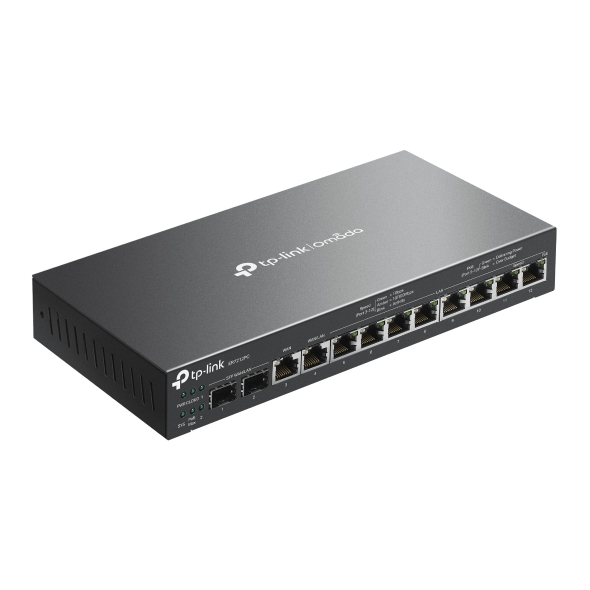
    Router VPN Gigabit Omada 3 en 1

    How to Find the Hardware Version on Your TP-Link Device
    IMPORTANT:  Model and hardware version availability varies by region. Please refer to your TP-Link regional website to determine product availability.
    Vx.0 = Vx.6/Vx.8/Vx.9(eg:V1.0=V1.6/V1.8/V1.9)
    Vx.x0 = Vx.x6/Vx.x8/Vx.x9 (eg:V1.20=V1.26/V1.28/V1.29)
    Vx.30 = Vx.32/Vx.33 (eg:V3.30=V3.32/V3.33)
    • Router 3-en-1 con diseño compacto y sin ventilador
    • 12× puertos Gigabit
    • 2× puertos WAN/LAN Gigabit SFP, 1× puerto WAN Gigabit RJ45, y 1× puerto WAN/LAN Gigabit RJ45
    • Potencia PoE de 110W
    • VPN Altamente Segura
    • Gestión Centralizada
    • Router 3-en-1 con diseño compacto y sin ventilador
    • 12× puertos Gigabit
    • 2× puertos WAN/LAN Gigabit SFP, 1× puerto WAN Gigabit RJ45, y 1× puerto WAN/LAN Gigabit RJ45
    • Potencia PoE de 110W
    • VPN Altamente Segura
    • Gestión Centralizada
    • Documents
    • Videos
    • Downloads
    • Tools
    • Bulletins
    • Community

    Filter By TypeReset

    • checkbox

      Ficha Técnica

    • checkbox

      Guía de Instalación de Hardware

    • checkbox

      Centro de Recursos

      checkbox
    • checkbox

      Comunicados

    • checkbox

      Guía de Referencia

      checkbox
    • checkbox

      Otros

    Filter By TagReset

    • Controller
    • Gateway
    • Vlan
    • ACL
    • Standalone
    • Mesh
    • CLI
    • VPN
    • App
    • Online
    • Reset
    • Authentication
    • Portal
    • Wireless
    • API

    Omada Incident Detection and Health Assessment White Paper

    Technical White Paper
    10-16-2026
    2455

    How to Configure Internet Settings on Omada Controller Using Omada App

    Learn how to configure IPv4 and IPv6 Internet settings on Omada gateways using the Omada App, including WAN connection types and setup steps.

    Configuration Guide
    10-23-2026
    2082

    How to Configure DMZ on Omada Gateways

    Learn how to configure DMZ on Omada Gateways in Standalone and Controller Mode to forward inbound WAN traffic to a designated internal host.

    Configuration Guide
    10-08-2026
    9646

    Omada Hardware Controller Management Capacity: Recommended and Maximum Device Limits

    Understand recommended and maximum device capacities for Omada Controllers, capacity notifications, and performance considerations when managing large-scale deployments.

    FAQ
    08-15-2026
    13346

    How to Prepare for the End of ECSP v1 Support in Omada Controller

    Learn how to identify ECSP v1 devices, upgrade to ECSP v2-compatible firmware, and prepare Local or Cloud-Based Controllers for v6.4 and later.

    Configuration Guide
    09-04-2026
    7069

    How to Allow Specific Public IPs to Access an Internal Server on Omada Gateways

    When hosting an internal server behind an Omada Gateway, such as a web server, exposing it to the Internet can pose security risks. This guide demonstrates how to allow only specific public IP addresses to access an internal server, while blocking all other public traffic.

    Configuration Guide
    06-19-2026
    18680

    How to Utilize Link Backup and Policy Routing to Keep Critical Devices Online and Conserve Data

    In dual-WAN environments where one WAN connection is designated as a backup link, it is often necessary to control which devices and networks are permitted to use the backup connection during a failover event. This guide demonstrates how to use Policy Routing to allow only specific devices, networks, or IP addresses to route traffic through the backup WAN.

    Configuration Guide
    06-11-2026
    18452

    How to Configure Port Mirroring on Omada Gateways

    Discover how to set up Port Mirroring on Omada Gateways to monitor and analyze network traffic. Capture packets, troubleshoot network issues, and gain deeper visibility into network activity in both Controller and Standalone modes.

    Configuration Guide
    10-20-2026
    20305

    How to Use an Omada Controller to Manage Omada Devices Across Different Subnets Over the Internet

    In enterprise networks, devices are often deployed across different subnets, making it common for Omada devices and the Omada Controller to reside in separate network segments. Supporting device adoption and management across subnets enables centralized control without changing existing network designs. This article introduces different methods for adopting devices across subnets using Omada products.

    Configuration Guide
    06-23-2026
    66083

    How to Configure IPsec VPN on Omada Gateway in Controller Mode (Controller v6.2 and Above)

    IPsec Site-to-Site VPN enables the connection of geographically separated networks. Large enterprises commonly use it to establish secure VPN connections between branch offices and headquarters. The IPsec VPN connects branch routers over the public network, ensuring secure transmission of private network data.

    Configuration Guide
    08-14-2026
    24511

    No results found.

    Filter By TypeReset

    • checkbox

      Firmware

    • checkbox

      Software

      checkbox
    • checkbox

      Archivos MIBs

    • checkbox

      Códigos GPL

    No results found.

    Other Tools

    Omada App

    Omada App

    Filter By TypeReset

    • checkbox

      Seguridad

    • checkbox

      Notificaciones

    • checkbox

      Otros

    No results found.

    SuscripciónTP-Link toma en serio su privacidad. Para obtener más detalles sobre las prácticas de privacidad de TP-Link, consulte Política de privacidad de TP-Link .

    Email Error

    Me gustaría estar al día con las noticias de TP-Link, actualizaciones de productos y promociones.

    Al completar este formulario, confirma que comprende y acepta nuestra Política de privacidad .

    reCaptcha not verified

    Síguenos

    • TP-Link Omada facebook
    About
    • Perfil Coorporativo
    • Sostenibilidad
    • Contact Us
    • Privacy Policy
    Press
    • News
    • Blog
    • Security Advisory
    Partners
    • Partner Program
    Learning Center
    • Technology Trends
    TP-Link Omada Omada Pro VIGI
    Central America & Caribbean / Español

    Copyright © 2026 TP-LINK PANAMA, S.A. All rights reserved.

    Este sitio web utiliza cookies para mejorar la navegación por el sitio web, analizar las actividades en línea y ofrecer la mejor experiencia de usuario posible en nuestro sitio web. Puedes oponerte al uso de cookies en cualquier momento. Encontrarás más información en nuestra política de privacidad .

    Your Privacy Choices

    Este sitio web utiliza cookies para mejorar la navegación por el sitio web, analizar las actividades en línea y ofrecer la mejor experiencia de usuario posible en nuestro sitio web. Puedes oponerte al uso de cookies en cualquier momento. Encontrarás más información en nuestra política de privacidad .

    Cookies Básicas

    Estas cookies son necesarias para el funcionamiento del sitio web y no pueden desactivarse en tu sistema.

    TP-Link

    SESSION, JSESSIONID, accepted_local_switcher, tp_privacy_banner, tp_privacy_base, tp_privacy_marketing, tp_top-banner, tp_popup-bottom, tp_popup-center, tp_popup-right-middle, tp_popup-right-bottom, tp_productCategoryType

    Youtube

    id, VISITOR_INFO1_LIVE, LOGIN_INFO, SIDCC, SAPISID, APISID, SSID, SID, YSC, __Secure-1PSID, __Secure-1PAPISID, __Secure-1PSIDCC, __Secure-3PSID, __Secure-3PAPISID, __Secure-3PSIDCC, 1P_JAR, AEC, NID, OTZ

    Zendesk

    OptanonConsent, __cf_bm, __cfruid, _cfuvid, _help_center_session, _pendo___sg__.<container-id>, _pendo_meta.<container-id>, _pendo_visitorId.<container-id>, _zendesk_authenticated, _zendesk_cookie, _zendesk_session, _zendesk_shared_session, ajs_anonymous_id, cf_clearance

    Cookies de Análisis y de Marketing

    Las cookies de análisis nos permiten analizar tus actividades en nuestro sitio web con el fin de mejorar y adaptar la funcionalidad del mismo.

    Las cookies de marketing pueden ser instaladas a través de nuestro sitio web por nuestros socios publicitarios con el fin de crear un perfil de tus intereses y mostrarte anuncios relevantes en otros sitios web.

    Google Analytics & Google Tag Manager

    _gid, _ga_<container-id>, _ga, _gat_gtag_<container-id>

    Google Ads & DoubleClick

    test_cookie, _gcl_au