Omada Pro Logo official website Vigi Logo official website
Contact Us
  • Contact Sales
  • Contact Support
Log In
avatar

    Messages Messages Bookmarks Bookmarks My Cases My Cases Account Settings Account Settings
    Nordic / English
    Omada logo
    • Products

      Products

      • Wireless
        • WiFi 7
          WiFi 7
        • Ceiling Mount
          Ceiling Mount
        • Wall Plate
          Wall Plate
        • Outdoor
          Outdoor
        • GPON
          GPON
        • View All
          View All
      • Switches
        • Campus
          Campus
        • Aggregation
          Aggregation
        • Access Max
          Access Max
        • Access Pro
          Access Pro
        • Access Plus
          Access Plus
        • Access
          Access
        • Agile
          Agile
        • Industrial
          Industrial
        • View All
          View All
      • Gateways
        • Wired Gateways
          Wired Gateways
        • WiFi Gateways
          WiFi Gateways
        • 4G/5G WiFi Gateways
          4G/5G WiFi Gateways
        • Integrated Gateways
          Integrated Gateways
        • View All
          View All
      • Controllers
        • Cloud-Based
          Cloud-Based
        • Hardware
          Hardware
        • Software
          Software
        • View All
          View All
      • Accessories
        • Media Converters
          Media Converters
        • Modules/Cables
          Modules/Cables
        • PoE Adapters
          PoE Adapters
        • Rackmount Accessories
          Rackmount Accessories
        • View All
          View All

      Management Platforms

      • Management Systems
        • Cloud-Based
          Cloud-Based
        • Hardware
          Hardware
        • Software
          Software
        • View All
          View All
      • Cloud Portal

      Software Tools

      • Omada Design Hub
      • Omada WiFi Navi App
    • Solutions
      Solutions Home

      By Scenarios

      • WiFi for Hotels
      • Multi-Dwelling Units (MDU)
      • Small and Mid-Sized Offices
      • Small-Sized Chain Restaurants/Stores
      • Warehouse
      • WiFi for Farms/Ranches/Parking Lots
      • WiFi for Outdoors
      • 4G for Remote Locations

      By Technology

      • Unified Networking and Surveillance Solution
      • Free Cloud Management via Omada Central Essentials
      • WiFi 7
      • PPSK Solution
      • PtP & PtMP Wireless Bridges
      • GPON Solution
      • Multi-Gigabit Solution
      • PoE Switches for Surveillance

      Case Studies

      Case Studies

      Omada Powers Real-World Success

      Browse
    • Learn and Train

      Learn

      • FAQs
      • Setup Videos
      • Configuration Guides
      • Case Studies

      Train

      • Training Introduction
      • For Learners
      • For Instructors
    • Support
      Support Home

      Documents

      • Hardware Installation Guide
      • Knowledgebase
      • Datasheet
      • Reference Guide
      • View All

      Downloads

      • Software Download
      • Firmware Download
      • GPL Code
      • MIBs Files
      • View All

      Bulletins

      • Security Vulnerability
      • EOL/EOM/EOS Notification
      • View All

      Contact Support

      • Case Portal
      • Call Support
      • Warranty Services

      Tools

      • Omada Emulators
      • Omada App
      • Compatibility List
    • Distributors

      Find a Distributor

      • Find Now
    • Community
    • Where to Buy
    Search
    1. Home>
    2. Product Support>
    3. TL-SL2428>
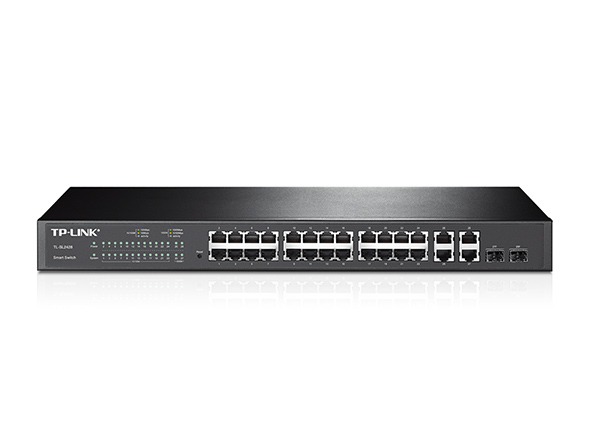
    24-Port 10/100Mbps + 4-Port Gigabit Smart Switch
    24-Port 10/100Mbps + 4-Port Gigabit Smart Switch
    24-Port 10/100Mbps + 4-Port Gigabit Smart Switch

    /1Download

    TL-SL2428

    24-Port 10/100Mbps + 4-Port Gigabit Smart Switch

    • Documents
    • Videos
    • Downloads
    • Tools
    • Bulletins
    • Community

    Filter By TypeReset

    • checkbox

      Datasheet

    • checkbox

      Hardware Installation Guide

    • checkbox

      Knowledgebase

      checkbox
    • checkbox

      Release Note

    • checkbox

      Reference Guide

      checkbox
    • checkbox

      Others

    Filter By TagReset

    • Controller
    • Gateway
    • Vlan
    • ACL
    • Standalone
    • Mesh
    • CLI
    • VPN
    • App
    • Online
    • Reset
    • Authentication
    • Portal
    • Wireless
    • API

    How to configure LACP on our Smart/ Managed Switch

    Configuration Guide
    10-29-2024
    23141

    How to configure Class of Service (CoS) through Omada Controller

    This article introduces the configuration of Class of Service (CoS) on Omada switches through Omada Controller.

    Configuration Guide
    10-22-2024
    19574

    Configuration guide of DHCP Options on Omada Switch

    DHCP Options are fields used to convey additional information in the DHCP, allowing the DHCP server to provide clients with other configuration parameters beyond the basic information such as IP address, subnet mask, and default gateway.

    Configuration Guide
    08-20-2024
    37156

    What should I do if I cannot access the web management page of my TP-Link switch?

    Troubleshooting Guide
    07-23-2024
    18601

    What should I do if my switch has no Internet access?

    This article will list a few simple steps about how to do a check on the switch when the switch has no Internet access and try to solve the problem.

    Troubleshooting Guide
    07-08-2024
    21029

    What should I do if my Internet from switch is unstable?

    This article will list a few simple steps about how to do a check on the switch when the Internet is unstable and try to solve the problem.

    Troubleshooting Guide
    07-08-2024
    16780

    How to block an illegal client with Certain IP address from getting access to the network using TP-Link Managed Switches

    Troubleshooting Guide
    07-01-2024
    23784

    What are the differences in features and application scenarios among various serial switches?

    FAQ
    07-01-2024
    11896

    How to configure 802.1Q tag VLAN on Web Smart Switch

    FAQ
    06-29-2022
    7552

    How to Setup TP-Link AP’s Multi-SSID (VLAN) to Work with TP-Link Switch

    FAQ
    06-29-2022
    30447
    • Total 19 items
    • 1
    • 2

    No results found.

    Filter By TypeReset

    • checkbox

      Firmware

    • checkbox

      Software

      checkbox
    • checkbox

      MIBs Files

    • checkbox

      GPL Code

    • checkbox

      Declaration of Conformity

      checkbox

    No results found.

    Other Tools

    Filter By TypeReset

    • checkbox

      Security Vulnerability

    • checkbox

      EOL/EOM/EOS Notification

    • checkbox

      Others

    No results found.

    No results found.

    SubscriptionTP-Link takes your privacy seriously. For further details on TP-Link's privacy practices, see TP-Link's Privacy Policy.

    Email Error

    I would like to be kept up to date with TP-Link news, product updates and promotions.

    By completing this form you confirm that you understand and agree to our Privacy Policy.

    reCaptcha not verified

    Follow Us

    • TP-Link Omada youtube
    • TP-Link Omada linkedin
    About
    • Corporate Profile
    • Sustainability
    • Contact Us
    • Careers at TP-Link
    • Privacy Policy
    Press
    • News
    • Blog
    • Security Advisory
    Learning Center
    • Technology Trends
    TP-Link Omada Omada Pro VIGI
    Nordic / English

    Copyright © 2026 TP-LINK Enterprises Nordic AB. All rights reserved.

    This website uses cookies to improve website navigation, analyze online activities and have the best possible user experience on our website. You can object to the use of cookies at any time. You can find more information in our privacy policy .

    Your Privacy Choices

    This website uses cookies to improve website navigation, analyze online activities and have the best possible user experience on our website. You can object to the use of cookies at any time. You can find more information in our privacy policy .

    Basic Cookies

    These cookies are necessary for the website to function and cannot be deactivated in your systems.

    TP-Link

    SESSION, JSESSIONID, accepted_local_switcher, tp_privacy_banner, tp_privacy_base, tp_privacy_marketing, tp_top-banner, tp_popup-bottom, tp_popup-center, tp_popup-right-middle, tp_popup-right-bottom, tp_productCategoryType

    Youtube

    id, VISITOR_INFO1_LIVE, LOGIN_INFO, SIDCC, SAPISID, APISID, SSID, SID, YSC, __Secure-1PSID, __Secure-1PAPISID, __Secure-1PSIDCC, __Secure-3PSID, __Secure-3PAPISID, __Secure-3PSIDCC, 1P_JAR, AEC, NID, OTZ

    Zendesk

    OptanonConsent, __cf_bm, __cfruid, _cfuvid, _help_center_session, _pendo___sg__.<container-id>, _pendo_meta.<container-id>, _pendo_visitorId.<container-id>, _zendesk_authenticated, _zendesk_cookie, _zendesk_session, _zendesk_shared_session, ajs_anonymous_id, cf_clearance

    Analysis and Marketing Cookies

    Analysis cookies enable us to analyze your activities on our website in order to improve and adapt the functionality of our website.

    The marketing cookies can be set through our website by our advertising partners in order to create a profile of your interests and to show you relevant advertisements on other websites.

    Google Analytics & Google Tag Manager

    _gid, _ga_<container-id>, _ga, _gat_gtag_<container-id>

    Google Ads & DoubleClick

    test_cookie, _gcl_au