Omada Pro Logo official website Vigi Logo official website
Contact Us
  • Contact Sales
  • Contact Support
Log In
avatar

    Messages Messages Bookmarks Bookmarks Account Settings Account Settings
    België / Nederlands  |  Français
    Omada logo
    • Products

      Products

      • Fusion Gateways
        • Fusion Series
          Fusion Series
        • Fusion Pro Series
          Fusion Pro Series
        • View All
          View All
      • Standard Gateways
        • Wired Gateways
          Wired Gateways
        • WiFi Gateways
          WiFi Gateways
        • 4G/5G WiFi Gateways
          4G/5G WiFi Gateways
        • Integrated Gateways
          Integrated Gateways
        • DSL Gateways
          DSL Gateways
        • View All
          View All
      • Wireless
        • WiFi 7
          WiFi 7
        • Ceiling Mount
          Ceiling Mount
        • Wall Plate
          Wall Plate
        • Desktop
          Desktop
        • Outdoor
          Outdoor
        • Wireless Bridge
          Wireless Bridge
        • GPON
          GPON
        • View All
          View All
      • Switches
        • Campus
          Campus
        • Aggregation
          Aggregation
        • Access Max
          Access Max
        • Access Pro
          Access Pro
        • Access Plus
          Access Plus
        • Access
          Access
        • Agile
          Agile
        • Industrial
          Industrial
        • Unmanaged
          Unmanaged
        • View All
          View All
      • Controllers
        • Cloud-Based
          Cloud-Based
        • Hardware
          Hardware
        • Software
          Software
        • View All
          View All
      • Accessories
        • Power & PoE
          Power & PoE
        • Media Converters
          Media Converters
        • Modules & Cables
          Modules & Cables
        • Mounting & Brackets
          Mounting & Brackets
        • View All
          View All

      Management Platforms

      • Management Systems
        • Fusion Gateways
          Fusion Gateways
        • Cloud-Based
          Cloud-Based
        • Hardware
          Hardware
        • Software
          Software
        • View All
          View All
      • Cloud Portal

      Software Tools

      • Omada Design Hub
      • Omada WiFi Navi App
      • Omada App
    • Solutions
      Solutions Home

      By Scenarios

      • WiFi for Hotels
      • Multi-Dwelling Units (MDU)
      • Small and Mid-Sized Offices
      • Small-Sized Chain Restaurants/Stores
      • Warehouse
      • WiFi for Farms/Ranches/Parking Lots
      • WiFi for Outdoors
      • High-Density WiFi

      By Technology

      • Unified Networking and Surveillance Solution
      • Free Cloud Management via Omada Central Essentials
      • WiFi 7
      • PPSK Solution
      • PtP & PtMP Wireless Bridges
      • GPON Solution
      • Multi-Gigabit Solution
      • PoE Switches for Surveillance

      Case Studies

      Case Studies

      Omada Powers Shift4’s POS Solution over 20,000 Sites in the US

      Zoek
    • Learn and Train

      Learn

      • FAQs
      • Setup Videos
      • Configuration Guides
      • Case Studies

      Train

      • Training Introduction
      • For Learners
      • For Instructors
    • Support
      Support Home

      Documents

      • Quick Start Guide
      • Hardware Installation Guide
      • Knowledgebase
      • Datasheet
      • Reference Guide
      • View All

      Downloads

      • Software Download
      • Firmware Download
      • GPL Code
      • MIBs Files
      • View All

      Bulletins

      • Security Vulnerability
      • EOL/EOM/EOS Notification
      • View All

      Contact Support

      • Email Support
      • Partner support
      • Warranty Services

      Tools

      • Omada Emulators
      • Omada App
      • Omada Guard App
      • Compatibility List
    • Partner

      Partner Program

      • Log In
      • Explore Now

      Become a Partner

      • Join Now

      Find a Distributor

      • Find Now
    • Community
    • Event
    Search
    1. Home>
    2. Product Support>
    3. ER7212PC>
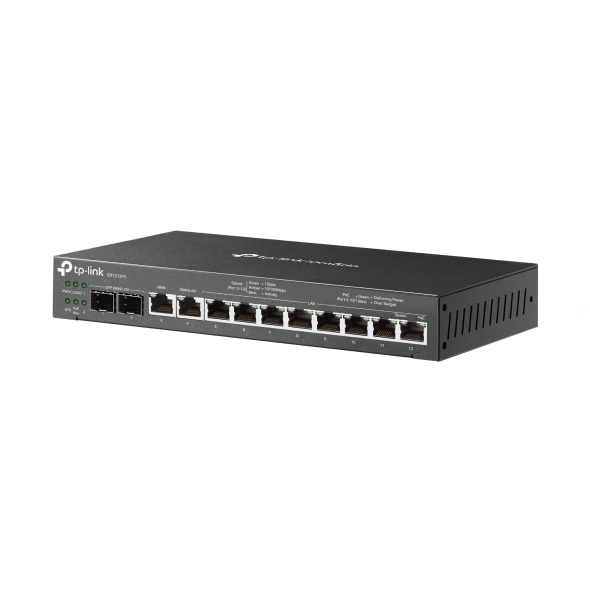
    Omada 3-in-1 Gigabit VPN Gateway
    Omada 3-in-1 Gigabit VPN Gateway
    Omada 3-in-1 Gigabit VPN Gateway
    Omada 3-in-1 Gigabit VPN Gateway
    Omada 3-in-1 Gigabit VPN Gateway
    Omada 3-in-1 Gigabit VPN Gateway
    Omada 3-in-1 Gigabit VPN Gateway
    Omada 3-in-1 Gigabit VPN Gateway
    Omada 3-in-1 Gigabit VPN Gateway
    Omada 3-in-1 Gigabit VPN Gateway
    Omada 3-in-1 Gigabit VPN Gateway
    Omada 3-in-1 Gigabit VPN Gateway
    Omada 3-in-1 Gigabit VPN Gateway
    Omada 3-in-1 Gigabit VPN Gateway
    Omada 3-in-1 Gigabit VPN Gateway

    /5Download

    ER7212PC

    V2

    Omada 3-in-1 Gigabit VPN Gateway

    How to Find the Hardware Version on Your TP-Link Device
    IMPORTANT:  Model and hardware version availability varies by region. Please refer to your TP-Link regional website to determine product availability.
    Vx.0 = Vx.6/Vx.8/Vx.9(eg:V1.0=V1.6/V1.8/V1.9)
    Vx.x0 = Vx.x6/Vx.x8/Vx.x9 (eg:V1.20=V1.26/V1.28/V1.29)
    Vx.30 = Vx.32/Vx.33 (eg:V3.30=V3.32/V3.33)
    • Controller + Gateway + PoE Switch Functions
    • 12× Gigabit Ports
    • Up to 4× WAN Ports
    • 110W PoE Budget
    • Highly Secure VPN
    • Centralized Cloud Management
    • Controller + Gateway + PoE Switch Functions
    • 12× Gigabit Ports
    • Up to 4× WAN Ports
    • 110W PoE Budget
    • Highly Secure VPN
    • Centralized Cloud Management
    • Documents
    • Videos
    • Downloads
    • Tools
    • Bulletins
    • Community

    Filter By TypeReset

    • checkbox

      Datasheet

    • checkbox

      Hardware Installation Guide

    • checkbox

      Knowledgebase

      checkbox
    • checkbox

      Release Note

    • checkbox

      Reference Guide

      checkbox
    • checkbox

      Others

    Filter By TagReset

    • Controller
    • Gateway
    • Vlan
    • ACL
    • Standalone
    • Mesh
    • CLI
    • VPN
    • App
    • Online
    • Reset
    • Authentication
    • Portal
    • Wireless
    • API

    ER7212PC(UN)_V2_2.4.3 Build 20260722

    Release Note
    07-31-2026
    1159

    How to Allow Specific Public IPs to Access an Internal Server on Omada Gateways

    When hosting an internal server behind an Omada Gateway, such as a web server, exposing it to the Internet can pose security risks. This guide demonstrates how to allow only specific public IP addresses to access an internal server, while blocking all other public traffic.

    Configuration Guide
    06-19-2026
    14001

    How to Utilize Link Backup and Policy Routing to Keep Critical Devices Online and Conserve Data

    In dual-WAN environments where one WAN connection is designated as a backup link, it is often necessary to control which devices and networks are permitted to use the backup connection during a failover event. This guide demonstrates how to use Policy Routing to allow only specific devices, networks, or IP addresses to route traffic through the backup WAN.

    Configuration Guide
    06-11-2026
    14592

    How to Configure Port Mirroring on Omada Gateways

    This article describes how to configure port mirroring for Gateways on Omada Controller and Standalone Mode. Port Mirroring is a feature that copies network traffic from one or more ports and sends it to another port for monitoring or analysis. This is commonly used for troubleshooting network issues, monitoring traffic, or performing traffic analysis using packet capture tools.

    Configuration Guide
    07-10-2026
    16118

    How to Use an Omada Controller to Manage Omada Devices Across Different Subnets Over the Internet

    In enterprise networks, devices are often deployed across different subnets, making it common for Omada devices and the Omada Controller to reside in separate network segments. Supporting device adoption and management across subnets enables centralized control without changing existing network designs. This article introduces different methods for adopting devices across subnets using Omada products.

    Configuration Guide
    06-23-2026
    50233

    How to Configure IPsec VPN on Omada Gateway in Controller Mode (Controller v6.2 and Above)

    IPsec Site-to-Site VPN enables the connection of geographically separated networks. Large enterprises commonly use it to establish secure VPN connections between branch offices and headquarters. The IPsec VPN connects branch routers over the public network, ensuring secure transmission of private network data.

    Configuration Guide
    08-14-2026
    19583

    ER7212PC(UN)_V2_2.4.2 Build 20260411

    Release Note
    04-23-2026
    4682

    How to Configure IPsec VPN on Omada Gateway in Standalone Mode

    With the Site-to-Site VPN function, different private networks can be connected over the internet.

    Configuration Guide
    07-03-2026
    19364

    How to Restrict Specific Clients from Accessing Specific URLs Using an Omada Gateway

    Sometimes, we may need to restrict certain clients behind the gateway from accessing specific URLs. Omada gateways provide a feature called URL Filtering to help manage and control web access in such cases.

    Configuration Guide
    08-14-2026
    19748

    How to Configure SD-WAN via Omada Controller v6.2

    This article provides a comprehensive walkthrough for configuring the SD-WAN function on the Omada Controller, enabling enterprises to centralize network management, optimize traffic routing, and establish secure hub-spoke connectivity across distributed sites in one Controller. The guide covers prerequisites, gateway adoption, IP range allocation, and post-configuration verification to ensure reliable WAN performance.

    Configuration Guide
    08-14-2026
    26440
    • Total 65 items
    • 1
    • 2
    • 3
    • 4
    • 5
    • 6
    • 7
    • 10 / pagina

    No results found.

    Filter By TypeReset

    • checkbox

      Firmware

    • checkbox

      Software

      checkbox
    • checkbox

      MIBs Files

    • checkbox

      GPL Code

    • checkbox

      Declaration of Conformity

      checkbox
    • Total 11 items
    • 1
    • 2

    Other Tools

    Omada App

    Omada App

    Filter By TypeReset

    • checkbox

      Security Vulnerability

    • checkbox

      EOL/EOM/EOS Notification

    • checkbox

      Others

    No results found.

    • Total 179 items
    • 1
    • 2
    • 3
    • 4
    • 5
    • •••
    • 18
    • 10 / pagina

    SubscriptionTP-Link hecht veel waarde aan privacy. Voor meer informatie over ons privacybeleid kan je onze Privacy Policy bekijken.

    Email Error

    Ik wil graag op de hoogte worden gehouden van TP-Link nieuws, product updates en promoties.

    By completing this form you confirm that you understand and agree to our Privacy Policy.

    reCaptcha not verified

    Volg Ons

    • TP-Link Omada facebook
    • TP-Link Omada youtube
    • TP-Link Omada twitter
    About
    • Corporate Profile
    • About Us
    • Sustainability
    • Contact Us
    • Privacy Policy
    Press
    • News
    • Blog
    • Security Advisory
    Partners
    • Partner Program
    Learning Center
    • Technology Trends
    TP-Link Omada Omada Pro VIGI
    België / Nederlands  |  Français

    Copyright © 2026 TP-Link Enterprises Belgium BV. Alle rechten voorbehouden.

    This website uses cookies to improve website navigation, analyze online activities and have the best possible user experience on our website. You can object to the use of cookies at any time. You can find more information in our privacy policy . Don’t show again

    Your Privacy Choices

    This website uses cookies to improve website navigation, analyze online activities and have the best possible user experience on our website. You can object to the use of cookies at any time. You can find more information in our privacy policy . Don’t show again

    Standaard Cookies

    Deze cookies zijn noodzakelijk voor de werking van de website en kunnen niet worden uitgeschakeld.

    TP-Link

    SESSION, JSESSIONID, accepted_local_switcher, tp_privacy_banner, tp_privacy_base, tp_privacy_marketing, tp_top-banner, tp_popup-bottom, tp_popup-center, tp_popup-right-middle, tp_popup-right-bottom, tp_productCategoryType

    Youtube

    id, VISITOR_INFO1_LIVE, LOGIN_INFO, SIDCC, SAPISID, APISID, SSID, SID, YSC, __Secure-1PSID, __Secure-1PAPISID, __Secure-1PSIDCC, __Secure-3PSID, __Secure-3PAPISID, __Secure-3PSIDCC, 1P_JAR, AEC, NID, OTZ

    Zendesk

    OptanonConsent, __cf_bm, __cfruid, _cfuvid, _help_center_session, _pendo___sg__.<container-id>, _pendo_meta.<container-id>, _pendo_visitorId.<container-id>, _zendesk_authenticated, _zendesk_cookie, _zendesk_session, _zendesk_shared_session, ajs_anonymous_id, cf_clearance

    Analyse en Marketing Cookies

    Cookies voor analyse geven ons de mogelijkheid uw activiteiten op onze website te volgen en zo de functionaliteit van de website aan te passen en te verbeteren.

    Marketing cookies kunnen op onze website worden geplaatst door externe adverteerders waar wij mee samenwerken om een profiel te creëren met uw interesses en u zo van relevante advertenties te kunnen voorzien op andere websites.

    Google Analytics & Google Tag Manager

    _gid, _ga_<container-id>, _ga, _gat_gtag_<container-id>

    Google Ads & DoubleClick

    test_cookie, _gcl_au