Omada Pro Logo official website Vigi Logo official website
Contáctanos
  • Contact Sales
  • Contact Support
Log In
avatar

    Messages Messages Bookmarks Bookmarks Account Settings Account Settings
    Perú / Español
    Omada logo
    • Productos

      Productos

      • Fusion Gateways
        • Fusion Series
          Fusion Series
      • Gateways Estándar
        • Gateways Cableados
          Gateways Cableados
        • Gateways WiFi
          Gateways WiFi
        • Gateways 4G WiFi
          Gateways 4G WiFi
        • Gateways Integrados
          Gateways Integrados
        • Ver todo
          Ver todo
      • Wi-Fi
        • Wi-Fi 7
          Wi-Fi 7
        • Montaje en Techo
          Montaje en Techo
        • Montaje en Pared
          Montaje en Pared
        • Exterior
          Exterior
        • Wireless Bridge
          Wireless Bridge
        • GPON
          GPON
        • Sobremesa
          Sobremesa
        • Ver todo
          Ver todo
      • Switches
        • Campus
          Campus
        • Aggregation
          Aggregation
        • Access Max
          Access Max
        • Access Pro
          Access Pro
        • Access Plus
          Access Plus
        • Access
          Access
        • Agile
          Agile
        • Industrial
          Industrial
        • Ver todo
          Ver todo
      • Controladores
        • Cloud-Based
          Cloud-Based
        • Hardware
          Hardware
        • Software
          Software
        • Ver todo
          Ver todo
      • Accesorios
        • Energía y PoE
          Energía y PoE
        • Media Converters
          Media Converters
        • Módulos & Cables
          Módulos & Cables
        • Montaje y Soportes
          Montaje y Soportes
        • Ver todo
          Ver todo

      Plataformas de Gestión

      • Sistemas de Gestión
        • Fusion Gateways
          Fusion Gateways
        • Cloud-Based
          Cloud-Based
        • Hardware
          Hardware
        • Software
          Software
        • Ver todo
          Ver todo
      • Portal en la Nube

      Herramientas de Software

      • Omada Design Hub
      • Omada WiFi Navi App
    • Soluciones
      Solutions Home

      Por Escenarios

      • Oficinas pequeñas y medianas
      • Cadenas pequeñas de restaurantes y tiendas
      • WiFi para granjas, ranchos y estacionamientos
      • WiFi de alta densidad

      Por Tecnología

      • WiFi 7
      • Solución PPSK
      • PtP & PtMP Wireless Bridges
      • Solución Multi-Gigabit
      • Switches PoE para videovigilancia

      Casos de Éxito

      Casos de Éxito

      Omada impulsa la solución POS de Shift4 en más de 20,000 sitios en EE. UU.

      Navegar
    • Aprende y Capacítate

      Aprende

      • Preguntas Frecuentes
      • Videos de Configuración
      • Guías de Configuración
      • Casos de Éxito

      Capacítate

      • Introducción a la Capacitación
      • Para estudiantes
      • Para instructores
    • Soporte
      Support Home

      Documentos

      • Guía de instalación de Hardware
      • Base de Conocimientos
      • Ficha Técnica
      • Guía de referencia
      • Ver Todo

      Descargas

      • Descarga de Software
      • Descarga de Firmware
      • Código GPL
      • Archivos MIBs
      • Ver Todo

      Boletines

      • Vulnerabilidades de Seguridad
      • Notificaciones EOL/EOM/EOS
      • Ver Todo

      Contacto de Soporte

      • Soporte por Email
      • Soporte telefónico
      • Servicios de garantía

      Herramientas

      • Emuladores Omada
      • Omada App
      • Lista de Compatibilidad
    • Partner

      Conviértete en Partner

      • Únete ahora

      Registro de Oportunidades

      • Registrar ahora
    • Comunidad
    Buscar
    1. Home>
    2. Product Support>
    3. ER7212PC>
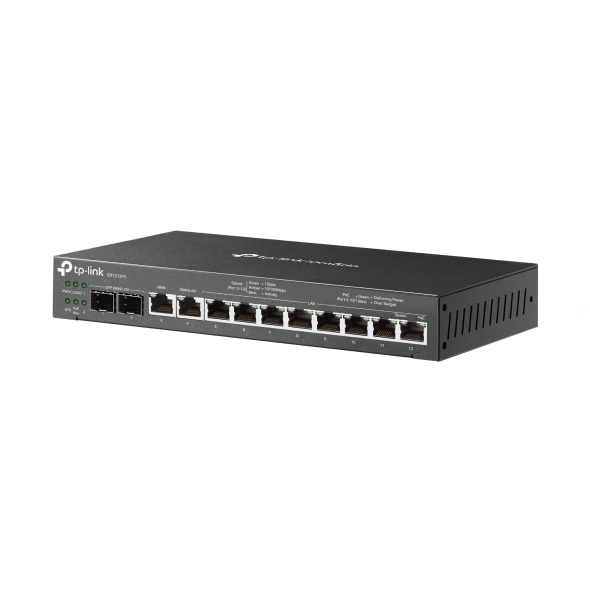
    Omada Router VPN Gigabit 3-in-1
    Omada Router VPN Gigabit 3-in-1
    Omada Router VPN Gigabit 3-in-1
    Omada Router VPN Gigabit 3-in-1
    Omada Router VPN Gigabit 3-in-1
    Omada Router VPN Gigabit 3-in-1
    Omada Router VPN Gigabit 3-in-1
    Omada Router VPN Gigabit 3-in-1
    Omada Router VPN Gigabit 3-in-1
    Omada Router VPN Gigabit 3-in-1
    Omada Router VPN Gigabit 3-in-1
    Omada Router VPN Gigabit 3-in-1
    Omada Router VPN Gigabit 3-in-1
    Omada Router VPN Gigabit 3-in-1
    Omada Router VPN Gigabit 3-in-1

    /5Download

    ER7212PC

    V2

    Omada Router VPN Gigabit 3-in-1

    How to Find the Hardware Version on Your TP-Link Device
    IMPORTANT:  Model and hardware version availability varies by region. Please refer to your TP-Link regional website to determine product availability.
    Vx.0 = Vx.6/Vx.8/Vx.9(eg:V1.0=V1.6/V1.8/V1.9)
    Vx.x0 = Vx.x6/Vx.x8/Vx.x9 (eg:V1.20=V1.26/V1.28/V1.29)
    Vx.30 = Vx.32/Vx.33 (eg:V3.30=V3.32/V3.33)
    • Funciones de Controlador + Gateway + Switch PoE
    • 12× Puertos Gigabit
    • Hasta 4× Puertos WAN
    • Potencia PoE de hata 110W
    • VPN Altamente Segura
    • Gestión Centralizada en la Nube
    • Funciones de Controlador + Gateway + Switch PoE
    • 12× Puertos Gigabit
    • Hasta 4× Puertos WAN
    • Potencia PoE de hata 110W
    • VPN Altamente Segura
    • Gestión Centralizada en la Nube
    • Documents
    • Videos
    • Downloads
    • Tools
    • Bulletins
    • Community

    Filter By TypeReset

    • checkbox

      Datasheet

    • checkbox

      Guía de Instalación del Hardware

    • checkbox

      Base de conocimientos

      checkbox
    • checkbox

      Nota de difusión

    • checkbox

      Guía de referencia

      checkbox
    • checkbox

      Otros

    Filter By TagReset

    • Controller
    • Gateway
    • Vlan
    • ACL
    • Standalone
    • Mesh
    • CLI
    • VPN
    • App
    • Online
    • Reset
    • Authentication
    • Portal
    • Wireless
    • API

    Omada Incident Detection and Health Assessment White Paper

    Technical White Paper
    10-16-2026
    2774

    ER7212PC(UN)_V2_Datasheet

    Datasheet
    01-06-2026
    18894

    How to Configure Internet Settings on Omada Controller Using Omada App

    Learn how to configure IPv4 and IPv6 Internet settings on Omada gateways using the Omada App, including WAN connection types and setup steps.

    Configuration Guide
    10-23-2026
    3536

    How to Configure DMZ on Omada Gateways

    Learn how to configure DMZ on Omada Gateways in Standalone and Controller Mode to forward inbound WAN traffic to a designated internal host.

    Configuration Guide
    10-08-2026
    9974

    Omada Hardware Controller Management Capacity: Recommended and Maximum Device Limits

    Understand recommended and maximum device capacities for Omada Controllers, capacity notifications, and performance considerations when managing large-scale deployments.

    FAQ
    08-15-2026
    13660

    How to Prepare for the End of ECSP v1 Support in Omada Controller

    Learn how to identify ECSP v1 devices, upgrade to ECSP v2-compatible firmware, and prepare Local or Cloud-Based Controllers for v6.4 and later.

    Configuration Guide
    09-04-2026
    7337

    How to Allow Specific Public IPs to Access an Internal Server on Omada Gateways

    When hosting an internal server behind an Omada Gateway, such as a web server, exposing it to the Internet can pose security risks. This guide demonstrates how to allow only specific public IP addresses to access an internal server, while blocking all other public traffic.

    Configuration Guide
    06-19-2026
    18980

    How to Utilize Link Backup and Policy Routing to Keep Critical Devices Online and Conserve Data

    In dual-WAN environments where one WAN connection is designated as a backup link, it is often necessary to control which devices and networks are permitted to use the backup connection during a failover event. This guide demonstrates how to use Policy Routing to allow only specific devices, networks, or IP addresses to route traffic through the backup WAN.

    Configuration Guide
    06-11-2026
    18689

    How to Configure Port Mirroring on Omada Gateways

    Discover how to set up Port Mirroring on Omada Gateways to monitor and analyze network traffic. Capture packets, troubleshoot network issues, and gain deeper visibility into network activity in both Controller and Standalone modes.

    Configuration Guide
    10-20-2026
    20581

    How to Use an Omada Controller to Manage Omada Devices Across Different Subnets Over the Internet

    In enterprise networks, devices are often deployed across different subnets, making it common for Omada devices and the Omada Controller to reside in separate network segments. Supporting device adoption and management across subnets enables centralized control without changing existing network designs. This article introduces different methods for adopting devices across subnets using Omada products.

    Configuration Guide
    06-23-2026
    67343

    No results found.

    Filter By TypeReset

    • checkbox

      Firmware

    • checkbox

      Software

      checkbox
    • checkbox

      Archivos MIB

    • checkbox

      Código GPL

    Other Tools

    Omada App

    Omada App

    Filter By TypeReset

    • checkbox

      Vulnerabilidad de la seguridad

    • checkbox

      Notificación EOL/EOM/EOS

    • checkbox

      Otros

    No results found.

    SuscripciónTP-Link toma en serio su privacidad. Para obtener más detalles sobre las prácticas de privacidad de TP-Link, consulte la Política de privacidad de TP-Link.

    Email Error

    Me gustaría estar al tanto de las novedades, actualizaciones de productos y promociones de TP-Link.

    Al completar este formulario, confirma que comprende y acepta nuestra Política de privacidad.

    reCaptcha not verified

    Síguenos

    Acerca de Nosotros
    • Perfil Corporativo
    • Contáctanos
    • Politica de privacidad
    Prensa
    • Noticias
    • Blog
    • Aviso de seguridad
    Partners
    • Partner Program
    Centro de Aprendizaje
    • Tendencias tecnológicas
    TP-Link Omada Omada Pro VIGI
    Perú / Español

    ©2026 TP-LINK PERÚ S.A.C. and its affiliated companies. All rights reserved.

    Este sitio web utiliza cookies para mejorar la navegación en el sitio web, analizar las actividades en línea y tener la mejor experiencia de usuario posible en nuestro sitio web. Puedes oponerte al uso de cookies en cualquier momento. Puede encontrar más información en nuestra política de privacidad . No volver a mostrar

    Your Privacy Choices

    Este sitio web utiliza cookies para mejorar la navegación en el sitio web, analizar las actividades en línea y tener la mejor experiencia de usuario posible en nuestro sitio web. Puedes oponerte al uso de cookies en cualquier momento. Puede encontrar más información en nuestra política de privacidad . No volver a mostrar

    Basic Cookies

    These cookies are necessary for the website to function and cannot be deactivated in your systems.

    TP-Link

    SESSION, JSESSIONID, accepted_local_switcher, tp_privacy_banner, tp_privacy_base, tp_privacy_marketing, tp_top-banner, tp_popup-bottom, tp_popup-center, tp_popup-right-middle, tp_popup-right-bottom, tp_productCategoryType

    Youtube

    id, VISITOR_INFO1_LIVE, LOGIN_INFO, SIDCC, SAPISID, APISID, SSID, SID, YSC, __Secure-1PSID, __Secure-1PAPISID, __Secure-1PSIDCC, __Secure-3PSID, __Secure-3PAPISID, __Secure-3PSIDCC, 1P_JAR, AEC, NID, OTZ

    Zendesk

    OptanonConsent, __cf_bm, __cfruid, _cfuvid, _help_center_session, _pendo___sg__.<container-id>, _pendo_meta.<container-id>, _pendo_visitorId.<container-id>, _zendesk_authenticated, _zendesk_cookie, _zendesk_session, _zendesk_shared_session, ajs_anonymous_id, cf_clearance

    Analysis and Marketing Cookies

    Analysis cookies enable us to analyze your activities on our website in order to improve and adapt the functionality of our website.

    The marketing cookies can be set through our website by our advertising partners in order to create a profile of your interests and to show you relevant advertisements on other websites.

    Google Analytics & Google Tag Manager

    _gid, _ga_<container-id>, _ga, _gat_gtag_<container-id>

    Google Ads & DoubleClick

    test_cookie, _gcl_au