Omada Pro Logo official website Vigi Logo official website
Contact Us
  • Contact Sales
  • Contact Support
Log In
avatar

    ข้อความ ข้อความ บุ๊กมาร์ก บุ๊กมาร์ก การตั้งค่าบัญชี การตั้งค่าบัญชี
    ไทย / ไทย
    Omada logo
    • Products

      Products

      • Wireless
        • WiFi 7
          WiFi 7
        • Ceiling Mount
          Ceiling Mount
        • Wall Plate
          Wall Plate
        • Outdoor
          Outdoor
        • View All
          View All
      • Switches
        • Campus
          Campus
        • Aggregation
          Aggregation
        • Access Max
          Access Max
        • Access Pro
          Access Pro
        • Access Plus
          Access Plus
        • Access
          Access
        • Agile
          Agile
        • Industrial
          Industrial
        • L3/L2+ Managed
          L3/L2+ Managed
        • View All
          View All
      • Gateways
        • Wired Gateways
          Wired Gateways
        • WiFi Gateways
          WiFi Gateways
        • 4G/5G WiFi Gateways
          4G/5G WiFi Gateways
        • Integrated Gateways
          Integrated Gateways
        • View All
          View All
      • Controllers
        • Cloud-Based
          Cloud-Based
        • Hardware
          Hardware
        • Software
          Software
        • View All
          View All
      • Accessories
        • Media Converters
          Media Converters
        • Modules/Cables
          Modules/Cables
        • PoE Adapters
          PoE Adapters
        • Rackmount Accessories
          Rackmount Accessories
        • View All
          View All

      Management Platforms

      • Management Systems
        • Cloud-Based
          Cloud-Based
        • Hardware
          Hardware
        • Software
          Software
        • View All
          View All
      • Cloud Portal
    • Solutions
      Solutions Home

      By Scenarios

      • WiFi for Hotels
      • Multi-Dwelling Units (MDU)
      • Small and Mid-Sized Offices
      • Small-Sized Chain Restaurants/Stores
      • WiFi for Farms/Ranches/Parking Lots
      • High-Density WiFi

      By Technology

      • Unified Networking and Surveillance Solution
      • Free Cloud Management via Omada Central Essentials
      • WiFi 7
      • PPSK Solution
      • PtP & PtMP Wireless Bridges
      • Multi-Gigabit Solution
      • PoE Switches for Surveillance
      • Industrial Switches

      Case Studies

      Case Studies

      Omada Powers Shift4’s POS Solution over 20,000 Sites in the US

      ค้นหา
    • Learn and Train

      Learn

      • FAQs
      • Setup Videos
      • Configuration Guides
      • Case Studies

      Train

      • Training Introduction
      • For Learners
      • For Instructors
    • Support
      Support Home

      Documents

      • Hardware Installation Guide
      • Knowledgebase
      • Datasheet
      • คู่มืออ้างอิง
      • View All

      Downloads

      • Software Download
      • Firmware Download
      • GPL Code
      • MIBs Files
      • View All

      Bulletins

      • Security Vulnerability
      • EOL/EOM/EOS Notification
      • View All

      Contact Support

      • Email Support
      • Call Support
      • Warranty Services

      Tools

      • Omada Emulators
      • Omada App
      • Compatibility List
    • Partner

      Partner Program

      • Log In
      • Explore Now

      Become a Partner

      • Join Now

      Deal Registration

      • Submit Now

      Find a Distributor

      • Find Now
    • Community
    Search
    1. หน้าหลัก>
    2. การสนับสนุนผลิตภัณฑ์>
    3. ER7212PC>
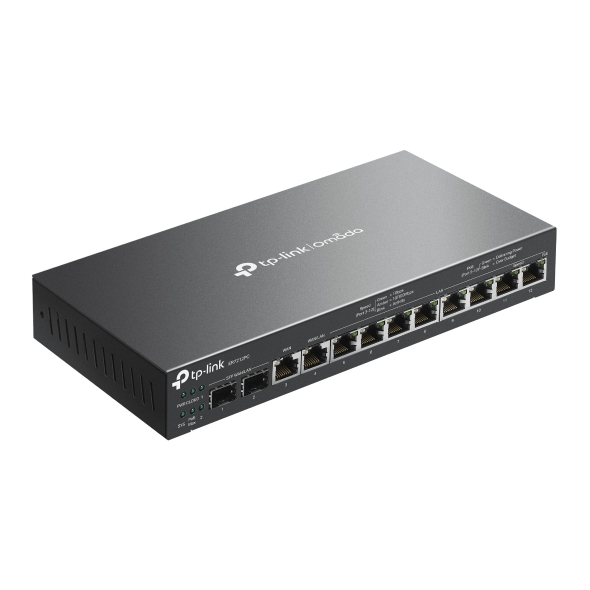
    Omada 3-in-1 Gigabit VPN Router
    Omada 3-in-1 Gigabit VPN Router
    Omada 3-in-1 Gigabit VPN Router
    Omada 3-in-1 Gigabit VPN Router
    Omada 3-in-1 Gigabit VPN Router
    Omada 3-in-1 Gigabit VPN Router
    Omada 3-in-1 Gigabit VPN Router
    Omada 3-in-1 Gigabit VPN Router
    Omada 3-in-1 Gigabit VPN Router
    Omada 3-in-1 Gigabit VPN Router
    Omada 3-in-1 Gigabit VPN Router
    Omada 3-in-1 Gigabit VPN Router
    Omada 3-in-1 Gigabit VPN Router
    Omada 3-in-1 Gigabit VPN Router
    Omada 3-in-1 Gigabit VPN Router

    /5ดาวน์โหลด

    ER7212PC

    V1

    Omada 3-in-1 Gigabit VPN Router

    • 3-in-1 Router with fanless and compact design
    • 12× Gigabit ports
    •  2× Gigabit SFP WAN/LAN ports, 1× Gigabit RJ45 WAN port, and 1× Gigabit RJ45 WAN/LAN port
    • 110W PoE Budget
    • Highly Secure VPN
    • Centralized Management
    • 3-in-1 Router with fanless and compact design
    • 12× Gigabit ports
    •  2× Gigabit SFP WAN/LAN ports, 1× Gigabit RJ45 WAN port, and 1× Gigabit RJ45 WAN/LAN port
    • 110W PoE Budget
    • Highly Secure VPN
    • Centralized Management
    • เอกสาร
    • วิดีโอ
    • ดาวน์โหลด
    • เครื่องมือ
    • จดหมายข่าว
    • ชุมชน

    คัดกรองตามประเภทรีเซ็ต

    • checkbox

      Datasheet

    • checkbox

      คู่มือการติดตั้งอุปกรณ์

    • checkbox

      ฐานความรู้

      checkbox
    • checkbox

      หมายเหตุการเปิดตัว

    • checkbox

      คู่มืออ้างอิง

      checkbox
    • checkbox

      อื่น ๆ

    คัดกรองตามแท็กรีเซ็ต

    • Controller
    • Gateway
    • VLAN
    • ACL
    • Standalone
    • Mesh
    • CLI
    • VPN
    • App
    • Online
    • Reset
    • Authentication
    • Portal
    • Wireless
    • API

    How to configure IPsec VPN on Omada Gateway in Controller Mode (Controller v6.2 and above)

    IPsec Site-to-Site VPN enables the connection of geographically separated networks. Large enterprises commonly use it to establish secure VPN connections between branch offices and headquarters. The IPsec VPN connects branch routers over the public network, ensuring secure transmission of private network data.

    คู่มือการกำหนดค่า
    04-29-2026
    4578

    How to configure IPsec VPN on Omada Gateway in Standalone Mode

    With the Site-to-Site VPN function, different private networks can be connected over the internet.

    คู่มือการกำหนดค่า
    04-20-2026
    5357

    How to use an Omada gateway to restrict specific clients from visiting specific URLs

    Sometimes, we may need to restrict certain clients behind the gateway from accessing specific URLs. Omada gateways provide a feature called URL Filtering to help manage and control web access in such cases.

    คู่มือการกำหนดค่า
    04-08-2026
    5815

    How to Configure SD-WAN via Omada Controller v6.2

    Software-Defined Wide Area Network (SD-WAN) revolutionizes traditional WAN architectures by leveraging centralized control and automation to dynamically route traffic across multiple connections (e.g., MPLS, broadband, LTE). SD-WAN enhances the hub-and-spoke model by integrating intelligent traffic steering and simplified cross-site management. Key benefit is centralized Policy Management, which defines and enforces network rules across all sites from a single Controller.

    คู่มือการกำหนดค่า
    04-02-2026
    5972

    How to Use Remote Access on Omada Controller

    คู่มือการกำหนดค่า
    03-17-2026
    10654

    How to configure the Session Limit and Bandwidth Control to control traffic on Omada Gateways

    Omada gateways support Session Limit and Bandwidth Control to address this; the former prevents connection table exhaustion by constraining the maximum concurrent sessions per user, while the latter avoids bandwidth monopolization by limiting upstream and downstream rates. Together, they resolve issues such as uneven network resource allocation, degraded critical services, and unstable device performance, ensuring fairness, stability, and high-quality network service in multi-user environments. 

    คู่มือการกำหนดค่า
    03-07-2026
    7291

    How to Use the Speed Test Feature on the Omada Controller v6.2 and above

    Starting from v6.2, Omada Network System introduces the Speed Test feature, offering both manual and scheduled modes to help us monitor network quality easily.

    คู่มือการกำหนดค่า
    03-04-2026
    10405

    How to Set Up an OpenVPN Connection with Omada Gateways on Client Devices with Different Operating Systems

    Omada Gateway can act as an OpenVPN server that enables clients to access the intranet or the internet securely. We will guide you through configuring OpenVPN connections from Android, iOS, Windows, Linux, and macOS devices to an Omada Gateway.

    คู่มือการกำหนดค่า
    02-14-2026
    12599

    How to configure WireGuard VPN Client to access peer server through IPsec Site-to-Site VPN using Omada Gateway

    This article explains how to enable the WireGuard VPN client to access a peer server via IPsec Site-to-Site VPN. It provides simple steps to help you configure your device for secure and seamless communication with the peer server.

    คู่มือการกำหนดค่า
    01-06-2026
    20423

    How to set up Site-to-Site Manual IPsec VPN Tunnels on Omada Gateway via Omada Controller using Omada APP

    IPsec Site-to-Site VPN can connect geographically isolated networks. It is mainly used in large enterprises to establish VPN channels between branches and the headquarter. IPsec VPN connection is established between branch routers through the public network to transmit private network data.

    คู่มือการกำหนดค่า
    11-20-2025
    14607
    • รวม 61 รายการ
    • 1
    • 2
    • 3
    • 4
    • 5
    • 6
    • 7
    • 10 / หน้า

    ไม่พบผลลัพธ์

    คัดกรองตามประเภทรีเซ็ต

    • checkbox

      เฟิร์มแวร์

    • checkbox

      ซอฟต์แวร์

      checkbox
    • checkbox

      ไฟล์ MIBs

    • checkbox

      รหัส GPL

    • รวม 17 รายการ
    • 1
    • 2

    เครื่องมืออื่น ๆ

    Omada App

    Omada App

    คัดกรองตามประเภทรีเซ็ต

    • checkbox

      ช่องโหว่ด้านความปลอดภัย

    • checkbox

      การแจ้งเตือน EOL/EOM/EOS

    • checkbox

      อื่น ๆ

    ไม่พบผลลัพธ์

    • รวม 175 รายการ
    • 1
    • 2
    • 3
    • 4
    • 5
    • •••
    • 18
    • 10 / หน้า

    ติดตามข้อมูลข่าวสารTP-Link ให้ความสำคัญกับความเป็นส่วนตัวของคุณอย่างจริงจัง หากต้องการรายละเอียดเพิ่มเติมเกี่ยวกับแนวทางการรักษาความเป็นส่วนตัวของ TP-Link โปรดดู นโยบายความเป็นส่วนตัวของ TP-Link

    Email Error

    ฉันต้องการอัปเดตข่าวสาร ผลิตภัณฑ์ใหม่ ๆ และโปรโมชันจาก TP-Link อยู่เสมอ

    โดยการกรอกแบบฟอร์มนี้แสดงว่าคุณยืนยันว่าคุณเข้าใจและยอมรับนโยบายความเป็นส่วนตัวของเรา

    reCaptcha not verified

    ติดตามเรา

    • TP-Link Omada facebook
    • TP-Link Omada youtube
    • TP-Link Omada linkedin
    • TP-Link Omada instagram
    • TP-Link Omada tiktok
    About
    • Corporate Profile
    • Sustainability
    • Contact Us
    • Privacy Policy
    • Ethical Violation Compliant
    Press
    • News
    • Blog
    • Security Advisory
    Partners
    • พาร์ทเนอร์โปรแกรม
    Learning Center
    • Technology Trends
    TP-Link Omada Omada Pro VIGI
    ไทย / ไทย

    ลิขสิทธิ์ถูกต้อง © 2026 TP-Link Enterprises (Thailand) Co.,Ltd. สงวนลิขสิทธิ์

    เว็บไซต์นี้ใช้คุกกี้เพื่อปรับปรุงการนำทางเว็บไซต์ วิเคราะห์กิจกรรมออนไลน์ และมอบประสบการณ์การใช้งานที่ดีที่สุดแก่ผู้ใช้บนเว็บไซต์ของเรา คุณสามารถปฏิเสธการใช้คุกกี้ได้ตลอดเวลา คุณสามารถดูข้อมูลเพิ่มเติมได้ใน นโยบายความเป็นส่วนตัว ของเรา อย่าแสดงอีก

    Your Privacy Choices

    เว็บไซต์นี้ใช้คุกกี้เพื่อปรับปรุงการนำทางเว็บไซต์ วิเคราะห์กิจกรรมออนไลน์ และมอบประสบการณ์การใช้งานที่ดีที่สุดแก่ผู้ใช้บนเว็บไซต์ของเรา คุณสามารถปฏิเสธการใช้คุกกี้ได้ตลอดเวลา คุณสามารถดูข้อมูลเพิ่มเติมได้ใน นโยบายความเป็นส่วนตัว ของเรา อย่าแสดงอีก

    คุกกี้พื้นฐาน

    คุกกี้เหล่านี้จำเป็นต่อการทำงานของเว็บไซต์และไม่สามารถปิดการใช้งานในระบบของคุณได้

    TP-Link

    SESSION, JSESSIONID, accepted_local_switcher, tp_privacy_banner, tp_privacy_base, tp_privacy_marketing, tp_top-banner, tp_popup-bottom, tp_popup-center, tp_popup-right-middle, tp_popup-right-bottom, tp_productCategoryType

    Youtube

    id, VISITOR_INFO1_LIVE, LOGIN_INFO, SIDCC, SAPISID, APISID, SSID, SID, YSC, __Secure-1PSID, __Secure-1PAPISID, __Secure-1PSIDCC, __Secure-3PSID, __Secure-3PAPISID, __Secure-3PSIDCC, 1P_JAR, AEC, NID, OTZ

    Zendesk

    OptanonConsent, __cf_bm, __cfruid, _cfuvid, _help_center_session, _pendo___sg__.<container-id>, _pendo_meta.<container-id>, _pendo_visitorId.<container-id>, _zendesk_authenticated, _zendesk_cookie, _zendesk_session, _zendesk_shared_session, ajs_anonymous_id, cf_clearance

    คุกกี้การวิเคราะห์และการตลาด

    คุกกี้การวิเคราะห์ช่วยให้เราวิเคราะห์กิจกรรมของคุณบนเว็บไซต์ของเราเพื่อปรับปรุงและปรับการทำงานของเว็บไซต์ของเรา

    คุกกี้การตลาดสามารถตั้งค่าผ่านเว็บไซต์ของเราโดยพันธมิตรโฆษณาของเราเพื่อสร้างโปรไฟล์ความสนใจของคุณและแสดงโฆษณาที่เกี่ยวข้องกับคุณบนเว็บไซต์อื่นๆ

    Google Analytics, Google Tag Manager

    _gid, _ga_<container-id>, _ga, _gat_gtag_<container-id>

    Google Ads และ DoubleClick

    test_cookie, _gcl_au