Omada Pro Logo official website Vigi Logo official website
Contact Us
  • Contact Sales
  • Contact Support
Log In
avatar

    Messages Messages Bookmarks Bookmarks Account Settings Account Settings
    Uruguay / Español
    Omada logo
    • Products

      Products

      • Wireless
        • WiFi 7
          WiFi 7
        • Ceiling Mount
          Ceiling Mount
        • Wall Plate
          Wall Plate
        • Desktop
          Desktop
        • Outdoor
          Outdoor
        • GPON
          GPON
        • View All
          View All
      • Switches
        • Unmanaged
          Unmanaged
        • View All
          View All
      • Gateways
        • Wired Gateways
          Wired Gateways
        • WiFi Gateways
          WiFi Gateways
        • 4G/5G WiFi Gateways
          4G/5G WiFi Gateways
        • Integrated Gateways
          Integrated Gateways
        • View All
          View All
      • Controllers
        • Cloud-Based
          Cloud-Based
        • Hardware
          Hardware
        • Software
          Software
        • View All
          View All
      • Accessories
        • Media Converters
          Media Converters
        • Modules/Cables
          Modules/Cables
        • PoE Adapters
          PoE Adapters
        • Rackmount Accessories
          Rackmount Accessories
        • View All
          View All

      Management Platforms

      • Management Systems
        • Cloud-Based
          Cloud-Based
        • Hardware
          Hardware
        • Software
          Software
        • View All
          View All
      • Cloud Portal
    • Solutions
      Solutions Home

      By Scenarios

      • Small and Mid-Sized Offices
      • Small-Sized Chain Restaurants/Stores
      • WiFi for Farms/Ranches/Parking Lots
      • High-Density WiFi

      By Technology

      • WiFi 7
      • PPSK Solution
      • PtP & PtMP Wireless Bridges
      • Multi-Gigabit Solution
      • PoE Switches for Surveillance

      Case Studies

      Case Studies

      Omada Powers Shift4’s POS Solution over 20,000 Sites in the US

      Browse
    • Learn and Train

      Learn

      • FAQs
      • Setup Videos
      • Configuration Guides
      • Case Studies

      Train

      • Training Introduction
      • For Learners
      • For Instructors
    • Support
      Support Home

      Documents

      • Hardware Installation Guide
      • Knowledgebase
      • Datasheet
      • Reference Guide
      • View All

      Downloads

      • Software Download
      • Firmware Download
      • GPL Code
      • MIBs Files
      • View All

      Bulletins

      • Security Vulnerability
      • EOL/EOM/EOS Notification
      • View All

      Contact Support

      • Email Support
      • Call Support
      • Warranty Services

      Tools

      • Omada Emulators
      • Omada App
      • Compatibility List
    • Community
    Search
    1. Home>
    2. Product Support>
    3. ER706W>
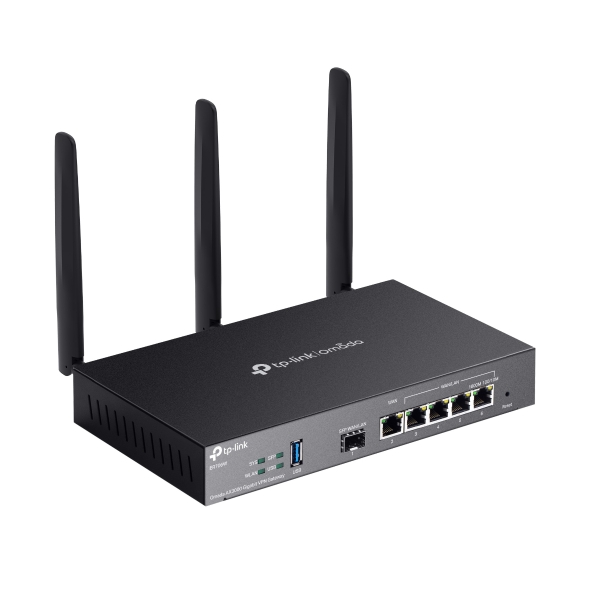
    Omada Gigabit AX3000 WiFi 6 VPN Gateway
    Omada Gigabit AX3000 WiFi 6 VPN Gateway
    Omada Gigabit AX3000 WiFi 6 VPN Gateway
    Omada Gigabit AX3000 WiFi 6 VPN Gateway
    Omada Gigabit AX3000 WiFi 6 VPN Gateway
    Omada Gigabit AX3000 WiFi 6 VPN Gateway
    Omada Gigabit AX3000 WiFi 6 VPN Gateway
    Omada Gigabit AX3000 WiFi 6 VPN Gateway
    Omada Gigabit AX3000 WiFi 6 VPN Gateway
    Omada Gigabit AX3000 WiFi 6 VPN Gateway
    Omada Gigabit AX3000 WiFi 6 VPN Gateway
    Omada Gigabit AX3000 WiFi 6 VPN Gateway
    Omada Gigabit AX3000 WiFi 6 VPN Gateway
    Omada Gigabit AX3000 WiFi 6 VPN Gateway
    Omada Gigabit AX3000 WiFi 6 VPN Gateway

    /5Download

    ER706W

    V1.20

    Omada Gigabit AX3000 WiFi 6 VPN Gateway

    • Centralized Cloud Management
    • Up to 3.0 Gbps WiFi 6
    • 6× Gigabit Ports (including 1× SFP)
    • Load Balancing on up to 5 WAN Ports
    • IPSec/PPTP/L2TP/GRE/WireGuard/ Open VPN/ SSL VPN
    • Centralized Cloud Management
    • Up to 3.0 Gbps WiFi 6
    • 6× Gigabit Ports (including 1× SFP)
    • Load Balancing on up to 5 WAN Ports
    • IPSec/PPTP/L2TP/GRE/WireGuard/ Open VPN/ SSL VPN
    • Documents
    • Videos
    • Downloads
    • Tools
    • Bulletins
    • Community

    Filter By TypeReset

    • checkbox

      Datasheet

    • checkbox

      Hardware Installation Guide

    • checkbox

      Knowledgebase

      checkbox
    • checkbox

      Release Note

    • checkbox

      Reference Guide

      checkbox
    • checkbox

      Others

    Filter By TagReset

    • Controller
    • Gateway
    • Vlan
    • ACL
    • Standalone
    • Mesh
    • CLI
    • VPN
    • App
    • Online
    • Reset
    • Authentication
    • Portal
    • Wireless
    • API

    How to configure IPsec VPN on Omada Gateway in Controller Mode (Controller v6.2 and above)

    IPsec Site-to-Site VPN enables the connection of geographically separated networks. Large enterprises commonly use it to establish secure VPN connections between branch offices and headquarters. The IPsec VPN connects branch routers over the public network, ensuring secure transmission of private network data.

    Configuration Guide
    04-29-2026
    6098

    How to configure IPsec VPN on Omada Gateway in Standalone Mode

    With the Site-to-Site VPN function, different private networks can be connected over the internet.

    Configuration Guide
    04-20-2026
    6634

    How to use an Omada gateway to restrict specific clients from visiting specific URLs

    Sometimes, we may need to restrict certain clients behind the gateway from accessing specific URLs. Omada gateways provide a feature called URL Filtering to help manage and control web access in such cases.

    Configuration Guide
    04-08-2026
    6878

    How to Configure SD-WAN via Omada Controller v6.2

    This article provides a comprehensive walkthrough for configuring the SD-WAN function on the Omada Controller, enabling enterprises to centralize network management, optimize traffic routing, and establish secure hub-spoke connectivity across distributed sites in one Controller. The guide covers prerequisites, gateway adoption, IP range allocation, and post-configuration verification to ensure reliable WAN performance.

    Configuration Guide
    04-02-2026
    8510

    How to Use Remote Access on Omada Controller

    With remote access feature, you can set up a reverse tunnel that lets you remotely reach local services inside your network—like the device’s web interface or SSH. This gives you a faster, more direct way to check, troubleshoot, and configure your devices whenever something goes wrong.

    Configuration Guide
    03-17-2026
    13103

    How to configure remote management on Omada Gateway

    Remote Management lets you manage the router remotely when you are not on the router's local network. It provides convenience for network management.

    Configuration Guide
    03-12-2026
    10397

    How to configure the Session Limit and Bandwidth Control to control traffic on Omada Gateways

    Omada gateways support Session Limit and Bandwidth Control to address this; the former prevents connection table exhaustion by constraining the maximum concurrent sessions per user, while the latter avoids bandwidth monopolization by limiting upstream and downstream rates. Together, they resolve issues such as uneven network resource allocation, degraded critical services, and unstable device performance, ensuring fairness, stability, and high-quality network service in multi-user environments. 

    Configuration Guide
    03-07-2026
    8744

    How to Use the Speed Test Feature on the Omada Controller v6.2 and above

    Starting from v6.2, Omada Network System introduces the Speed Test feature, offering both manual and scheduled modes to help us monitor network quality easily.

    Configuration Guide
    03-04-2026
    11869

    How to Set Up an OpenVPN Connection with Omada Gateways on Client Devices with Different Operating Systems

    Omada Gateway can act as an OpenVPN server that enables clients to access the intranet or the internet securely. We will guide you through configuring OpenVPN connections from Android, iOS, Windows, Linux, and macOS devices to an Omada Gateway.

    Configuration Guide
    02-14-2026
    13709

    How to configure WireGuard VPN Client to access peer server through IPsec Site-to-Site VPN using Omada Gateway

    This article explains how to enable the WireGuard VPN client to access a peer server via IPsec Site-to-Site VPN. It provides simple steps to help you configure your device for secure and seamless communication with the peer server.

    Configuration Guide
    01-06-2026
    23558
    • Total 95 items
    • 1
    • 2
    • 3
    • 4
    • 5
    • •••
    • 10
    • 10 / page

    No results found.

    Filter By TypeReset

    • checkbox

      Firmware

    • checkbox

      Software

      checkbox
    • checkbox

      MIBs Files

    • checkbox

      GPL Code

    • Total 18 items
    • 1
    • 2

    There are multiple versions of the ER706W

    Other Tools

    Omada App

    Omada App

    Filter By TypeReset

    • checkbox

      Security Vulnerability

    • checkbox

      EOL/EOM/EOS Notification

    • checkbox

      Others

    No results found.

    • Total 87 items
    • 1
    • 2
    • 3
    • 4
    • 5
    • •••
    • 9
    • 10 / page

    Suscribite para recibir las últimas novedadesTP-Link se toma en serio su privacidad. Para obtener más detalles sobre las prácticas de privacidad de TP-Link, consulte la Política de privacidad de TP-Link .

    Email Error

    Me gustaría estar al día con las noticias, actualizaciones de productos y promociones de TP-Link.

    Al completar este formulario, confirma que comprende y acepta nuestra Política de privacidad .

    reCaptcha not verified

    Nuestras redes

    • TP-Link Omada facebook
    • TP-Link Omada linkedin
    About
    • About Us
    • Corporate Information
    • Sustainability
    • Privacy Policy
    • Accessibility
    • Contact Us
    Press
    • News
    • Blog
    • Security Advisory
    Partners
    • Partner Program
    Learning Center
    • Technology Trends
    TP-Link Omada Omada Pro VIGI
    Uruguay / Español

    Copyright © 2026 TP-Link SRL Reservados todos los derechos.

    Este sitio utiliza cookies. Si continúa navegando por el sitio, acepta el uso que hacemos de las cookies. No volver a mostrar Más información .

    Your Privacy Choices

    Este sitio utiliza cookies. Si continúa navegando por el sitio, acepta el uso que hacemos de las cookies. No volver a mostrar Más información .

    Cookies basicas

    Esas cookies son necesarias para que el sitio web funcione y no se puede desactivar en sus sistemas.

    TP-Link

    SESSION, JSESSIONID, accepted_local_switcher, tp_privacy_banner, tp_privacy_base, tp_privacy_marketing, tp_top-banner, tp_popup-bottom, tp_popup-center, tp_popup-right-middle, tp_popup-right-bottom, tp_productCategoryType

    Youtube

    id, VISITOR_INFO1_LIVE, LOGIN_INFO, SIDCC, SAPISID, APISID, SSID, SID, YSC, __Secure-1PSID, __Secure-1PAPISID, __Secure-1PSIDCC, __Secure-3PSID, __Secure-3PAPISID, __Secure-3PSIDCC, 1P_JAR, AEC, NID, OTZ

    Zendesk

    OptanonConsent, __cf_bm, __cfruid, _cfuvid, _help_center_session, _pendo___sg__.<container-id>, _pendo_meta.<container-id>, _pendo_visitorId.<container-id>, _zendesk_authenticated, _zendesk_cookie, _zendesk_session, _zendesk_shared_session, ajs_anonymous_id, cf_clearance

    Cookies de análisis y marketing

    Las cookies de análisis nos permiten analizar sus actividades en nuestro sitio web para mejorar y adaptar la funcionalidad de nuestro sitio web.

    Nuestros socios publicitarios pueden configurar las cookies de marketing a través de nuestro sitio web para crear un perfil de sus intereses y mostrarle anuncios relevantes en otros sitios web.

    Google Analytics y Google Tag Manager

    _gid, _ga_<container-id>, _ga, _gat_gtag_<container-id>

    Google Ads y DoubleClick

    test_cookie, _gcl_au