Omada Pro Logo official website Vigi Logo official website
聯絡我們
  • 聯絡銷售人員
  • 尋求支援
登入
avatar

    Messages Messages Bookmarks Bookmarks My Cases My Cases Account Settings Account Settings
    Hong Kong, China / 繁體中文  |  English
    Omada logo
    • Products

      Products

      • Fusion Gateways
        • Fusion Max Series
          Fusion Max Series
        • Fusion Pro Series
          Fusion Pro Series
        • Fusion Series
          Fusion Series
        • View All
          View All
      • Wireless
        • WiFi 7
          WiFi 7
        • Ceiling Mount
          Ceiling Mount
        • Wall Plate
          Wall Plate
        • Desktop
          Desktop
        • Outdoor
          Outdoor
        • Wireless Bridge
          Wireless Bridge
        • GPON
          GPON
        • View All
          View All
      • Switches
        • View All
          View All
        • Campus <br><small style='opacity: 0.7;'>L3 Stackable</small>
          Campus
          L3 Stackable
        • Aggregation <br><small style='opacity: 0.7;'>L2+, Full Fiber</small>
          Aggregation
          L2+, Full Fiber
        • Access Max <br><small style='opacity: 0.7;'>L2+, Full 10G</small>
          Access Max
          L2+, Full 10G
        • Access Pro <br><small style='opacity: 0.7;'>L2+, 10G Uplink & 2.5G</small>
          Access Pro
          L2+, 10G Uplink & 2.5G
        • Access Plus <br><small style='opacity: 0.7;'>L2+, 10G Uplink & 1G</small>
          Access Plus
          L2+, 10G Uplink & 1G
        • Access <br><small style='opacity: 0.7;'>L2+, Gigabit</small>
          Access
          L2+, Gigabit
        • Agile <br><small style='opacity: 0.7;'>Easy-Managed</small>
          Agile
          Easy-Managed
        • Industrial
          Industrial
        • Unmanaged
          Unmanaged
      • Standard Gateways
        • Wired Gateways
          Wired Gateways
        • WiFi Gateways
          WiFi Gateways
        • 4G/5G WiFi Gateways
          4G/5G WiFi Gateways
        • Integrated Gateways
          Integrated Gateways
        • DSL Gateways
          DSL Gateways
        • View All
          View All
      • Controllers
        • Cloud-Based
          Cloud-Based
        • Hardware
          Hardware
        • Software
          Software
        • View All
          View All
      • Accessories
        • Power & PoE
          Power & PoE
        • Media Converters
          Media Converters
        • Modules & Cables
          Modules & Cables
        • Mounting & Brackets
          Mounting & Brackets
        • View All
          View All
      • Security Cameras
        • Cameras
          Cameras
        • Video Recorders
          Video Recorders
        • Security Camera Systems
          Security Camera Systems
        • Software Service
          Software Service

      Management Platforms

      • Management Systems
        • Fusion Gateways
          Fusion Gateways
        • Cloud-Based
          Cloud-Based
        • Hardware
          Hardware
        • Software
          Software
        • View All
          View All
      • Cloud Portal
    • Solutions
      Solutions Home

      By Scenarios

      • Small and Mid-Sized Offices
      • Small-Sized Chain Restaurants/Stores
      • WiFi for Farms/Ranches/Parking Lots
      • High-Density WiFi

      By Technology

      • WiFi 7
      • PPSK Solution
      • PtP & PtMP Wireless Bridges
      • Multi-Gigabit Solution
      • PoE Switches for Surveillance

      Case Studies

      Case Studies

      Omada Powers Shift4’s POS Solution over 20,000 Sites in the US

      瀏覽
    • Learn and Train

      Learn

      • FAQs
      • Setup Videos
      • Configuration Guides
      • Case Studies

      Train

      • Training Introduction
      • For Learners
      • For Instructors
    • Support
      Support Home

      Documents

      • Hardware Installation Guide
      • Knowledgebase
      • Datasheet
      • Reference Guide
      • View All

      Downloads

      • Software Download
      • Firmware Download
      • GPL Code
      • MIBs Files
      • View All

      Bulletins

      • Security Vulnerability
      • EOL/EOM/EOS Notification
      • View All

      Contact Support

      • Case Portal
      • Call Support
      • Warranty Services

      Tools

      • Omada Emulators
      • Omada App
      • Compatibility List
    • Community
    Search
    1. Home>
    2. Product Support>
    3. Omada Pro Software Controller>
    Omada Pro 軟體控制器
    Omada Pro 軟體控制器
    Omada Pro 軟體控制器

    /1Download

    Omada Pro Software Controller

    Omada Pro 軟體控制器

    How to Find the Hardware Version on Your TP-Link Device
    IMPORTANT:  Model and hardware version availability varies by region. Please refer to your TP-Link regional website to determine product availability.
    Vx.0 = Vx.6/Vx.8/Vx.9(eg:V1.0=V1.6/V1.8/V1.9)
    Vx.x0 = Vx.x6/Vx.x8/Vx.x9 (eg:V1.20=V1.26/V1.28/V1.29)
    Vx.30 = Vx.32/Vx.33 (eg:V3.30=V3.32/V3.33)
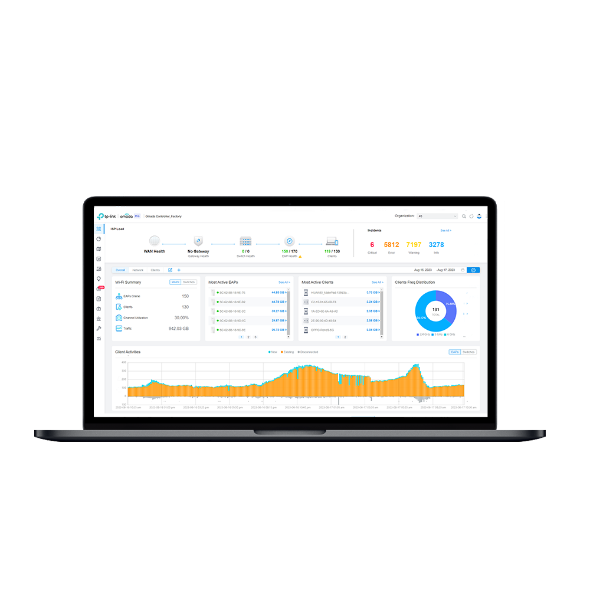
    • 集中管理 Omada Pro 基地台、交換器和路由器
    • 本地佈署
    • 雲端存取
    • 管理設備無上限
    • 自動化廣播頻率佈署
    • 智慧匿名偵測和分析
    • 集中管理 Omada Pro 基地台、交換器和路由器
    • 本地佈署
    • 雲端存取
    • 管理設備無上限
    • 自動化廣播頻率佈署
    • 智慧匿名偵測和分析
    • Documents
    • Videos
    • Downloads
    • Tools
    • Bulletins
    • Community

    Filter By TypeReset

    • checkbox

      產品型錄

    • checkbox

      硬體安裝手冊

    • checkbox

      資料庫

      checkbox
    • checkbox

      更新資訊

    • checkbox

      參考指南

      checkbox
    • checkbox

      其他

    Filter By TagReset

    • Controller
    • Gateway
    • Vlan
    • ACL
    • Standalone
    • Mesh
    • CLI
    • VPN
    • App
    • Online
    • Reset
    • Authentication
    • Portal
    • Wireless
    • API

    API and Code Samples for External Portal Server (Omada Controller v6.2.10 or Above)

    Explore Omada Controller API documentation and code samples for External Portal Server integration, including hotspot authentication, client authorization, portal redirects, and session management.

    FAQ
    08-22-2026
    14444

    How to Prepare for the End of ECSP v1 Support in Omada Controller

    Learn how to identify ECSP v1 devices, upgrade to ECSP v2-compatible firmware, and prepare Local or Cloud-Based Controllers for v6.4 and later.

    Configuration Guide
    09-04-2026
    6356

    What's New in Omada Network 6.3 Compared to 6.2

    This article outlines the key changes introduced in Omada Network 6.3 compared to 6.2. It is designed to help you quickly understand new features, enhancements, and structural updates in the latest version.

    Configuration Guide
    07-23-2026
    16655

    How to Upgrade from Omada Pro Controller to Omada Controller v6.3

    Starting with Omada Controller v6.3, the Omada Controller platform no longer distinguishes between Pro and standard versions. This document explains the differences before and after the upgrade, as well as how to upgrade from the Pro version to v6.3.

    Configuration Guide
    09-10-2026
    15762

    Support of Omada Pro Devices on Omada Controller V6.2

    Starting from Omada Controller V6.2, the Omada Pro devices can be adopted by Omada Controller, also supporting adopting both Omada and Omada Pro devices in the same site.

    Configuration Guide
    08-28-2026
    21922

    Get Started with Omada Pro Controller

    There are three types of Omada Controllers: Software, Hardware, and Cloud-Based. Though being different in form, they share a similar browser-based management interface for convenient management. Consequently, they have nearly the same initial setup steps, including building your network topology, deploying your Controller, and logging in to the Controller. This guide will walk you through the basic steps to help you get started quickly with Omada Pro Controller.

    Configuration Guide
    08-20-2026
    25478

    How to Find the IP Address of My Omada Devices

    By default, Omada devices use dynamic IP addresses. Whether connected to the internet or not, devices such as EAPs or switches should automatically obtain an IP address as long as they are connected to a local network or a DHCP server. There are different ways to find the IP address of an Omada device. Whether the device is in standalone mode or controller mode, you can also use the Omada APP or Discover Utility to find it.

    Configuration Guide
    10-07-2026
    85060

    Recommended Server Specifications for Omada Pro Software Controller

    This article introduces the recommended hardware specifications of the server for the Omada Pro Software Controller.

    FAQ
    08-20-2026
    32448

    How to Configure Abnormal on Omada Pro Controller

    This article primarily focuses on how to configure the Abnormal feature on the Omada Pro Controller to help users efficiently identify network issues, while offering a simple, intuitive, and reliable solution.

    Configuration Guide
    08-12-2026
    39956

    Omada Pro License Configuration Guide (for Local Controller)

    Configuration Guide
    08-31-2026
    39500
    • Total 11 items
    • 1
    • 2

    No results found.

    Filter By TypeReset

    • checkbox

      韌體

    • checkbox

      軟體

      checkbox
    • checkbox

      MIBs Files

    • checkbox

      GPL Code

    • checkbox

      符合性聲明

      checkbox

    Other Tools

    Filter By TypeReset

    • checkbox

      安全性漏洞

    • checkbox

      EOL/EOM/EOS 通知

    • checkbox

      其他

    No results found.

    No results found.

    訂閱TP-Link認真對待您的隱私。
    有關TP-Link隱私慣例的更多詳細訊息,請參閱TP-Link的隱私政策。

    Email Error

    I would like to be kept up to date with TP-Link news, product updates and promotions.

    填寫此表格即表示您確認您了解並同意我們的隱私權政策 。

    reCaptcha not verified

    關注我們

    • TP-Link Omada facebook
    • TP-Link Omada youtube
    • TP-Link Omada linkedin
    About
    • Corporate Profile
    • Contact Us
    • Privacy Policy
    Press
    • News
    • Blog
    • Security Advisory
    Partners
    • Partner Program
    Learning Center
    • Technology Trends
    TP-Link Omada Omada Pro VIGI
    Hong Kong, China / 繁體中文  |  English

    ©2026 TP-Link Hong Kong & Macau. and its affiliated companies. All rights reserved.

    本網站使用 cookie 來改善網站引導、分析線上活動並在我們的網站上提供最佳的使用者體驗。您可以隨時反對使用 cookie。您可以在我們的隱私權政策中找到更多資訊。 不再顯示

    Your Privacy Choices

    本網站使用 cookie 來改善網站引導、分析線上活動並在我們的網站上提供最佳的使用者體驗。您可以隨時反對使用 cookie。您可以在我們的隱私權政策中找到更多資訊。 不再顯示

    基本 Cookies

    These cookies are necessary for the website to function and cannot be deactivated in your systems.

    TP-Link

    SESSION, JSESSIONID, accepted_local_switcher, tp_privacy_banner, tp_privacy_base, tp_privacy_marketing, tp_top-banner, tp_popup-bottom, tp_popup-center, tp_popup-right-middle, tp_popup-right-bottom, tp_productCategoryType

    Youtube

    id, VISITOR_INFO1_LIVE, LOGIN_INFO, SIDCC, SAPISID, APISID, SSID, SID, YSC, __Secure-1PSID, __Secure-1PAPISID, __Secure-1PSIDCC, __Secure-3PSID, __Secure-3PAPISID, __Secure-3PSIDCC, 1P_JAR, AEC, NID, OTZ

    Zendesk

    OptanonConsent, __cf_bm, __cfruid, _cfuvid, _help_center_session, _pendo___sg__.<container-id>, _pendo_meta.<container-id>, _pendo_visitorId.<container-id>, _zendesk_authenticated, _zendesk_cookie, _zendesk_session, _zendesk_shared_session, ajs_anonymous_id, cf_clearance

    分析和行銷 Cookies

    Analysis cookies enable us to analyze your activities on our website in order to improve and adapt the functionality of our website.

    The marketing cookies can be set through our website by our advertising partners in order to create a profile of your interests and to show you relevant advertisements on other websites.

    Google Analytics & Google Tag Manager

    _gid, _ga_<container-id>, _ga, _gat_gtag_<container-id>

    Google Ads & DoubleClick

    test_cookie, _gcl_au