Omada Pro Logo official website Vigi Logo official website
Contact Us
  • Contact Support
Log In
avatar

    Messages Messages Bookmarks Bookmarks Account Settings Account Settings
    Central America & Caribbean / Español
    Omada logo
    • Products

      Products

      • Wireless
        • WiFi 7
          WiFi 7
        • Ceiling Mount
          Ceiling Mount
        • Wall Plate
          Wall Plate
        • Outdoor
          Outdoor
        • View All
          View All
      • Switches
        • Unmanaged
          Unmanaged
        • View All
          View All
      • Gateways
        • Wired Gateways
          Wired Gateways
        • WiFi Gateways
          WiFi Gateways
        • Integrated Gateways
          Integrated Gateways
        • View All
          View All
      • Controllers
        • Cloud-Based
          Cloud-Based
        • Hardware
          Hardware
        • Software
          Software
        • View All
          View All
      • Accessories
        • Media Converters
          Media Converters
        • Modules/Cables
          Modules/Cables
        • PoE Adapters
          PoE Adapters
        • Rackmount Accessories
          Rackmount Accessories
        • View All
          View All

      Management Platforms

      • Management Systems
        • Cloud-Based
          Cloud-Based
        • Hardware
          Hardware
        • Software
          Software
        • View All
          View All
      • Cloud Portal
    • Solutions
      Solutions Home

      By Scenarios

      • Small and Mid-Sized Offices
      • Small-Sized Chain Restaurants/Stores
      • WiFi for Farms/Ranches/Parking Lots
      • High-Density WiFi

      By Technology

      • WiFi 7
      • PPSK Solution
      • PtP & PtMP Wireless Bridges
      • Multi-Gigabit Solution
      • PoE Switches for Surveillance

      Case Studies

      Case Studies

      Omada Powers Shift4’s POS Solution over 20,000 Sites in the US

      Navegar
    • Learn and Train

      Learn

      • FAQs
      • Setup Videos
      • Configuration Guides
      • Case Studies

      Train

      • Training Introduction
      • For Learners
      • For Instructors
    • Support
      Support Home

      Documents

      • Hardware Installation Guide
      • Knowledgebase
      • Datasheet
      • Reference Guide
      • View All

      Downloads

      • Software Download
      • Firmware Download
      • GPL Code
      • MIBs Files
      • View All

      Bulletins

      • Security Vulnerability
      • EOL/EOM/EOS Notification
      • View All

      Contact Support

      • Email Support
      • Call Support
      • Warranty Services

      Tools

      • Omada Emulators
      • Omada App
      • Compatibility List
    • Community
    Search
    1. Home>
    2. Product Support>
    3. OC200>
    Controlador Cloud Omada
    Controlador Cloud Omada
    Controlador Cloud Omada
    Controlador Cloud Omada
    Controlador Cloud Omada
    Controlador Cloud Omada
    Controlador Cloud Omada
    Controlador Cloud Omada
    Controlador Cloud Omada
    Controlador Cloud Omada
    Controlador Cloud Omada
    Controlador Cloud Omada
    Controlador Cloud Omada
    Controlador Cloud Omada
    Controlador Cloud Omada
    Controlador Cloud Omada
    Controlador Cloud Omada
    Controlador Cloud Omada

    /6Download

    OC200

    V1

    Controlador Cloud Omada

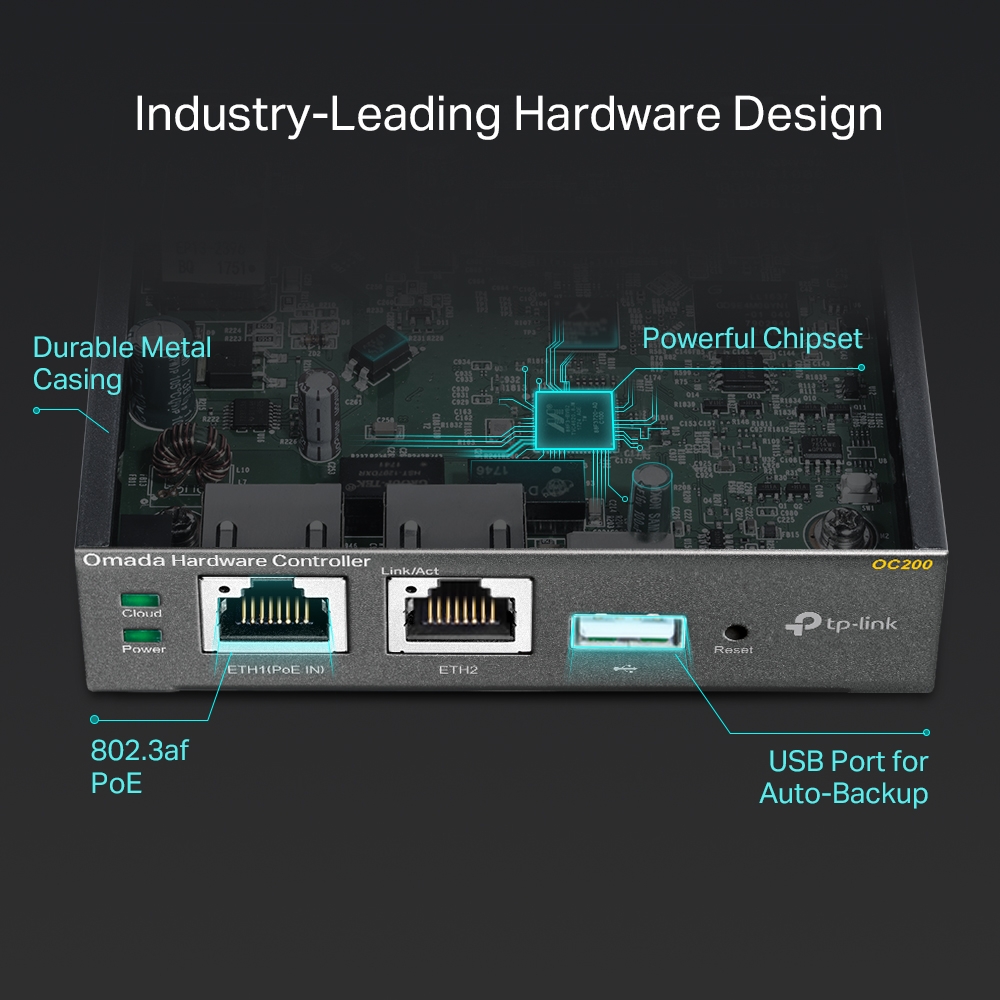
    • 2× 10/100Mbps Ethernet Port
    • 1× USB 2.0 Port, 1× Micro USB Port
    • 802.3af PoE or Micro-USB Power Adapter
    • Centralized Management for Omada EAPs
    • 2× 10/100Mbps Ethernet Port
    • 1× USB 2.0 Port, 1× Micro USB Port
    • 802.3af PoE or Micro-USB Power Adapter
    • Centralized Management for Omada EAPs
    • Documents
    • Videos
    • Downloads
    • Tools
    • Bulletins
    • Community

    Filter By TypeReset

    • checkbox

      Ficha Técnica

    • checkbox

      Guía de Instalación de Hardware

    • checkbox

      Centro de Recursos

      checkbox
    • checkbox

      Comunicados

    • checkbox

      Guía de Referencia

      checkbox
    • checkbox

      Otros

    Filter By TagReset

    • Controller
    • Gateway
    • Vlan
    • ACL
    • Standalone
    • Mesh
    • CLI
    • VPN
    • App
    • Online
    • Reset
    • Authentication
    • Portal
    • Wireless
    • API

    How to change the MAC format display in the controller

    This guide provides instructions for changing the MAC format display in the controller.

    Configuration Guide
    01-09-2026
    1879

    How to add/change an Omada Gateway to an existing Omada network?

    This article is a step-by-step guide for replacing a non-Omada or existing Omada gateway with a new Omada gateway.

    Configuration Guide
    12-18-2025
    4873

    How to configure Multicast/Broadcast Rate Limit

    Introduces how to configure Multicast/Broadcast Rate Limit.

    Configuration Guide
    12-10-2025
    5698

    How to Monitor and Manage Clients in Controller Mode using the Omada App

    The Omada App allows you to easily view and manage all clients connected to your Omada network. Through features such as the client list display, status filtering, condition sorting, search, and status description, you can quickly see client details such as connection type, signal strength, and data usage. You can also organize clients by network type or condition, locate specific users or devices, and monitor their real-time connection status.

    FAQ
    12-04-2025
    4775

    How to Monitor and Manage devices in Controller Mode using the Omada App

    The Omada App allows you to easily monitor and manage all devices connected to your Omada Controller . Through features such as the device list display, category filtering, condition sorting, search, and status description, you can quickly view device information, organize equipment by type or condition, locate specific devices, and understand their real-time status. These tools make it simple to maintain visibility and control over your entire Omada network anytime, anywhere.

    FAQ
    12-04-2025
    4231

    Brief introduction about VLAN topology in Omada Network v6

    This FAQ introduces some tips and highlights about VLAN topology in Omada Network v6.

    FAQ
    11-22-2025
    6081

    How to configure WireGuard VPN in Controller mode using Omada APP

    This article demonstrates how to configure a WireGuard VPN between Site HQ and Site STA, where each site is equipped with its own Omada Gateway. By following the configuration steps in Controller mode using the Omada App, administrators can quickly establish a secure and reliable VPN tunnel to connect distributed networks.

    Configuration Guide
    10-31-2025
    8399

    How to Configure Bluetooth feature on Omada Controller

    This article details the principle and advantages of Bluetooth IoT technology and provides specific configuration guidelines and application strategies for Bluetooth IoT.

    Configuration Guide
    10-30-2025
    6464

    How to configure VLAN with Omada Network v6

    We are aware that significant changes regarding LAN settings have been made from Omada Controller v5 to Omada Network v6. This article introduces how to configure the VLAN feature with newest Omada Network v6 to help you establish a better understanding of the workflow of how to configure VLAN with Omada Network v6.

    Configuration Guide
    10-27-2025
    24912

    How to assign a static IP address to the EAP using Omada APP

    Learn how to configure a static IP address for your EAP (Omada Access Point) using the Omada APP.

    FAQ
    10-10-2025
    8137
    • Total 102 items
    • 1
    • 2
    • 3
    • 4
    • 5
    • •••
    • 11
    • 10 / page

    No results found.

    Filter By TypeReset

    • checkbox

      Firmware

    • checkbox

      Software

      checkbox
    • checkbox

      Archivos MIBs

    • checkbox

      Códigos GPL

    Other Tools

    Omada App

    Omada App

    Filter By TypeReset

    • checkbox

      Seguridad

    • checkbox

      Notificaciones

    • checkbox

      Otros

    • Total 665 items
    • 1
    • 2
    • 3
    • 4
    • 5
    • •••
    • 67
    • 10 / page

    SuscripciónTP-Link toma en serio su privacidad. Para obtener más detalles sobre las prácticas de privacidad de TP-Link, consulte Política de privacidad de TP-Link .

    Email Error

    Me gustaría estar al día con las noticias de TP-Link, actualizaciones de productos y promociones.

    Al completar este formulario, confirma que comprende y acepta nuestra Política de privacidad .

    reCaptcha not verified

    Síguenos

    • TP-Link Omada facebook
    • TP-Link Omada instagram
    About
    • Perfil Coorporativo
    • Sostenibilidad
    • Contact Us
    • Privacy Policy
    Press
    • News
    • Blog
    • Security Advisory
    Partners
    • Partner Program
    Learning Center
    • Technology Trends
    TP-Link Omada Omada Pro VIGI
    Central America & Caribbean / Español

    Copyright © 2026 TP-LINK PANAMA, S.A. All rights reserved.

    Este sitio web utiliza cookies para mejorar la navegación por el sitio web, analizar las actividades en línea y ofrecer la mejor experiencia de usuario posible en nuestro sitio web. Puedes oponerte al uso de cookies en cualquier momento. Encontrarás más información en nuestra política de privacidad .

    Your Privacy Choices

    Este sitio web utiliza cookies para mejorar la navegación por el sitio web, analizar las actividades en línea y ofrecer la mejor experiencia de usuario posible en nuestro sitio web. Puedes oponerte al uso de cookies en cualquier momento. Encontrarás más información en nuestra política de privacidad .

    Cookies Básicas

    Estas cookies son necesarias para el funcionamiento del sitio web y no pueden desactivarse en tu sistema.

    TP-Link

    SESSION, JSESSIONID, accepted_local_switcher, tp_privacy_banner, tp_privacy_base, tp_privacy_marketing, tp_top-banner, tp_popup-bottom, tp_popup-center, tp_popup-right-middle, tp_popup-right-bottom, tp_productCategoryType

    Youtube

    id, VISITOR_INFO1_LIVE, LOGIN_INFO, SIDCC, SAPISID, APISID, SSID, SID, YSC, __Secure-1PSID, __Secure-1PAPISID, __Secure-1PSIDCC, __Secure-3PSID, __Secure-3PAPISID, __Secure-3PSIDCC, 1P_JAR, AEC, NID, OTZ

    Zendesk

    OptanonConsent, __cf_bm, __cfruid, _cfuvid, _help_center_session, _pendo___sg__.<container-id>, _pendo_meta.<container-id>, _pendo_visitorId.<container-id>, _zendesk_authenticated, _zendesk_cookie, _zendesk_session, _zendesk_shared_session, ajs_anonymous_id, cf_clearance

    Cookies de Análisis y de Marketing

    Las cookies de análisis nos permiten analizar tus actividades en nuestro sitio web con el fin de mejorar y adaptar la funcionalidad del mismo.

    Las cookies de marketing pueden ser instaladas a través de nuestro sitio web por nuestros socios publicitarios con el fin de crear un perfil de tus intereses y mostrarte anuncios relevantes en otros sitios web.

    Google Analytics & Google Tag Manager

    _gid, _ga_<container-id>, _ga, _gat_gtag_<container-id>

    Google Ads & DoubleClick

    test_cookie, _gcl_au