


How to View SDM Template Resource Usage on Omada Managed Switches in Controller Mode


Contents
SDM template support and resource allocation
Static SDM templates in earlier versions
View SDM resource usage and available capacity
Introduction
Managed switches use specialized high-speed memory called Ternary Content Addressable Memory (TCAM) to look up forwarding and policy entries efficiently. TCAM provides hardware resources for functions such as traffic forwarding, access control, and QoS.
These hardware resources have a fixed capacity and are shared by multiple functions. Different network deployments place different demands on them. For example, IPv4 and IPv6 ACL rules consume different amounts of TCAM, so the resources allocated to each affect the number of rules the switch can support.
An SDM (Switching Database Management) template determines how the available TCAM resources are allocated among supported features. By assigning resources to the features a network needs, an SDM template helps make effective use of the switch’s hardware capacity.
For example, an IPv4-only network does not need resources reserved for IPv6 ACLs. A template that allocates those resources to IPv4 ACLs can increase the number of IPv4 rules the switch supports. Conversely, a network that requires more IPv6 access control rules can use a template that prioritizes IPv6 ACL resources.
Static SDM templates use predefined resource allocations and require administrators to select a template that suits their network. Dynamic SDM templates allow supported features to share resources as needed, reducing the need for manual allocation and improving resource utilization.
Requirements
-
Omada Network 6.4 or later
- Omada Managed Switches (Agile and Industrial Switches excluded)
SDM template support and resource allocation
Omada Network has introduced SDM template management and dynamic resource sharing in stages. The behavior depends on the switch series and the Omada Network version, as described below.
Static SDM templates in earlier versions
Starting with Omada Network 6.2, administrators can change the SDM template and view TCAM resource allocation for Omada Managed switches (Agile and Industrial Switches excluded). Before dynamic template support was introduced, these series typically used four static templates: omada, omada-enterpriseV4, omada-enterpriseV6, and omada-enterpriseMix.
These templates allocate resources among four feature categories: ACL&QoS (IPv4), ACL&QoS (IPv6), IP Source Guard, and IPv6 Source Guard. Switch ACL and QoS rules consume entries from the corresponding IPv4 or IPv6 allocation. IP Source Guard and IPv6 Source Guard are configured through the CLI Template rather than the Omada Network graphical interface.
- omada: The default template reserves resources for both IPv4 and IPv6 ACL and QoS rules.
- omada-enterpriseV4: Use this template when more IPv4 ACL resources are needed and IPv6 ACLs are not required.
- omada-enterpriseV6: Use this template when more IPv6 ACL resources are needed, and IPv4 ACLs are not required.
- omada-enterpriseMix: Among the four static templates, this is the only option that provides resources for IP Source Guard and IPv6 Source Guard.
Dynamic SDM templates
Starting with Omada Network 6.2.10, Omada S7500, S6500, SX6, and SG6 series switches use dynamic SDM templates. These templates support dynamic resource sharing, so administrators no longer need to select a static template to balance resource allocations among features.
Starting with Omada Network 6.4, dynamic SDM template support is also available for Omada S5500, S4500, SG5, SX3, SG3, and SG2 series switches. These series can likewise share resources dynamically, replacing the static template selection described above.
View SDM resource usage and available capacity
In Omada Network, the SDM Template section displays the active template, overall resource usage, and the entries used by each feature. The Available Resources view shows how many additional entries the remaining resources can support.
The following part will take a switch stack consisting of one SG6654X and one SG6248XHP managed by the Omada Network as an example to demonstrate how to view and configure the SDM Template on these switches.
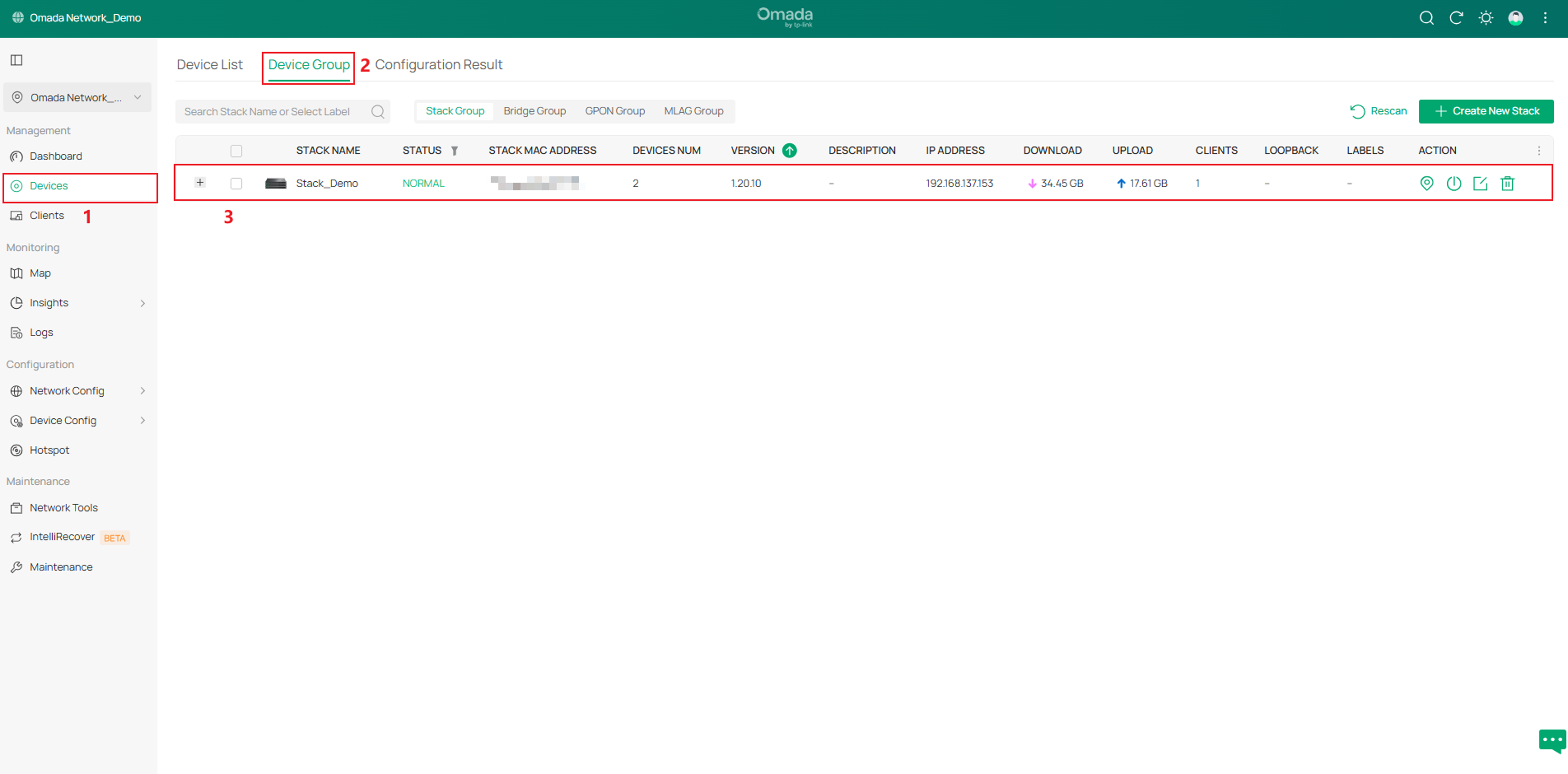
Step 1. Go to Devices > Device Group, and click on the target switch stack.
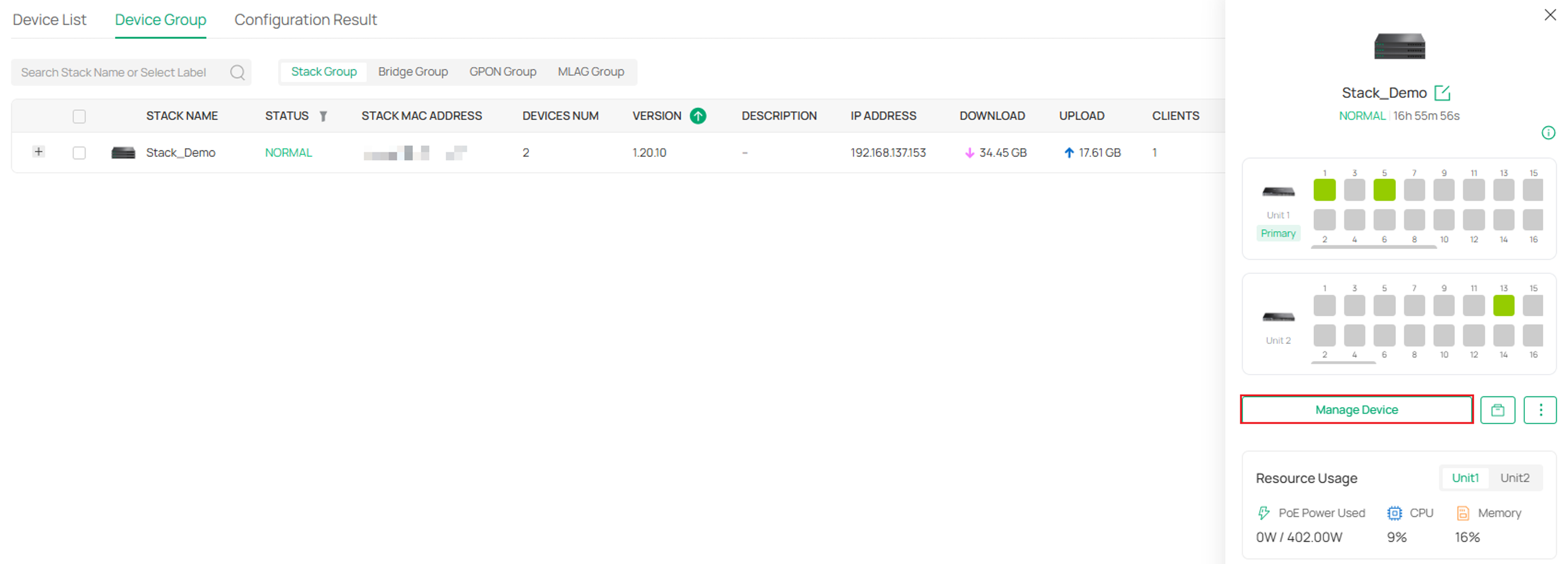
Step 2. Click “Manage Device” in the pop-up window.
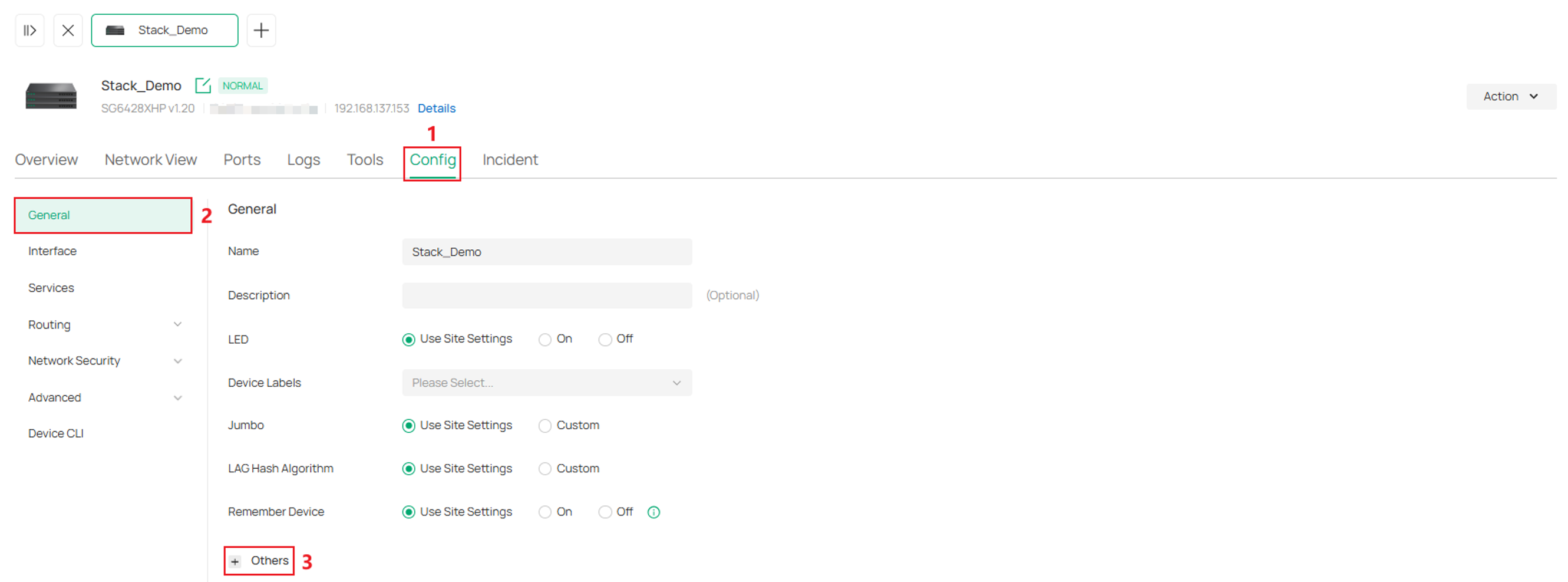
Step 3. Go to Config > General > Others.
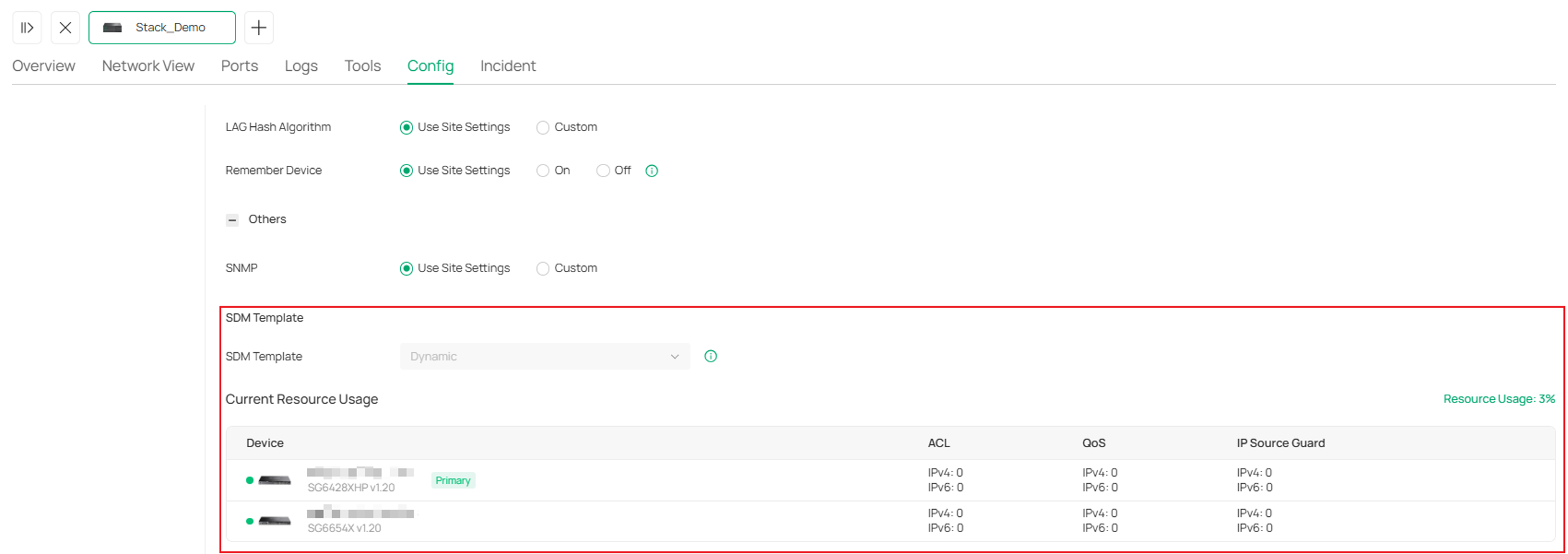
In the SDM Template view, you can see that the Dynamic Template is currently applied and track how many entries you've used versus the limit for each feature.
Note:
1. The overall Resource Usage of a stack is calculated as the total hardware resource usage of all member switches divided by their total available hardware resources.
2. If a member of the stack is disconnected, the Resource Usage will be shown as 'Unknown', and the resource usage for each feature of this device will be displayed as '–'.
3. Even if you have not configured any ACL, QoS, or IP Source Guard rules, Resource Usage will not show as 0% because the Packet Control and CPP Ingress modules consume a few resources by default.
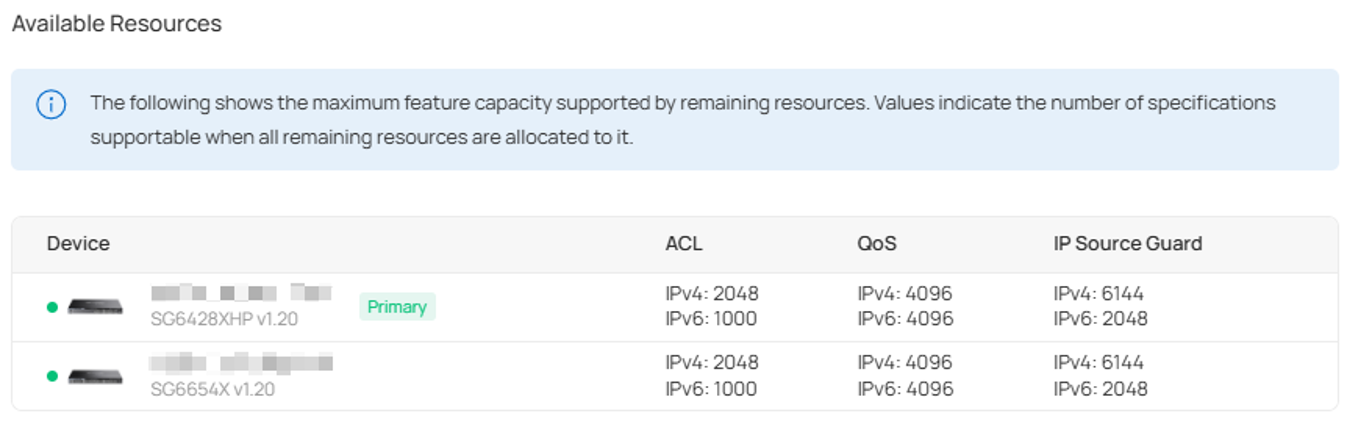
Step 4. Click Resource Usage: X% to go to the Available Resources view.

And you will see the maximum feature allowances of the omada dynamic template.
Conclusion
SDM templates determine how Omada switches allocate their shared hardware resources. Earlier static templates require a choice based on the features a network needs, while dynamic templates allow resources to be shared without manual template selection. In Omada Network, checking resource usage and available capacity helps you assess whether a switch can support additional ACL, QoS, or IP Source Guard entries.
To learn more about each function and configuration, please visit Support Home to download or check the manual for your product.
