Omada Pro Logo official website Vigi Logo official website
Contáctanos
  • Contacto para soporte
Iniciar sesión
avatar

    Messages Messages Bookmarks Bookmarks Account Settings Account Settings
    Ecuador / Español
    Omada logo
    • Productos

      Products

      • Wireless
        • Ceiling Mount
          Ceiling Mount
        • Wall Plate
          Wall Plate
        • Outdoor
          Outdoor
        • View All
          View All
      • Switches
        • Access
          Access
        • View All
          View All
      • Gateways
        • Wired Gateways
          Wired Gateways
        • WiFi Gateways
          WiFi Gateways
        • Integrated Gateways
          Integrated Gateways
        • View All
          View All
      • Controllers
        • Cloud-Based
          Cloud-Based
        • Hardware
          Hardware
        • Software
          Software
        • View All
          View All
      • Accessories
        • Power & PoE
          Power & PoE
        • Media Converters
          Media Converters
        • Modules & Cables
          Modules & Cables
        • Mounting & Brackets
          Mounting & Brackets
        • View All
          View All

      Management Platforms

      • Management Systems
        • Cloud-Based
          Cloud-Based
        • Hardware
          Hardware
        • Software
          Software
        • View All
          View All
      • Cloud Portal
    • Soluciones
      Solutions Home

      By Scenarios

      • Small and Mid-Sized Offices
      • Small-Sized Chain Restaurants/Stores
      • WiFi for Farms/Ranches/Parking Lots
      • High-Density WiFi

      By Technology

      • WiFi 7
      • PPSK Solution
      • PtP & PtMP Wireless Bridges
      • Multi-Gigabit Solution
      • PoE Switches for Surveillance

      Case Studies

      Case Studies

      Omada Powers Shift4’s POS Solution over 20,000 Sites in the US

      Navegar
    • Aprender y Capacitarse

      Learn

      • FAQs
      • Setup Videos
      • Configuration Guides
      • Case Studies

      Train

      • Training Introduction
      • For Learners
      • For Instructors
    • Soporte
      Support Home

      Documents

      • Hardware Installation Guide
      • Knowledgebase
      • Datasheet
      • Reference Guide
      • View All

      Downloads

      • Software Download
      • Firmware Download
      • GPL Code
      • MIBs Files
      • View All

      Bulletins

      • Security Vulnerability
      • EOL/EOM/EOS Notification
      • View All

      Contact Support

      • Email Support
      • Call Support
      • Warranty Services

      Tools

      • Omada Emulators
      • Omada App
      • Compatibility List
    • Comunidad
    Buscar
    1. Home>
    2. Product Support>
    3. Omada Cloud-Based Controller>
    Omada Cloud-Based Controller
    Omada Cloud-Based Controller
    Omada Cloud-Based Controller
    Omada Cloud-Based Controller
    Omada Cloud-Based Controller
    Omada Cloud-Based Controller
    Omada Cloud-Based Controller
    Omada Cloud-Based Controller
    Omada Cloud-Based Controller
    Omada Cloud-Based Controller
    Omada Cloud-Based Controller
    Omada Cloud-Based Controller
    Omada Cloud-Based Controller
    Omada Cloud-Based Controller
    Omada Cloud-Based Controller

    /5Download

    Omada Cloud-Based Controller

    Omada Cloud-Based Controller

    How to Find the Hardware Version on Your TP-Link Device
    IMPORTANT:  Model and hardware version availability varies by region. Please refer to your TP-Link regional website to determine product availability.
    Vx.0 = Vx.6/Vx.8/Vx.9(eg:V1.0=V1.6/V1.8/V1.9)
    Vx.x0 = Vx.x6/Vx.x8/Vx.x9 (eg:V1.20=V1.26/V1.28/V1.29)
    Vx.30 = Vx.32/Vx.33 (eg:V3.30=V3.32/V3.33)
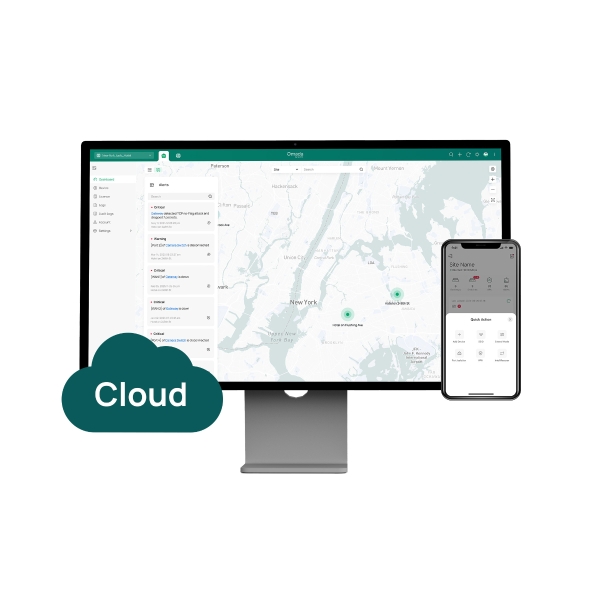
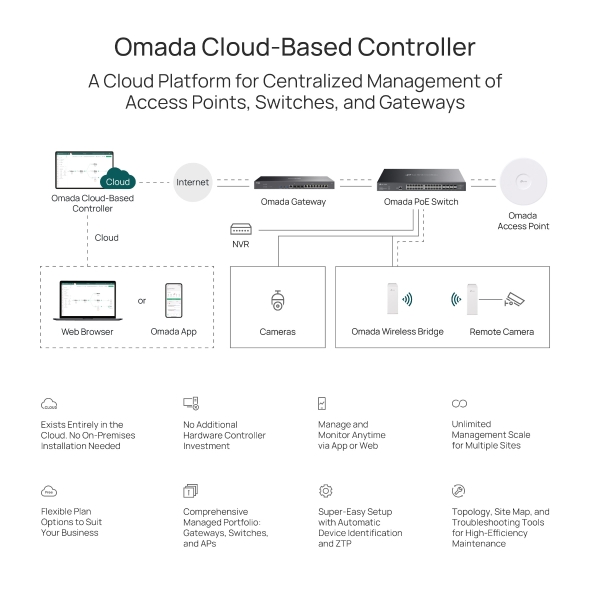
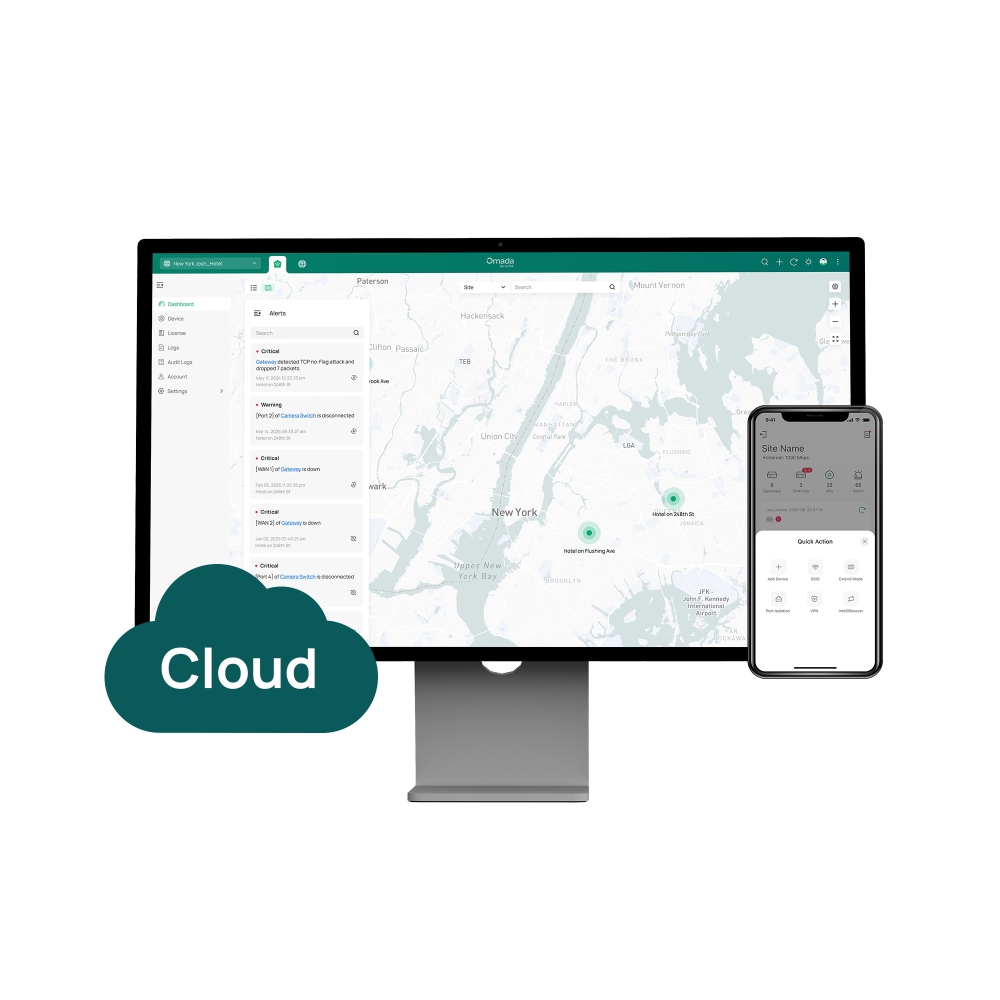
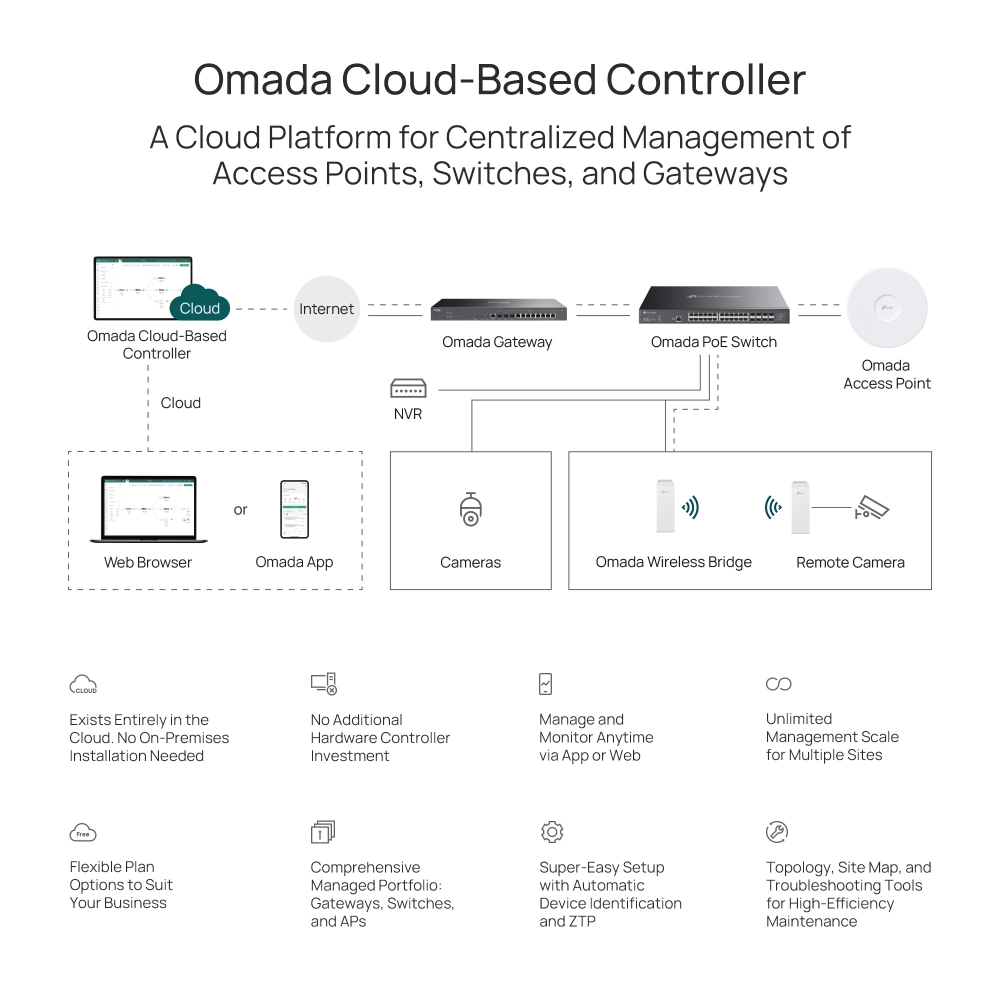
    • Administración centralizada de la nube
    • Completamente en la nube
    • Aprovisionamiento Zero-Touch (sin intervención)
    • Sin inversión de controlador de hardware adicional
    • Sin instalación local
    • Administración centralizada de la nube
    • Completamente en la nube
    • Aprovisionamiento Zero-Touch (sin intervención)
    • Sin inversión de controlador de hardware adicional
    • Sin instalación local
    • Documents
    • Videos
    • Downloads
    • Tools
    • Bulletins
    • Comunidad

    Filter By TypeReset

    • checkbox

      Datasheet

    • checkbox

      Guía de Instalación del Hardware

    • checkbox

      Base de conocimientos

      checkbox
    • checkbox

      Nota de difusión

    • checkbox

      Guía de referencia

      checkbox
    • checkbox

      Otros

    Filter By TagReset

    • Controller
    • Gateway
    • Vlan
    • ACL
    • Standalone
    • Mesh
    • CLI
    • VPN
    • App
    • Online
    • Reset
    • Authentication
    • Portal
    • Wireless
    • API

    How to Configure Root Node Feature on an Omada Controller

    Configure the Root Node in Omada Controller to correct topology relationships on sites without an Omada gateway and identify device uplinks more accurately.

    Configuration Guide
    09-24-2026
    7266

    How to Configure Intelligent Incident Detection on Omada Controller (v6.3 or Above)

    Configure Intelligent Incident Detection on Omada Controller v6.3 and above to monitor network anomalies, analyze root causes, receive notifications, and troubleshoot issues.

    Configuration Guide
    08-14-2026
    13157

    How to Prepare for the End of ECSP v1 Support in Omada Controller

    Learn how to identify ECSP v1 devices, upgrade to ECSP v2-compatible firmware, and prepare Local or Cloud-Based Controllers for v6.4 and later.

    Configuration Guide
    09-04-2026
    6220

    How to Configure Site Template Feature on Omada Controller

    The Site Template feature, available in the Controller’s Global View, is designed to simplify the configuration and management of multiple sites. It allows administrators to create reusable templates containing common site settings, such as Internet, LAN, WLAN, ACL, URL Filtering, Portal, and MAC Authentication configurations, and apply them to multiple sites in bulk.

    Configuration Guide
    07-15-2026
    61550

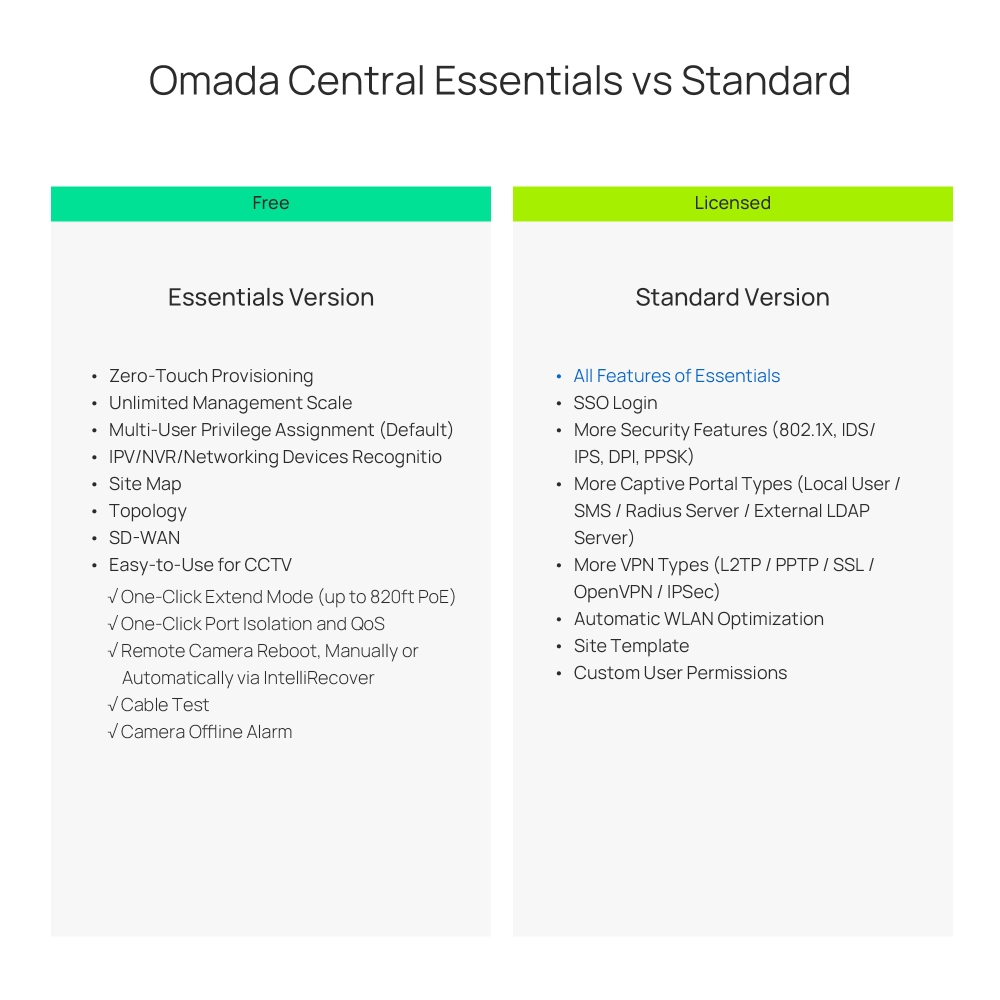
    Omada Pro License Conversion to Standard License Overview

    As Omada Controller continues to improve its capabilities, starting with version 6.3, Omada Controller will undergo unified optimization. Under the new versioning strategy, Omada Controller will no longer differentiate between Pro and Standard versions, providing a consistent product experience.

    Configuration Guide
    07-23-2026
    14362

    How to Configure and Use the “Replace with Spare” Feature on Omada Controller v6.3 and Above

    How to easily replace a device managed by Omada Controller? The Spare feature introduced in Omada Controller v6.3 provides a fast and reliable replacement mechanism. Follow this article to explore.

    Configuration Guide
    07-01-2026
    14731

    Omada Switch OUI-Based VLAN Configuration Guide

    Configure OUI-Based VLAN on supported Omada switches to automate device identification, VLAN assignment, port membership, and traffic prioritization through Controller or CLI.

    Configuration Guide
    08-06-2026
    41648

    WLAN Optimization (AI-RRM) White Paper

    Technical White Paper
    07-10-2026
    8776

    How to Use an Omada Controller to Manage Omada Devices Across Different Subnets Over the Internet

    In enterprise networks, devices are often deployed across different subnets, making it common for Omada devices and the Omada Controller to reside in separate network segments. Supporting device adoption and management across subnets enables centralized control without changing existing network designs. This article introduces different methods for adopting devices across subnets using Omada products.

    Configuration Guide
    06-23-2026
    62932

    How to Configure Spanning Tree on Omada Controller

    Spanning Tree Protocol (STP) is a Layer 2 Protocol that prevents loops in the network.

    Configuration Guide
    07-30-2026
    51626
    • Total 82 items
    • 1
    • 2
    • 3
    • 4
    • 5
    • •••
    • 9
    • 10 / page

    No results found.

    Filter By TypeReset

    • checkbox

      Firmware

    • checkbox

      Software

      checkbox
    • checkbox

      Archivos MIB

    • checkbox

      Código GPL

    No results found.

    Other Tools

    Filter By TypeReset

    • checkbox

      Vulnerabilidad de la seguridad

    • checkbox

      Notificación EOL/EOM/EOS

    • checkbox

      Otros

    • Total 63 items
    • 1
    • 2
    • 3
    • 4
    • 5
    • 6
    • 7
    • 10 / page

    SuscripciónTP-Link toma en serio su privacidad. Para obtener más detalles sobre las prácticas de privacidad de TP-Link, consulte la Política de privacidad de TP-Link.

    Email Error

    Me gustaría estar al tanto de las novedades, actualizaciones de productos y promociones de TP-Link.

    Al completar este formulario, confirma que comprende y acepta nuestra Política de Privacidad .

    reCaptcha not verified

    Síguenos

    • TP-Link Omada facebook
    • TP-Link Omada youtube
    Acerca de Nosotros
    • Perfil Corporativo
    • Contáctanos
    • Política de Privacidad
    Prensa
    • Noticias
    • Blog
    • Aviso de Seguridad
    Partners
    • Partner Program
    Centro de Capacitación
    • Tendencias Tecnológicas
    TP-Link Omada Omada Pro VIGI
    Ecuador / Español

    ©2026 TPLINK Colombia LTDA and its affiliated companies. All rights reserved.

    Este sitio web utiliza cookies para mejorar la navegación en el sitio web, analizar las actividades en línea y tener la mejor experiencia de usuario posible en nuestro sitio web. Puedes oponerte al uso de cookies en cualquier momento. Puede encontrar más información en nuestra política de privacidad . No volver a mostrar

    Your Privacy Choices

    Este sitio web utiliza cookies para mejorar la navegación en el sitio web, analizar las actividades en línea y tener la mejor experiencia de usuario posible en nuestro sitio web. Puedes oponerte al uso de cookies en cualquier momento. Puede encontrar más información en nuestra política de privacidad . No volver a mostrar

    Basic Cookies

    These cookies are necessary for the website to function and cannot be deactivated in your systems.

    TP-Link

    SESSION, JSESSIONID, accepted_local_switcher, tp_privacy_banner, tp_privacy_base, tp_privacy_marketing, tp_top-banner, tp_popup-bottom, tp_popup-center, tp_popup-right-middle, tp_popup-right-bottom, tp_productCategoryType

    Youtube

    id, VISITOR_INFO1_LIVE, LOGIN_INFO, SIDCC, SAPISID, APISID, SSID, SID, YSC, __Secure-1PSID, __Secure-1PAPISID, __Secure-1PSIDCC, __Secure-3PSID, __Secure-3PAPISID, __Secure-3PSIDCC, 1P_JAR, AEC, NID, OTZ

    Zendesk

    OptanonConsent, __cf_bm, __cfruid, _cfuvid, _help_center_session, _pendo___sg__.<container-id>, _pendo_meta.<container-id>, _pendo_visitorId.<container-id>, _zendesk_authenticated, _zendesk_cookie, _zendesk_session, _zendesk_shared_session, ajs_anonymous_id, cf_clearance

    Analysis and Marketing Cookies

    Analysis cookies enable us to analyze your activities on our website in order to improve and adapt the functionality of our website.

    The marketing cookies can be set through our website by our advertising partners in order to create a profile of your interests and to show you relevant advertisements on other websites.

    Google Analytics & Google Tag Manager

    _gid, _ga_<container-id>, _ga, _gat_gtag_<container-id>

    Google Ads & DoubleClick

    test_cookie, _gcl_au