Vigi Logo official website
Επικοινωνήστε μαζί μας
  • Τεχνική Υποστήριξη
  • Προμηθευτείτε ένα Δείγμα
Είσοδος
avatar

    Μηνύματα Μηνύματα Σελιδοδείκτες Σελιδοδείκτες Ρυθμίσεις λογαριασμού Ρυθμίσεις λογαριασμού
    Greece / Ελληνικά
    Omada logo
    • Προϊόντα

      Προϊόντα

      • Wireless
        • WiFi 7
          WiFi 7
        • Οροφής
          Οροφής
        • Επιτοίχια
          Επιτοίχια
        • Επιτραπέζια
          Επιτραπέζια
        • Εξωτερικού Χώρου
          Εξωτερικού Χώρου
        • Ζεύξη Εξωτερικού Χώρου
          Ζεύξη Εξωτερικού Χώρου
        • GPON
          GPON
        • Προβολή όλων
          Προβολή όλων
      • Switches
        • Campus
          Campus
        • Aggregation
          Aggregation
        • Access Max
          Access Max
        • Access Pro
          Access Pro
        • Access Plus
          Access Plus
        • Access
          Access
        • Agile
          Agile
        • Industrial
          Industrial
        • View All
          View All
      • Gateways
        • Ενσύρματοι Δρομολογητές
          Ενσύρματοι Δρομολογητές
        • Δρομολογητές WiFi
          Δρομολογητές WiFi
        • Δρομολογητές 4G WiFi
          Δρομολογητές 4G WiFi
        • Integrated Δρομολογητές
          Integrated Δρομολογητές
        • View All
          View All
      • Controllers
        • Cloud-Based
          Cloud-Based
        • Hardware
          Hardware
        • Software
          Software
        • View All
          View All
      • Accessories
        • Media Converters
          Media Converters
        • Modules/Cables
          Modules/Cables
        • PoE Adapters
          PoE Adapters
        • Rackmount Accessories
          Rackmount Accessories
        • AP Accessories
          AP Accessories
        • View All
          View All

      Management Platforms

      • Management Systems
        • Cloud-Based
          Cloud-Based
        • Hardware
          Hardware
        • Software
          Software
        • View All
          View All
      • Cloud Portal
    • Λύσεις
      Λύσεις Αρχική Σελίδα

      Ανά Σενάριο

      • Μικρές/Μεσαίες Επιχειρήσεις
      • Αλυσίδα Καταστημάτων/Εστιατορίων
      • WiFi for Farms/Ranches/Parking Lots
      • WiFi for Outdoors
      • High-Density WiFi

      Ανά Τεχνολογία

      • Unified Networking and Surveillance Solution
      • Free Cloud Management via Omada Central Essentials
      • WiFi 7
      • PPSK Solution
      • PtP & PtMP Wireless Bridges
      • GPON Solution
      • Multi-Gigabit Solution
      • PoE Switches for Surveillance
      • Industrial Switches

      Case Studies

      Case Studies

      Omada Powers Real-World Success

      Περιήγηση
    • Μάθηση και Εκπαίδευση

      Μάθηση

      • Συχνές Ερωτήσεις
      • Videos Ρυθμίσεων
      • Οδηγοί Ρυθμίσεων
      • Μελέτες Περιπτώσεων

      Εκπαίδευση

      • Εισαγωγή Εκπαίδευσης
      • Για Μαθητές
      • Για Εκπαιδευτές
    • Υποστήριξη
      Υποστήριξη Αρχική Σελίδα

      Αρχεία

      • Οδηγός εγκατάστασης
      • Knowledgebase
      • Datasheet
      • Reference Guide
      • Προβολή όλων

      Λήψεις

      • Λήψη λογισμικού
      • Λήψη Firmware
      • Κώδικας GPL
      • Αρχεία MIBs
      • Προβολή όλων

      Δελτία

      • Security Vulnerability
      • EOL/EOM/EOS Notification
      • Προβολή όλων

      Επικοινωνήστε με την Υποστήριξη

      • Υποστήριξη μέσω Email
      • Τηλεφωνική Υποστήριξη
      • Υπηρεσίες εγγύησης

      Εργαλεία

      • Εξομειωτές Omada
      • Omada App
      • Λίστα Συμβατότητας
    • Community
    Αναζήτηση
    1. Αρχική>
    2. Υποστήριξη Προϊόντων>
    3. OC300>
    Omada Hardware Controller
    Omada Hardware Controller
    Omada Hardware Controller
    Omada Hardware Controller
    Omada Hardware Controller
    Omada Hardware Controller
    Omada Hardware Controller
    Omada Hardware Controller
    Omada Hardware Controller
    Omada Hardware Controller
    Omada Hardware Controller
    Omada Hardware Controller
    Omada Hardware Controller
    Omada Hardware Controller
    Omada Hardware Controller
    Omada Hardware Controller
    Omada Hardware Controller
    Omada Hardware Controller
    Omada Hardware Controller
    Omada Hardware Controller
    Omada Hardware Controller
    Omada Hardware Controller
    Omada Hardware Controller
    Omada Hardware Controller

    /8Λήψη

    OC300

    V1

    Omada Hardware Controller

    • 2× 10/100/1000 Mbps Ethernet Ports
    • 1× USB 3.0 Port
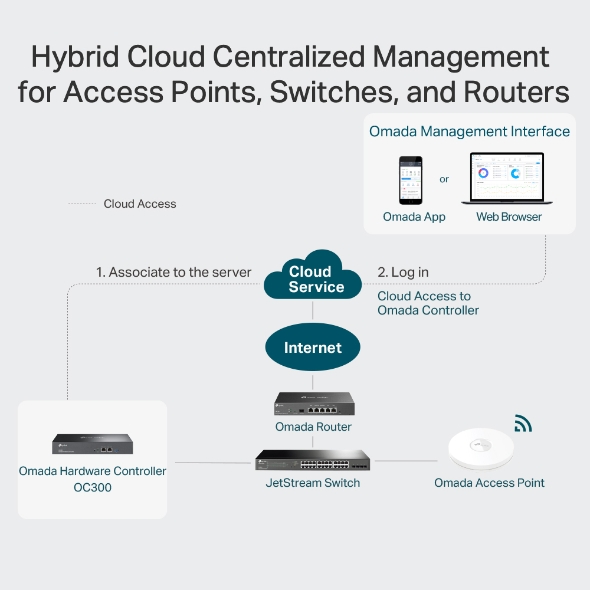
    • Centralized Management for APs, Switches, and Routers
    • Cloud Access
    • Up to 700 Devices
    • 2× 10/100/1000 Mbps Ethernet Ports
    • 1× USB 3.0 Port
    • Centralized Management for APs, Switches, and Routers
    • Cloud Access
    • Up to 700 Devices
    • Έγγραφα
    • Βίντεο
    • Λήψεις
    • Εργαλεία
    • Bulletins
    • Κοινότητα

    Φίλτρο ανα ΤύποΕπαναφορά

    • checkbox

      Datasheet

    • checkbox

      Hardware Installation Guide

    • checkbox

      Knowledgebase

      checkbox
    • checkbox

      Release Note

    • checkbox

      Reference Guide

      checkbox
    • checkbox

      Others

    Φιλτράρισμα ανά ετικέταΕπαναφορά

    • Controller
    • Gateway
    • Vlan
    • ACL
    • Standalone
    • Mesh
    • CLI
    • VPN
    • App
    • Online
    • Επαναφορά
    • Αυθεντικοποίηση
    • Πύλη
    • Wireless
    • API

    How does the behavior of the client health differ under different controller

    Client Health is a new monitoring feature introduced in Omada Controller 6.1 that evaluates and tracks the connection quality and experience of all wireless client devices on your network. By enabling this feature, the system continuously collects and calculates wireless client-level health data, helping network administrators quickly identify wireless client connectivity issues and optimize network performance.

    FAQ
    02-13-2026
    3885

    How to change the MAC format display in the controller

    This guide provides instructions for changing the MAC format display in the controller.

    Configuration Guide
    01-09-2026
    5497

    How to add/change an Omada Gateway to an existing Omada network?

    This article is a step-by-step guide for replacing a non-Omada or existing Omada gateway with a new Omada gateway.

    Configuration Guide
    12-18-2025
    10402

    How to configure Multicast/Broadcast Rate Limit

    Introduces how to configure Multicast/Broadcast Rate Limit.

    Configuration Guide
    12-10-2025
    11005

    How to Monitor and Manage Clients in Controller Mode using the Omada App

    The Omada App allows you to easily view and manage all clients connected to your Omada network. Through features such as the client list display, status filtering, condition sorting, search, and status description, you can quickly see client details such as connection type, signal strength, and data usage. You can also organize clients by network type or condition, locate specific users or devices, and monitor their real-time connection status.

    FAQ
    12-04-2025
    8873

    How to Monitor and Manage devices in Controller Mode using the Omada App

    The Omada App allows you to easily monitor and manage all devices connected to your Omada Controller . Through features such as the device list display, category filtering, condition sorting, search, and status description, you can quickly view device information, organize equipment by type or condition, locate specific devices, and understand their real-time status. These tools make it simple to maintain visibility and control over your entire Omada network anytime, anywhere.

    FAQ
    12-04-2025
    7814

    Brief introduction about VLAN topology in Omada Network v6

    This FAQ introduces some tips and highlights about VLAN topology in Omada Network v6.

    FAQ
    11-22-2025
    10001

    Omada SDN Controller_V6_User Guide

    User Guide
    11-03-2025
    12785

    How to configure WireGuard VPN in Controller mode using Omada APP

    This article demonstrates how to configure a WireGuard VPN between Site HQ and Site STA, where each site is equipped with its own Omada Gateway. By following the configuration steps in Controller mode using the Omada App, administrators can quickly establish a secure and reliable VPN tunnel to connect distributed networks.

    Configuration Guide
    10-31-2025
    13090

    How to Configure Bluetooth feature on Omada Controller

    This article details the principle and advantages of Bluetooth IoT technology and provides specific configuration guidelines and application strategies for Bluetooth IoT.

    Configuration Guide
    10-30-2025
    10571
    • Συνολικά ΧΧΧΧ αντικείμενα
    • 1
    • 2
    • 3
    • 4
    • 5
    • •••
    • 12
    • 10 / page

    Δεν βρέθηκαν αποτελέσματα.

    Φίλτρο ανα ΤύποΕπαναφορά

    • checkbox

      Firmware

    • checkbox

      Software

      checkbox
    • checkbox

      MIBs Files

    • checkbox

      GPL Code

    • checkbox

      Declaration of Conformity

      checkbox
    • Συνολικά ΧΧΧΧ αντικείμενα
    • 1
    • 2
    • 3
    • 4

    Υπάρχουν πολλαπλές versions του

    Άλλα εργαλεία

    Omada App

    Omada App

    Φίλτρο ανα ΤύποΕπαναφορά

    • checkbox

      Security Vulnerability

    • checkbox

      EOL/EOM/EOS Notification

    • checkbox

      Others

    • Συνολικά ΧΧΧΧ αντικείμενα
    • 1
    • 2
    • 3
    • 4
    • 5
    • •••
    • 15
    • 10 / page

    ΕγγραφήΗ TP-Link λαμβάνει σοβαρά υπόψη το απόρρητό σας. Για περισσότερες λεπτομέρειες σχετικά με τις πρακτικές απορρήτου της TP-Link, ανατρέξτε στην ενότητα Πολιτική απορρήτου του TP-Link.

    Email Error

    Θα ήθελα να είμαι ενημερωμένος με τις ειδήσεις TP-Link, ενημερώσεις προϊόντων και προσφορές.

    Συμπληρώνοντας αυτήν τη φόρμα επιβεβαιώνετε ότι κατανοείτε και αποδέχεστε την Πολιτική απορρήτου μας.

    reCaptcha not verified

    Ακολουθήστε μας

    • TP-Link Omada facebook
    • TP-Link Omada youtube
    • TP-Link Omada linkedin
    • TP-Link Omada twitter
    About
    • Corporate Profile
    • Contact Us
    • Privacy Policy
    Press
    • News
    • Blog
    • Security Advisory
    Learning Center
    • Technology Trends
    TP-Link Omada VIGI
    Greece / Ελληνικά

    ©2026 TP-Link Hellas and its affiliated companies. All rights reserved.

    Αυτός ο ιστότοπος χρησιμοποιεί cookies. Συνεχίζοντας την περιήγηση στον ιστότοπο, αποδέχεστε τις χρήσεις των cookies από εμάς. Μάθε περισσότερα.

    Your Privacy Choices

    Αυτός ο ιστότοπος χρησιμοποιεί cookies. Συνεχίζοντας την περιήγηση στον ιστότοπο, αποδέχεστε τις χρήσεις των cookies από εμάς. Μάθε περισσότερα.

    Βασικά Cookies

    Αυτά τα cookie είναι απαραίτητα για τη λειτουργία του ιστότοπου και δεν μπορούν να απενεργοποιηθούν στα συστήματά σας.

    TP-Link

    SESSION, JSESSIONID, accepted_local_switcher, tp_privacy_banner, tp_privacy_base, tp_privacy_marketing, tp_top-banner, tp_popup-bottom, tp_popup-center, tp_popup-right-middle, tp_popup-right-bottom, tp_productCategoryType

    Youtube

    id, VISITOR_INFO1_LIVE, LOGIN_INFO, SIDCC, SAPISID, APISID, SSID, SID, YSC, __Secure-1PSID, __Secure-1PAPISID, __Secure-1PSIDCC, __Secure-3PSID, __Secure-3PAPISID, __Secure-3PSIDCC, 1P_JAR, AEC, NID, OTZ

    Zendesk

    OptanonConsent, __cf_bm, __cfruid, _cfuvid, _help_center_session, _pendo___sg__.<container-id>, _pendo_meta.<container-id>, _pendo_visitorId.<container-id>, _zendesk_authenticated, _zendesk_cookie, _zendesk_session, _zendesk_shared_session, ajs_anonymous_id, cf_clearance

    Cookies Ανάλυσης και Μάρκετινγκ

    Τα cookie ανάλυσης μας δίνουν τη δυνατότητα να αναλύσουμε τις δραστηριότητές σας στον ιστότοπό μας για να βελτιώσουμε και να προσαρμόσουμε τη λειτουργικότητα του ιστότοπού μας.

    Τα διαφημιστικά cookie μπορούν να ρυθμιστούν μέσω του ιστότοπού μας από τους διαφημιστικούς μας συνεργάτες, προκειμένου να δημιουργήσουν ένα προφίλ των ενδιαφερόντων σας και να σας εμφανίζει σχετικές διαφημίσεις σε άλλους ιστότοπους.

    Google Analytics & Google Tag Manager

    _gid, _ga_<container-id>, _ga, _gat_gtag_<container-id>

    Google Ads & DoubleClick

    test_cookie, _gcl_au