


Auto Backup is a very commonly used function of the Omada Controller. With this function, you can have your settings and data periodically backed up automatically on your computer, which is very convenient. By default, the backup files will be saved in the path: TP-LINK\EAP Controller\data\autobackup, where the controller software is installed. Some customers may also want to store these backup files to the cloud, and they will use cloud backup services. But for these cloud services, there may be restrictions that some folders won’t be back up to the cloud. If you install the Omada Controller in this kind of folder, the backup files won’t be uploaded to the cloud.
Here we take Backblaze as an example. Backblaze is a provider of online backup services and cloud storage that allows users to back up their data to an offsite data center. Generally, Backblaze can store almost everything on your computer, except for some specific folders and file types as shown below:
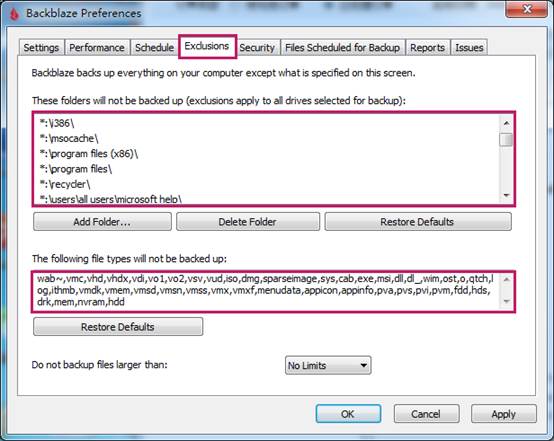
As we can see, for example, the folder” \program files (x86)” or “\program files” cannot be backed up by Backblaze. But by default, the Omada Controller is installed in this folder. So the data of Omada Controller cannot be backed up by the Backblaze. And of course, the backup files generated by the Omada Controller will not be uploaded to Backblaze.
To solve this problem, it is recommended to install your Omada Controller in folders except listed above. Then the data can be backed up normally.
When using other backup services like Backblaze, please also check whether your cloud backup service has similar restrictions.
