


Contents
Introduction
ECSP is the communication protocol used between Omada devices and the Omada Controller. It enables device adoption, configuration synchronization, monitoring, and other Controller-based management functions.
To improve the security, reliability, and maintainability of the Omada ecosystem, TP-Link is transitioning device management communications from ECSP v1 to ECSP v2.
Beginning with Omada Controller v6.3, notifications may appear when devices running ECSP v1 firmware are detected. These notifications help administrators identify affected devices and upgrade them to ECSP v2-compatible firmware where available.
Beginning with Omada Controller v6.4, devices that communicate only through ECSP v1 can no longer be adopted or managed by the Controller.
This article explains how to identify affected devices and the actions required for both Local Controller and Cloud-Based Controller deployments.
Expected Timeline
The transition away from ECSP v1 will be implemented in phases.
|
Version |
Change |
|
Omada Controller v6.3 |
Introduces notifications and upgrade guidance for devices running ECSP v1 firmware. |
|
Omada Controller v6.3.x |
Cloud-Based Controller may continue providing notifications and email reminders to help identify affected devices. |
|
Omada Controller v6.4 (Planned for Q4 2026) |
Devices that communicate only through ECSP v1 can no longer be adopted or managed by the Controller. |
Requirements
This article applies to
- Omada Software Controller
- Omada Hardware Controllers
- Omada Cloud-Based Controllers
- Omada Integrated Gateways
- Omada Fusion Gateways
Conditions
- The Controller is running, or will be upgraded to, Omada Controller v6.3 or later.
- One or more managed devices are running ECSP v1 firmware.
- Devices are managed through Omada Controller.
Determine the controller type
The required actions vary depending on the Controller type.
Local Controller:
- Omada Software Controller
- Omada Hardware Controller
- Omada Integrated Gateway
- Omada Fusion Gateway
- The administrator determines when the Controller is upgraded.
Cloud-Based Controller
- Managed and upgraded by the Omada platform.
For Local Controller
Administrators should identify and address affected devices before upgrading the Controller to v6.4 or later.
Note: A Local Controller cannot be upgraded to v6.4 or later while devices that communicate only through ECSP v1 remain under management.
Step 1. Upgrade the Controller to v6.3
If the Controller is running v6.2 or earlier, upgrade it to v6.3 before proceeding.
Omada Controller v6.3 introduces notifications and upgrade guidance that help identify devices running ECSP v1 firmware. These notifications are required to determine which devices require attention before upgrading to v6.4 or later.
Note: If the Controller is already running v6.3 or later, proceed to Step 2. Review ECSP v1 Notifications.
Step 2. Review ECSP v1 notifications
Ensure Device Update Notifications are enabled:
Global View > Firmware > Overview > Upgrade Settings > Device Update Notifications
When ECSP v1 devices are detected, notifications may appear in:
- Global View
- Site View
- Device List
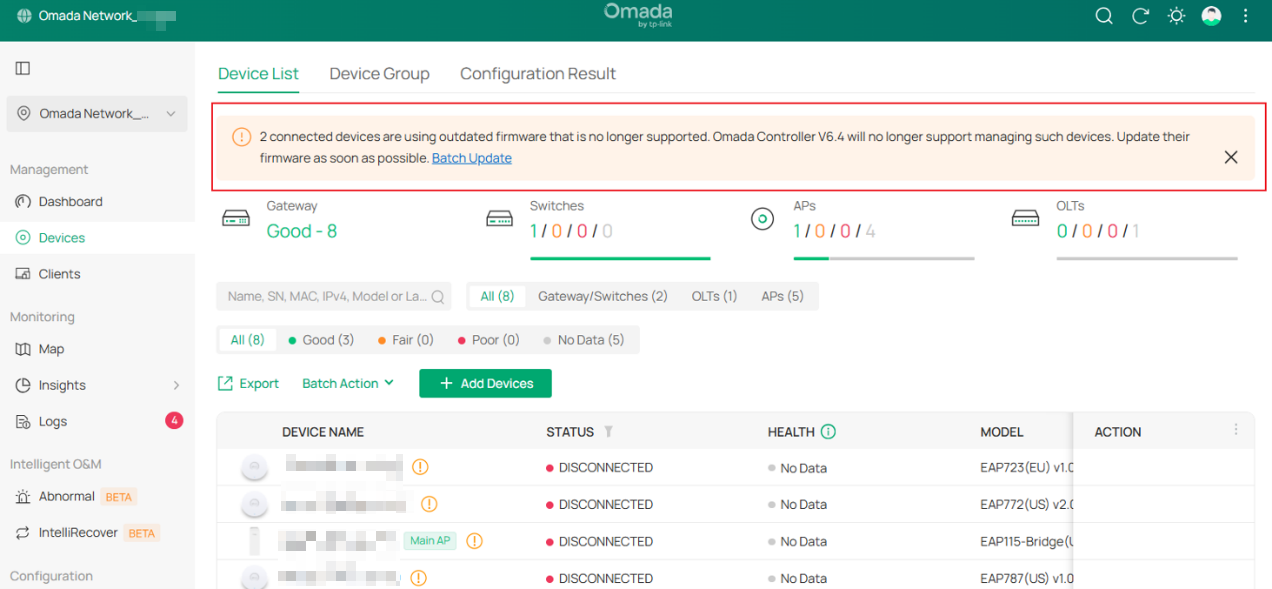
If a device has an available ECSP v2-compatible firmware, a notification similar to the following may appear.
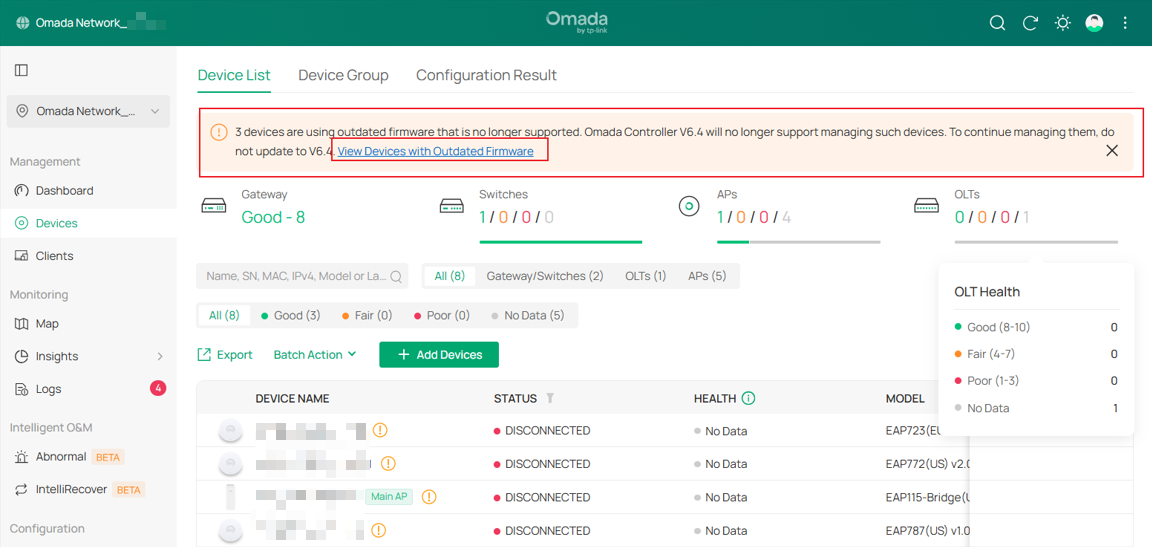
If no ECSP v2-compatible firmware is available, a notification indicating that the firmware is outdated may be displayed.
Step 3. Upgrade affected devices
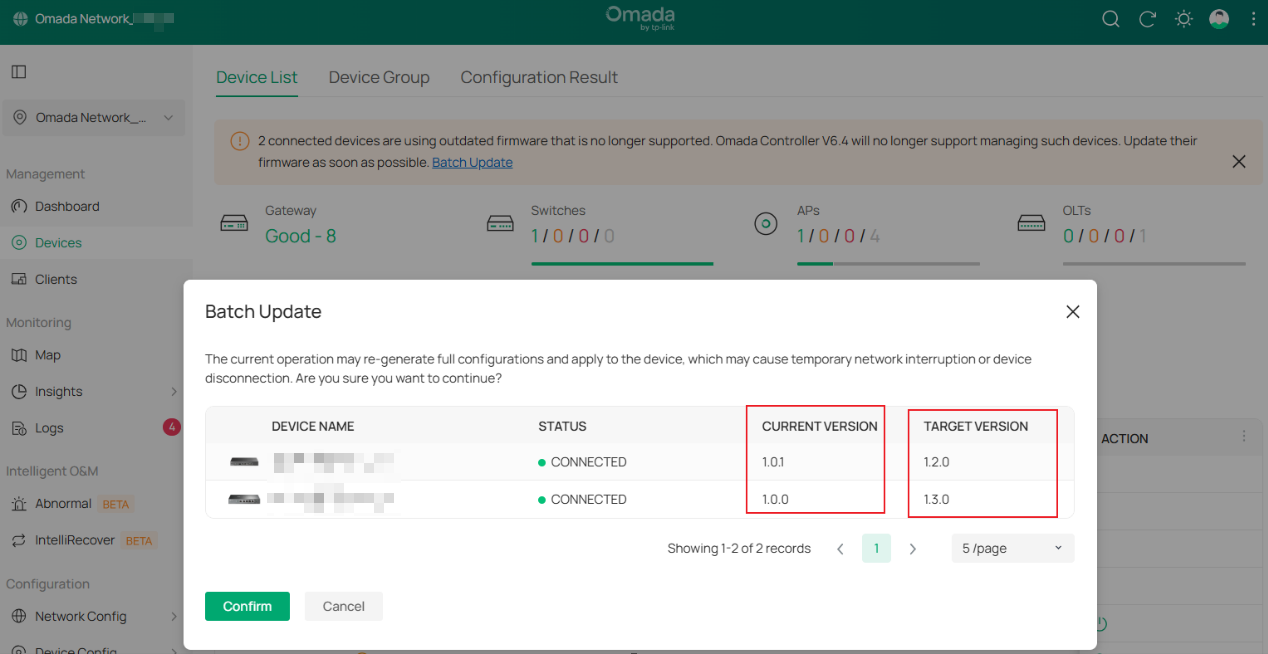
If ECSP v2-compatible firmware is available, upgrade the device to the latest firmware version.
The Batch Update option can be used to upgrade multiple eligible devices simultaneously.
Step 4. Handle devices without ECSP v2-compatible firmware
If firmware with ECSP v2 support is not available for a device:
- Do not upgrade the Local Controller to v6.4 or later if continued management of the device is required.
- Evaluate whether the device should be replaced with a supported model.
Step 5. Upgrade the Controller to v6.4 or later
After all affected devices have been upgraded to ECSP v2-compatible firmware, removed from the Controller, or replaced, upgrade the Controller to v6.4 or later.
For Cloud-Based Controller
Cloud-Based Controller upgrades are managed by the Omada platform. Cloud-Based Controller v6.4 is currently planned for release in Q4 2026. To minimize service disruption, administrators are encouraged to review ECSP v1 notifications and upgrade affected devices before the platform transition.
Step 1. Review ECSP v1 notifications and email reminders
When devices running ECSP v1 firmware are detected, notifications may be displayed in Cloud-Based Controller. Site Owners and Super Administrators may also receive email reminders. Review the affected devices and complete any required firmware upgrades as soon as possible.
Step 2. Upgrade affected devices
Eligible devices can be upgraded through Cloud-Based Controller.
When affected ECSP v1 devices are detected, Cloud-Based Controller may provide notifications and email reminders to help administrators identify devices that require upgrades. Devices with available ECSP v2-compatible firmware should be upgraded as soon as possible to ensure continued Controller-based management after future platform upgrades.
Note: If ECSP v1 devices are not upgraded before support is removed, they can no longer be adopted or managed through Cloud-Based Controller. In such cases, firmware upgrades may need to be performed directly on the devices.
Step 3. Process offline devices
Offline devices cannot be upgraded until they reconnect to the Controller.
If the device is still in use, restore connectivity and upgrade it to an ECSP v2-compatible firmware version when it becomes available.
If the device is no longer required, remove it from the Controller.
Conclusion
Before transitioning to Omada Controller v6.4, review all devices running ECSP v1 firmware and take the appropriate actions based on the deployment type.
Local Controller deployments: Upgrade affected devices to ECSP v2-compatible firmware, remove them from the Controller, or replace them before upgrading the Controller.
Cloud-Based Controller deployments: Review notifications and email reminders promptly and complete firmware upgrades for affected devices before the platform transition.
By completing these preparations in advance, device management can continue without interruption after ECSP v1 support is removed.
To learn more about each function and configuration, please visit Support Home to download or check the manual for your product.
QA
Q1: Why is support for ECSP v1 being removed?
A1: As part of our ongoing commitment to product security, reliability, and long-term platform maintenance, Omada Controller is transitioning to ECSP v2 as the supported device communication protocol. This change helps ensure a more consistent management experience and enables future platform enhancements.
Q2: How do I know whether my device is affected?
A2: Go to Global View > Firmware > Overview > Upgrade Settings > Device Update Notifications and turn on the toggle. Starting from Controller v6.3, affected ECSP v1 devices will trigger notifications in Device List, Global View, and Site View.
Q3: When should I upgrade device firmware?
A3: If an ECSP v2-compatible firmware is available for your device, we recommend upgrading as soon as possible after receiving the notification.
For Local Controller deployments, device upgrades should be completed before upgrading the Controller to v6.4.
For Cloud-Based Controller deployments, we recommend completing device upgrades as early as possible.
Q4: What should I do if a device is offline (DISCONNECTED)?
A4: Offline devices cannot be upgraded through the Controller.
If the device is still in use:
- Restore device connectivity.
- Re-establish management if necessary.
- Upgrade the firmware after the device becomes online.
If the device is no longer used, you may remove it from the Controller using the Forget operation.
Q5: What if my device does not have an available ECSP v2-compatible firmware?
A5: ECSP v2 support is already available for most current Omada devices. When a device requires attention, Omada Controller will provide notifications and upgrade guidance where applicable.
Most devices currently managed by Omada Cloud-Based Controller already support ECSP v2 or have an available ECSP v2-compatible firmware. As a result, the expected impact on existing Cloud-Based Controller deployments is limited.
If a device has reached end-of-life (EOL) and no ECSP v2-compatible firmware is available, it cannot transition to ECSP v2. For Local Controller deployments, do not upgrade the Controller to v6.4 or later if continued management of the device is required. Consider replacing the device with a supported model when appropriate.
Q6: What is the difference between Local Controller and Cloud-Based Controller?
A6: The impact and upgrade process differ depending on the deployment type.
Local Controller (Software Controller, Hardware Controller, Integrated Gateway, and Fusion Gateway)
- Upgrade timing is controlled by the administrator.
- Firmware upgrades must generally be performed by the administrator.
- Controller upgrades may be blocked if unsupported ECSP v1 devices remain.
Cloud-Based Controller
- Controller upgrades are managed by the platform.
- Eligible online devices may receive automated firmware upgrade assistance where supported.
Q7: What notifications or restrictions will I see after upgrading to v6.4?
A7: After upgrading to Omada Controller v6.4 or later, ECSP v1 devices can no longer be adopted or managed by the Controller. Devices that require Controller-based management should be upgraded to ECSP v2-compatible firmware before the Controller is upgraded.
Q8: Where can I get support or additional information?
A8: Additional information and assistance are available through the following resources: Business Community and Omada Network Support
