


The differences and similarities between Load Balancing and Link Backup


Contents
Differences between Load Balancing and Link Backup
Similarities between Load Balancing and Link Backup
Introduction
The Omada gateway’s Load Balancing feature supports multi-WAN internet access, allowing users to distribute network traffic across multiple WAN ports based on traffic and resource usage. This helps reduce network congestion and resource wastage. The WAN Link Backup feature provides link backup based on multi-WAN internet access and supports link switching between the primary WAN and backup WAN.
The Load Balancing feature distributes connections proportionally. Based on the currently online WAN ports and the bandwidth and weight settings configured for each WAN link, the device will decide which WAN entry the next data packet should pass through.
If you want to learn more about how to configure Load Balancing, please refer to the configuration guide How to configure Load Balancing on Omada Gateway via Omada Controller.
The Link Backup feature provides a failover mechanism for your network, which ensures the network’s reliability and stability. It allows seamless switching to a backup link when the primary network link fails, ensuring uninterrupted network communication.
If you want to learn more about how to configure Link Backup, please refer to the configuration guide How to Configure Link Backup on Omada Gateway via Omada Controller.
Requirements
- Omada Gateways (Firmware compatible with controller v6.2)
- Omada Software Controller / Hardware Controller / Cloud-Based Controller (v6.2 and above)
Differences between Load Balancing and Link Backup
1. Functionality
Load Balancing is mainly designed to distribute traffic across multiple links to improve application responsiveness and overall network throughput. It can significantly improve the system's ability to handle a large number of concurrent requests, improving user experience.
Link Backup is mainly designed to provide a backup link in case of primary network link failure, which will ensure continuous network connection and data transmission. This feature mainly ensures high availability of network links, so that key services will not be interrupted when the link fails.
2. Traffic Distribution
Load Balancing can dynamically distribute traffic to each WAN connection according to the preset strategy (proportion), while Link Backup switches traffic to the backup link only when the primary link fails.
3. Configuration
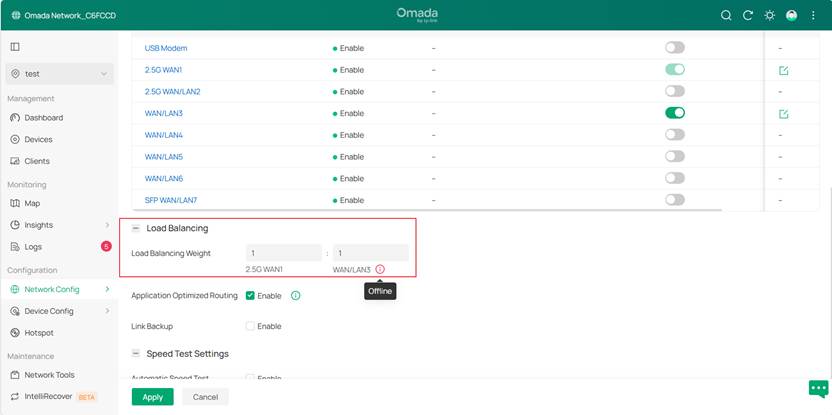
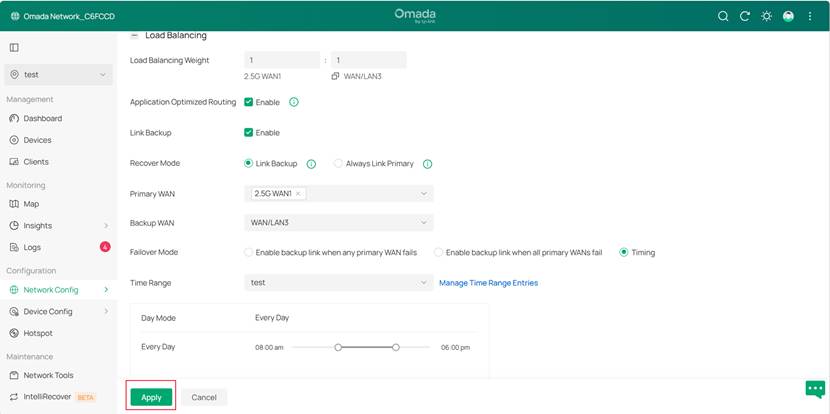
Load Balancing requires configuring weight for each WAN port, and traffic distribution follows these ratios (see below). For detailed instructions, please refer to the configuration guide How to Configure Load Balancing on Omada Gateway.
In Controller mode, you can go to Network Config > Network settings > Internet > Load Balancing to configure Load Balancing. Under the Load Balancing Weight configuration for each port, the port's online status will be displayed.
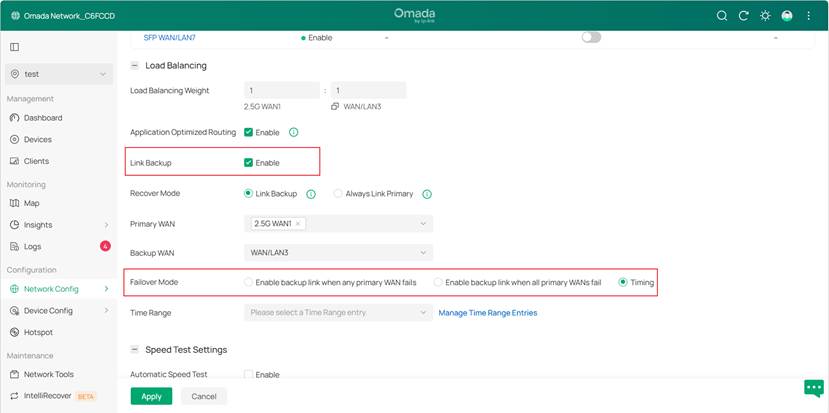
To configure Link Backup, you need to configure the primary and backup WAN ports and define the fault detection and switching strategies (see below). For detailed instructions, please refer to the configuration guide How to Configure Link Backup on Omada Gateway.
In Controller mode, you can enable and configure Link Backup on Network Config > Network settings > Internet > Load Balancing> Link Backup.
Failover Mode now includes a Timing option, which allows configuration of a time range for scheduled switching to the backup WAN for traffic forwarding.
Note: This feature requires firmware compatible with controller v6.2 to be supported.
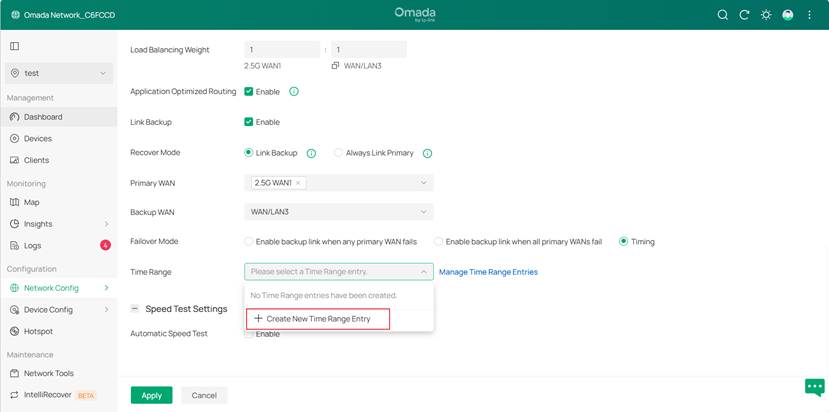
On the Time Range, you can create a Time Range Entry according to your needs.
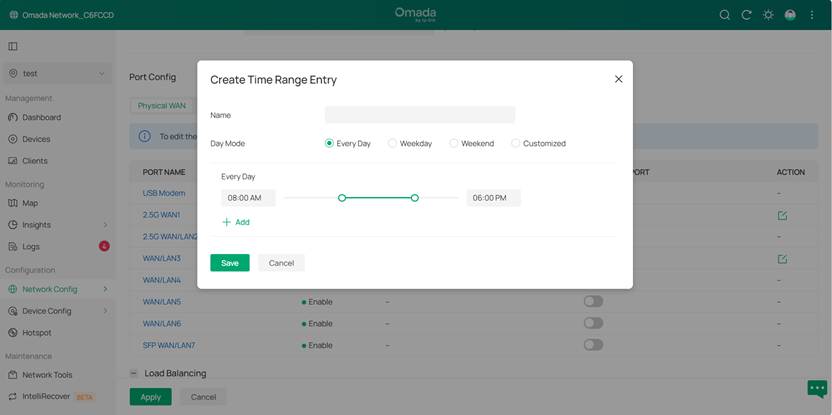
After configuration, click the Apply button to save your settings.
In summary, in a multi-WAN scenario, the Load Balancing feature focuses on improving network performance and optimizing resource allocation, and distributes network data to all online WAN ports. On the other hand, the Link Backup feature, focusing on improving network reliability and failover ability, provides a backup WAN link for the system.
For example, if a client, with internet links from two or more ISPs, hopes to fully utilize the bandwidth of all links based on the bandwidth allocation, Load Balancing can meet this demand.
If the client mainly uses the link with a higher bandwidth and hopes to enable the backup link in case of a failure on the primary link to ensure uninterrupted network connectivity, Link Backup is suitable for such a scenario.
Similarities between Load Balancing and Link Backup
The Load Balancing and Link Backup features on Omada gateways are both designed for multi-WAN scenarios; they both improve network stability and reliability by optimizing the distribution of network traffic, and they both determine which link the network data should be sent through based on the status of the WAN ports.
The Load Balancing feature only distributes traffic to all online WAN ports. However, when the Link Backup feature is enabled, it monitors the status of the primary and backup links: If the primary link changes from online to offline, Link Backup will activate the backup link, and network data will then be sent through the backup link if it is detected as online.
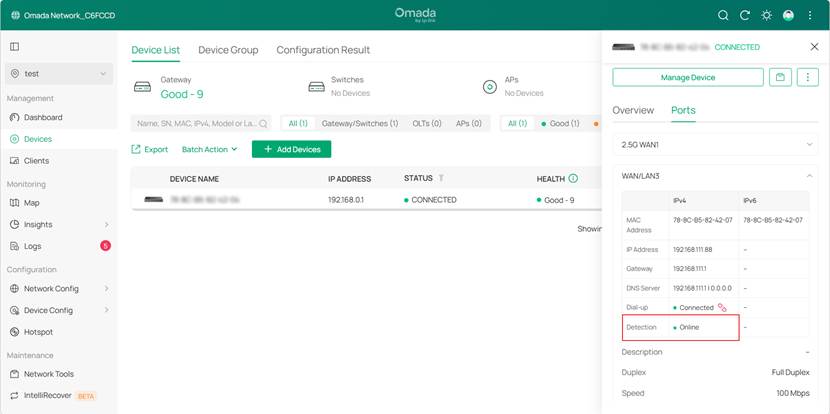
You can view the port status directly under the Load Balancing Weight. Or go to Devices > Devices List > Click the Device > Ports > WAN/LAN3 (the corresponding WAN port) > Detection to check the status detection.
Conclusion
The above are the similarities and differences between Load Balancing and Link Backup. You can configure the two features according to your actual needs.
Get to know more details of each function and configuration please go to Download Center to download the manual of your product.
