


What Is the Console Cable and the Line Sequence of It


The Console Cable is used for the serial connection between your computer’s serial port and the console port on your TP-Link switch or router to access the CLI (Command Line Interface) of the device.
There are many kinds of Console cable in the market, the main two types of Console cable that TP-Link uses is shown in the pictures below:
Type 1: RS232 DB9 Male Head <-->RS232 DB9 Female Head
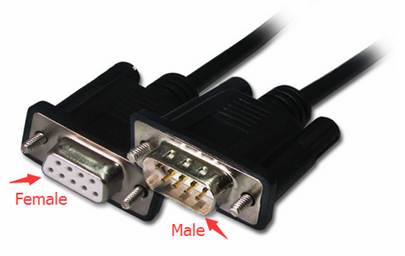
Note: this kind of Console Cable is used for some old version TP-Link products that is discontinued now.
Type 2: RS232 DB9 Female Head <--> RJ45 connector
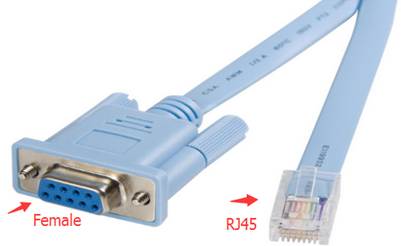
We highly recommend you to use the original Console Cable that comes with the product, but if you lost the Console Cable by accident and need to use a third-part Console Cable or make one by yourself, please make sure the line sequence of the cable’s connectors is correct.
Here we take the Type 2 Console Cable which is used for TP-Link products on shipment now as example to introduce the line sequence and its corresponding relationship of the RS232 DB9 female head and the RJ45 head.
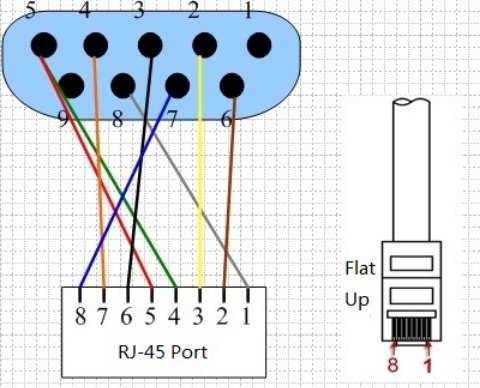
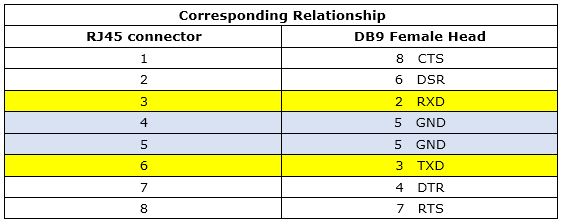
Note: if your computer has no RS232 DB9 male head, you may need an USB to RS232 DB9 male head convertor as well.
