Why Virtual Server (Port Forwarding) Is Not Working on a TP-Link Business Router


Normally, you will use a virtual server (also named port forwarding) to provide network service for devices outside the local network. Please follow the steps below for troubleshooting virtual server failure on your TP-Link Business router.
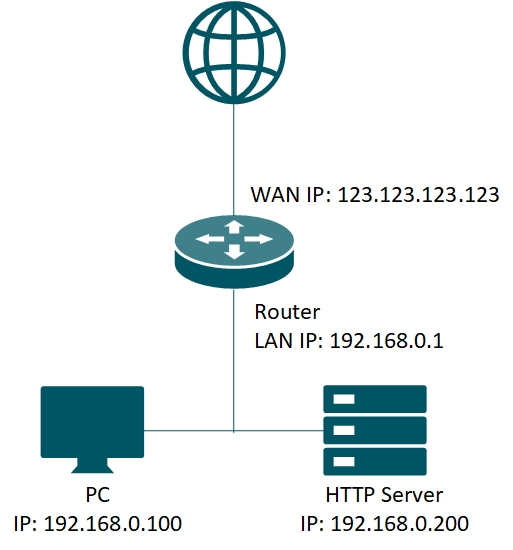
Step 1: Make sure the server is accessible from the internal network.
Please double-check the IP address and the port of the server. Check if you can access the server in the local network. If you are still unable to access the server in your local network, please check the settings of your server.
Take the above image as an example, there is a server in the network providing HTTP service with port 80. To check the server access, you can try to visit http://192.168.0.200 with a browser.
Note: if a firewall or antivirus program running on the server, be sure to adjust the firewall policy and allow access to the specified ports from the outside, or you can temporarily disable the firewall for testing.
Step 2: Check the port forwarding settings in the router.
To set up the virtual server, refer to FAQ--How to set up Port Forwarding feature on TP-Link SMB Router?
Verify that the internal port, external port, and Internal Server IP are correct. And it’s recommended to set up DHCP reservation or static IP for the server.
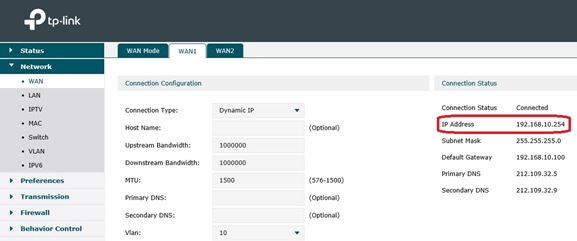
Step 3: Pay attention to the WAN IP of the router.
If there is still a problem, check the WAN IP of the router. Verify that the router is getting a public IP address. If it is a private IP address (simply put, it starts with 10, 172.16 - 31 or 192.168), then you have to do the same settings on the modem router as well.