

Omada Pro Logo official website Vigi Logo official website
Contact Us
  • Contact Sales
  • Contact Support
Log In
avatar

    Messages Messages Bookmarks Bookmarks Account Settings Account Settings
    Uruguay / Español
    Omada logo
    • Products

      Products

      • Wireless
        • WiFi 7
          WiFi 7
        • Ceiling Mount
          Ceiling Mount
        • Wall Plate
          Wall Plate
        • Desktop
          Desktop
        • Outdoor
          Outdoor
        • GPON
          GPON
        • View All
          View All
      • Switches
        • Unmanaged
          Unmanaged
        • View All
          View All
      • Gateways
        • Wired Gateways
          Wired Gateways
        • WiFi Gateways
          WiFi Gateways
        • 4G/5G WiFi Gateways
          4G/5G WiFi Gateways
        • Integrated Gateways
          Integrated Gateways
        • View All
          View All
      • Controllers
        • Cloud-Based
          Cloud-Based
        • Hardware
          Hardware
        • Software
          Software
        • View All
          View All
      • Accessories
        • Alimentación y PoE
          Alimentación y PoE
        • Media Converters
          Media Converters
        • Modules & Cables
          Modules & Cables
        • Mounting & Brackets
          Mounting & Brackets
        • View All
          View All

      Management Platforms

      • Management Systems
        • Cloud-Based
          Cloud-Based
        • Hardware
          Hardware
        • Software
          Software
        • View All
          View All
      • Cloud Portal
    • Solutions
      Solutions Home

      By Scenarios

      • Small and Mid-Sized Offices
      • Small-Sized Chain Restaurants/Stores
      • WiFi for Farms/Ranches/Parking Lots
      • High-Density WiFi

      By Technology

      • WiFi 7
      • PPSK Solution
      • PtP & PtMP Wireless Bridges
      • Multi-Gigabit Solution
      • PoE Switches for Surveillance

      Case Studies

      Case Studies

      Omada Powers Shift4’s POS Solution over 20,000 Sites in the US

      Browse
    • Learn and Train

      Learn

      • FAQs
      • Setup Videos
      • Configuration Guides
      • Case Studies

      Train

      • Training Introduction
      • For Learners
      • For Instructors
    • Support
      Support Home

      Documents

      • Hardware Installation Guide
      • Knowledgebase
      • Datasheet
      • Reference Guide
      • View All

      Downloads

      • Software Download
      • Firmware Download
      • GPL Code
      • MIBs Files
      • View All

      Bulletins

      • Security Vulnerability
      • EOL/EOM/EOS Notification
      • View All

      Contact Support

      • Email Support
      • Call Support
      • Warranty Services

      Tools

      • Omada Emulators
      • Omada App
      • Compatibility List
    • Community
    Search
    1. Home>
    2. Product Support>
    3. Omada Cloud Essentials>
    Omada Cloud Essentials
    Omada Cloud Essentials
    Omada Cloud Essentials
    Omada Cloud Essentials
    Omada Cloud Essentials
    Omada Cloud Essentials
    Omada Cloud Essentials
    Omada Cloud Essentials
    Omada Cloud Essentials
    Omada Cloud Essentials
    Omada Cloud Essentials
    Omada Cloud Essentials
    Omada Cloud Essentials
    Omada Cloud Essentials
    Omada Cloud Essentials
    Omada Cloud Essentials
    Omada Cloud Essentials
    Omada Cloud Essentials

    /6Download

    Omada Cloud Essentials

    Omada Cloud Essentials

    How to Find the Hardware Version on Your TP-Link Device
    IMPORTANT:  Model and hardware version availability varies by region. Please refer to your TP-Link regional website to determine product availability.
    Vx.0 = Vx.6/Vx.8/Vx.9(eg:V1.0=V1.6/V1.8/V1.9)
    Vx.x0 = Vx.x6/Vx.x8/Vx.x9 (eg:V1.20=V1.26/V1.28/V1.29)
    Vx.30 = Vx.32/Vx.33 (eg:V3.30=V3.32/V3.33)
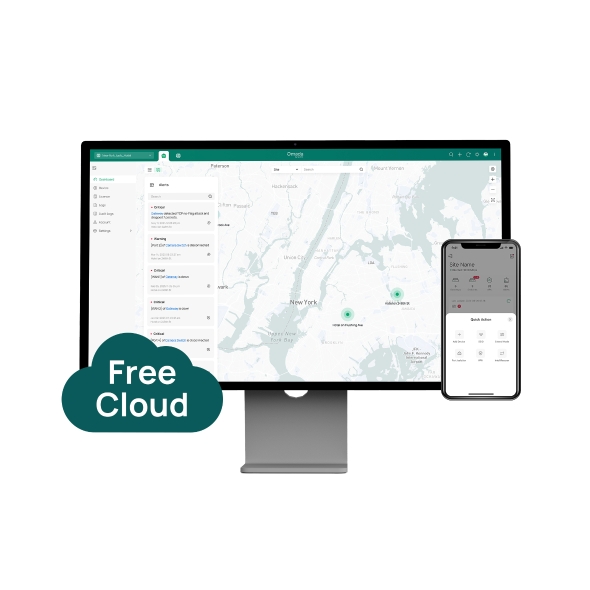
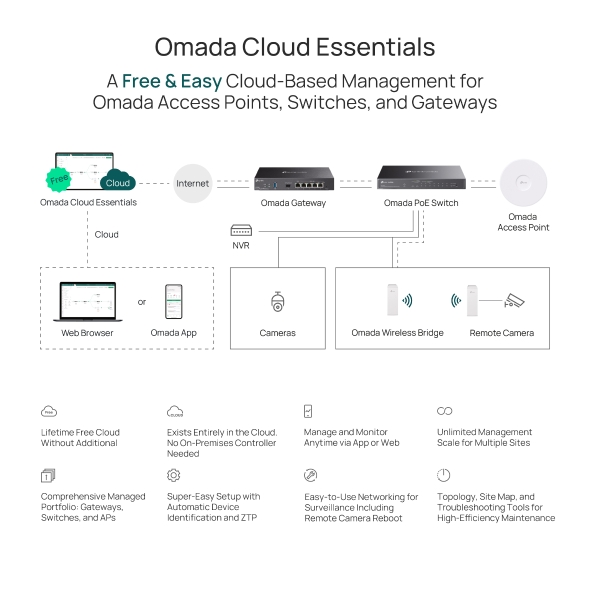
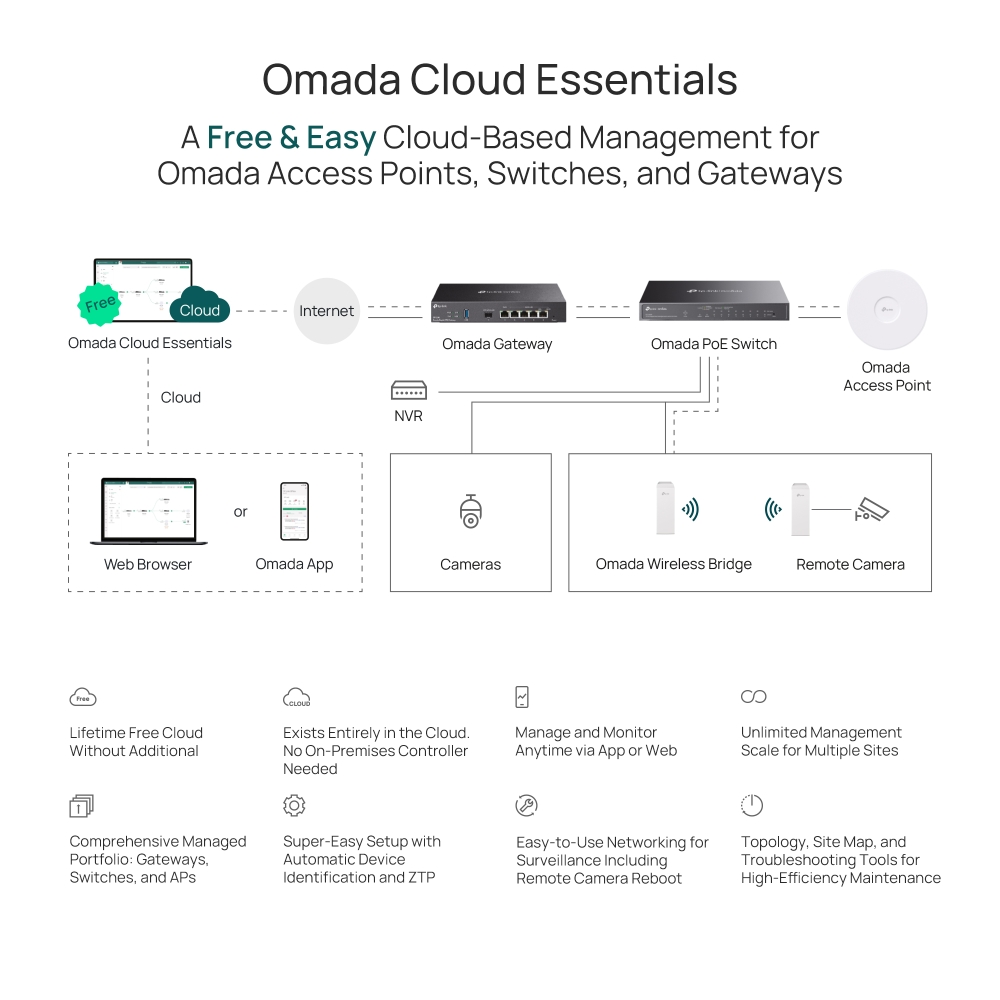
    • Lifetime Free Cloud Management
    • Super-Easy Setup
    • Zero-Touch Provisioning
    • Existing Entirely in the Cloud
    • No Additional Hardware Controller Investment
    • Lifetime Free Cloud Management
    • Super-Easy Setup
    • Zero-Touch Provisioning
    • Existing Entirely in the Cloud
    • No Additional Hardware Controller Investment
    • Documents
    • Videos
    • Downloads
    • Tools
    • Bulletins
    • Community

    Filter By TypeReset

    • checkbox

      Datasheet

    • checkbox

      Hardware Installation Guide

    • checkbox

      Knowledgebase

      checkbox
    • checkbox

      Release Note

    • checkbox

      Reference Guide

      checkbox
    • checkbox

      Others

    Filter By TagReset

    • Controller
    • Gateway
    • Vlan
    • ACL
    • Standalone
    • Mesh
    • CLI
    • VPN
    • App
    • Online
    • Reset
    • Authentication
    • Portal
    • Wireless
    • API

    How to Configure Root Node Feature on an Omada Controller

    Configure the Root Node in Omada Controller to correct topology relationships on sites without an Omada gateway and identify device uplinks more accurately.

    Configuration Guide
    09-24-2026
    12347

    How to Prepare for the End of ECSP v1 Support in Omada Controller

    Learn how to identify ECSP v1 devices, upgrade to ECSP v2-compatible firmware, and prepare Local or Cloud-Based Controllers for v6.4 and later.

    Configuration Guide
    09-04-2026
    9915

    How to Use an Omada Controller to Manage Omada Devices Across Different Subnets Over the Internet

    In enterprise networks, devices are often deployed across different subnets, making it common for Omada devices and the Omada Controller to reside in separate network segments. Supporting device adoption and management across subnets enables centralized control without changing existing network designs. This article introduces different methods for adopting devices across subnets using Omada products.

    Configuration Guide
    06-23-2026
    78924

    How to Configure Spanning Tree on Omada Controller

    Spanning Tree Protocol (STP) is a Layer 2 Protocol that prevents loops in the network.

    Configuration Guide
    07-30-2026
    63954

    How to Enable PWA to Improve Page Load Performance

    In weak or unstable network conditions, pages may load slowly or experience noticeable delays during access.Omada Controller supports PWA capabilities to improve performance and stability:

    Configuration Guide
    07-15-2026
    39082

    What Is the Difference in Client Health Behavior Across Controllers

    Client Health is a new monitoring feature introduced in Omada Controller 6.1 that evaluates and tracks the connection quality and experience of all wireless client devices on your network. By enabling this feature, the system continuously collects and calculates wireless client-level health data, helping network administrators quickly identify wireless client connectivity issues and optimize network performance.

    FAQ
    08-24-2026
    30218

    How to Configure WireGuard VPN in Controller Mode Using Omada App

    This article demonstrates how to configure a WireGuard VPN between Site HQ and Site STA, where each site is equipped with its own Omada Gateway. By following the configuration steps in Controller mode using the Omada App, administrators can quickly establish a secure and reliable VPN tunnel to connect distributed networks.

    Configuration Guide
    08-18-2026
    42145

    How to Configure Bluetooth on Omada Controller

    This article details the principle and advantages of Bluetooth IoT technology and provides specific configuration guidelines and application strategies for Bluetooth IoT.

    Configuration Guide
    08-18-2026
    34846

    How to Configure VLAN in Omada Network v6

    We are aware that significant changes regarding LAN settings have been made from Omada Controller v5 to Omada Network v6. This article introduces how to configure the VLAN feature with newest Omada Network v6 to help you establish a better understanding of the workflow of how to configure VLAN with Omada Network v6.

    Configuration Guide
    08-18-2026
    151448

    How to Separate Large Numbers of VLANs via Bridge VLAN and SSID VLAN (with VLAN Pool)

    Bridge VLAN is a feature that allows multiple VLANs to share a single Layer 3 interface and DHCP pool to reduce gateway resource usage. SSID VLAN binds a specific SSID to one or multiple VLANs for straightforward traffic isolation. By combining Bridge VLAN and SSID VLAN, you can meet the requirements of the apartment or hotel room network design without creating a large number of Layer 3 interfaces.

    Configuration Guide
    08-19-2026
    42801

    No results found.

    Filter By TypeReset

    • checkbox

      Firmware

    • checkbox

      Software

      checkbox
    • checkbox

      MIBs Files

    • checkbox

      GPL Code

    No results found.

    Other Tools

    Filter By TypeReset

    • checkbox

      Security Vulnerability

    • checkbox

      EOL/EOM/EOS Notification

    • checkbox

      Others

    No results found.

    Suscribite para recibir las últimas novedadesTP-Link se toma en serio su privacidad. Para obtener más detalles sobre las prácticas de privacidad de TP-Link, consulte la Política de privacidad de TP-Link .

    Email Error

    Me gustaría estar al día con las noticias, actualizaciones de productos y promociones de TP-Link.

    Al completar este formulario, confirma que comprende y acepta nuestra Política de privacidad .

    reCaptcha not verified

    Nuestras redes

    • TP-Link Omada facebook
    • TP-Link Omada linkedin
    About
    • About Us
    • Corporate Information
    • Sustainability
    • Privacy Policy
    • Accessibility
    • Contact Us
    Press
    • News
    • Blog
    • Security Advisory
    Partners
    • Partner Program
    Learning Center
    • Technology Trends
    TP-Link Omada Omada Pro VIGI
    Uruguay / Español

    Copyright © 2026 TP-Link SRL Reservados todos los derechos.

    Este sitio utiliza cookies. Si continúa navegando por el sitio, acepta el uso que hacemos de las cookies. No volver a mostrar Más información .

    Your Privacy Choices

    Este sitio utiliza cookies. Si continúa navegando por el sitio, acepta el uso que hacemos de las cookies. No volver a mostrar Más información .

    Cookies basicas

    Esas cookies son necesarias para que el sitio web funcione y no se puede desactivar en sus sistemas.

    TP-Link

    SESSION, JSESSIONID, accepted_local_switcher, tp_privacy_banner, tp_privacy_base, tp_privacy_marketing, tp_top-banner, tp_popup-bottom, tp_popup-center, tp_popup-right-middle, tp_popup-right-bottom, tp_productCategoryType

    Youtube

    id, VISITOR_INFO1_LIVE, LOGIN_INFO, SIDCC, SAPISID, APISID, SSID, SID, YSC, __Secure-1PSID, __Secure-1PAPISID, __Secure-1PSIDCC, __Secure-3PSID, __Secure-3PAPISID, __Secure-3PSIDCC, 1P_JAR, AEC, NID, OTZ

    Zendesk

    OptanonConsent, __cf_bm, __cfruid, _cfuvid, _help_center_session, _pendo___sg__.<container-id>, _pendo_meta.<container-id>, _pendo_visitorId.<container-id>, _zendesk_authenticated, _zendesk_cookie, _zendesk_session, _zendesk_shared_session, ajs_anonymous_id, cf_clearance

    Cookies de análisis y marketing

    Las cookies de análisis nos permiten analizar sus actividades en nuestro sitio web para mejorar y adaptar la funcionalidad de nuestro sitio web.

    Nuestros socios publicitarios pueden configurar las cookies de marketing a través de nuestro sitio web para crear un perfil de sus intereses y mostrarle anuncios relevantes en otros sitios web.

    Google Analytics y Google Tag Manager

    _gid, _ga_<container-id>, _ga, _gat_gtag_<container-id>

    Google Ads y DoubleClick

    test_cookie, _gcl_au