


Contents
7 Common Reasons Why Your PoE Devices Won’t Power On
2. Active vs. Passive PoE Incompatibility
3. Total PSE Power Budget Exhaustion
5. Cable Distance and Voltage Drop
6. Administrative Port Settings and PoE Scheduling
7. Damaged Cable Pairs or Terminations (Physical Fault)
Introduction
Power over Ethernet (PoE) simplifies network deployments by transmitting electrical power and data simultaneously over a single Ethernet cable. Instead of running dedicated high-voltage AC lines to security cameras, wireless access points, or VoIP phones, a single Cat5e or Cat6 cable can do it all. However, when a connected device remains powered off, troubleshooting can become frustrating. In this guide, we will discuss 7 common reasons why your PoE devices won’t power on.
Before You Start
Before troubleshooting a PoE connection, it is important to understand the two primary hardware roles defined by IEEE PoE standards:
- PSE (Power Sourcing Equipment): The device that delivers power onto the Ethernet cable, such as a PoE switch or PoE injector.
- PD (Powered Device): The device receiving and consuming power, such as an IP surveillance camera, access point, or IoT device.
7 Common Reasons Why Your PoE Devices Won’t Power On
1. IEEE Standard Mismatch
The first possible cause is an IEEE PoE standard mismatch between the Powered Device (PD) and Power Sourcing Equipment (PSE).
PoE is defined by several IEEE standards, each supporting different power levels. If a PD requires a higher PoE standard than the PSE can provide, the device may fail to power on or may operate with limited functionality. To learn more about PoE standards and power levels, see: What is Power Over Ethernet (PoE) and How Does it Work?
For example, if an IP security camera requires 802.3bt (Type 3/PoE++) but is connected to a switch port that supports only 802.3af (PoE), the camera may not power on or may operate with limited functionality.
2. Active vs. Passive PoE Incompatibility
The second reason PoE devices won’t power on is due to active vs. passive PoE incompatibility.
Active PoE and Passive PoE are both types of PoE that deliver electrical power and data over an Ethernet cable, but they handle compatibility differently.
Active PoE follows IEEE standards such as 802.3af, 802.3at, and 802.3bt. With Active PoE, the Power Sourcing Equipment (PSE) conducts a safety handshake before delivering power to verify device compatibility and voltage requirements. For instance, if you plug a standard laptop into a PoE switch, the switch detects that the laptop lacks native PoE support and withholds power to prevent damage.
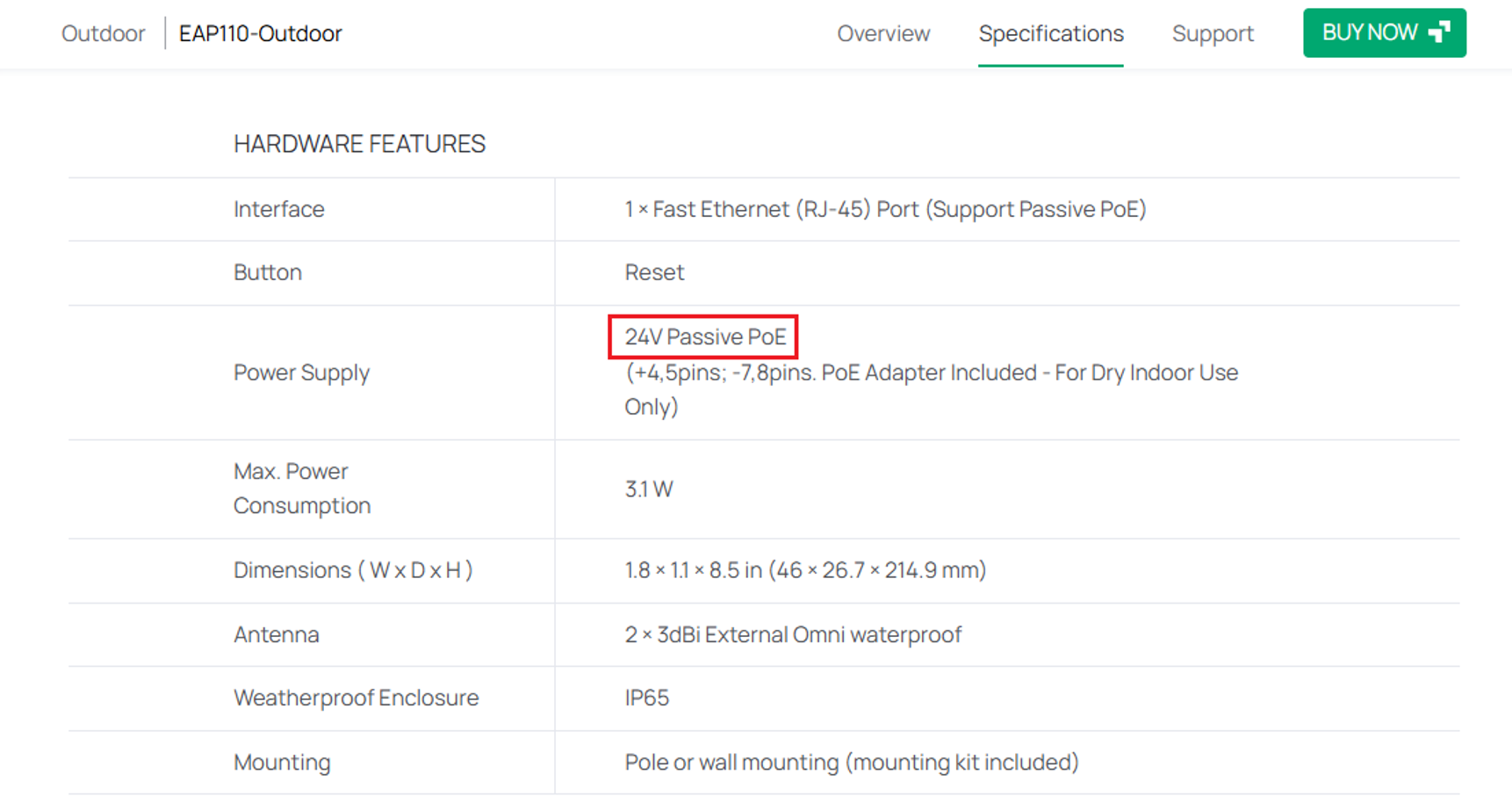
Passive PoE does not follow IEEE standards. Passive PoE PSEs supply an unnegotiated, constant voltage across the cable without a safety handshake. Connecting a client device with mismatched voltage requirements can permanently damage the circuitry.
For example, plugging a 24V passive PD into an active 802.3af/at PSE switch will result in no power. Conversely, plugging an active PD into a passive PoE adapter risks underpowering or permanently damaging the electronics.
To fix this, check the device’s spec sheet and ensure you are matching the power delivery type. If a PD needs passive PoE, ensure you use a PSE such as a passive PoE adapter.
3. Total PSE Power Budget Exhaustion
The third reason why PoE devices won’t power on is due to PSE power budget exhaustion.
A PSE such as a PoE switch can support high wattage on individual ports, but its internal power supply has a limit known as its total PoE power budget. For example, the Omada SG3218XP-M2 has a total power budget of approximately 240W:
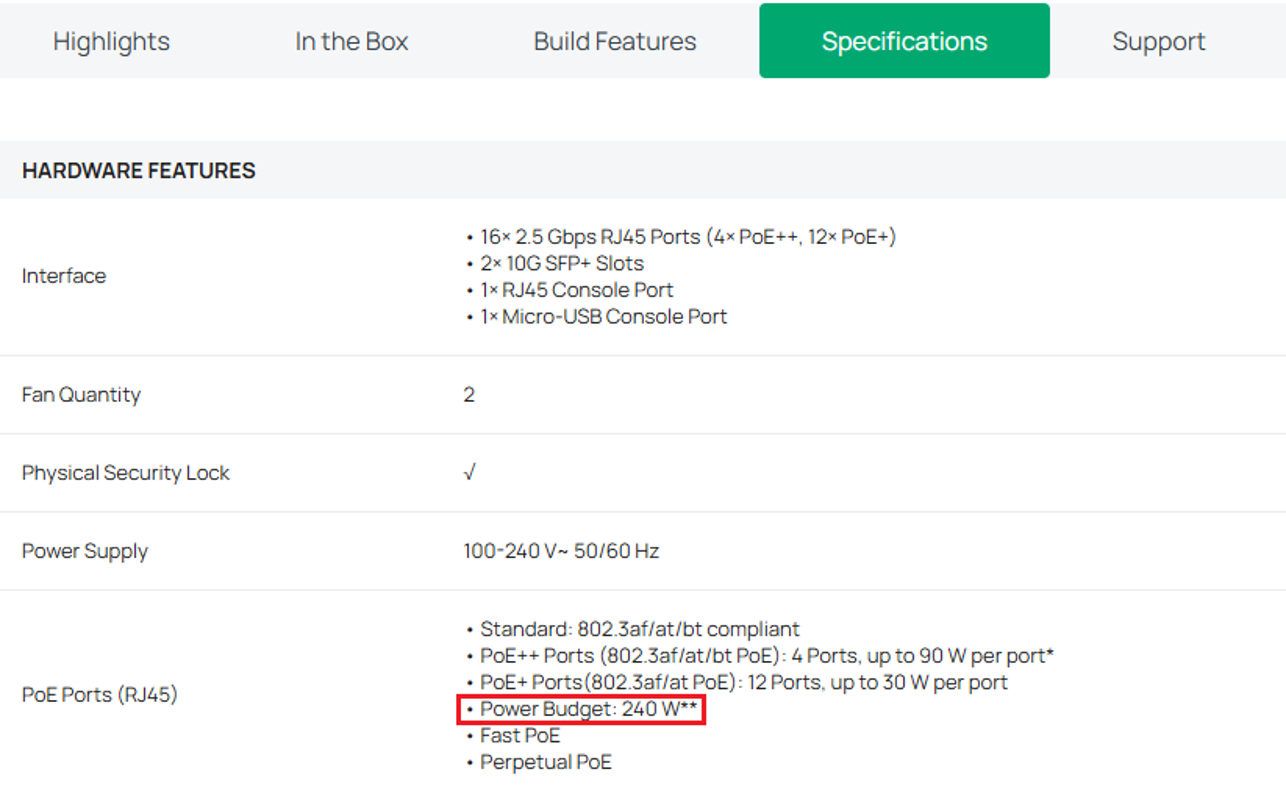
In this example, if 9 high-powered access points each pull 25W, creating a total of 225W, plugging in a 10th access point will demand a total of 250W, which is over the power budget of 240W. When a new device is connected and the total available PoE power is insufficient, Omada PoE switches will power off the PD connected to the lower-priority port.
4. Mode Incompatibilities
The fourth possible cause is a PoE mode incompatibility between the Powered Device (PD) and Power Sourcing Equipment (PSE).
PoE supports two methods for delivering power over Ethernet cabling:
- Alternative A: Power delivered over data pairs 1/2 and 3/6.
- Alternative B: Power delivered over spare pairs 4/5 and 7/8.
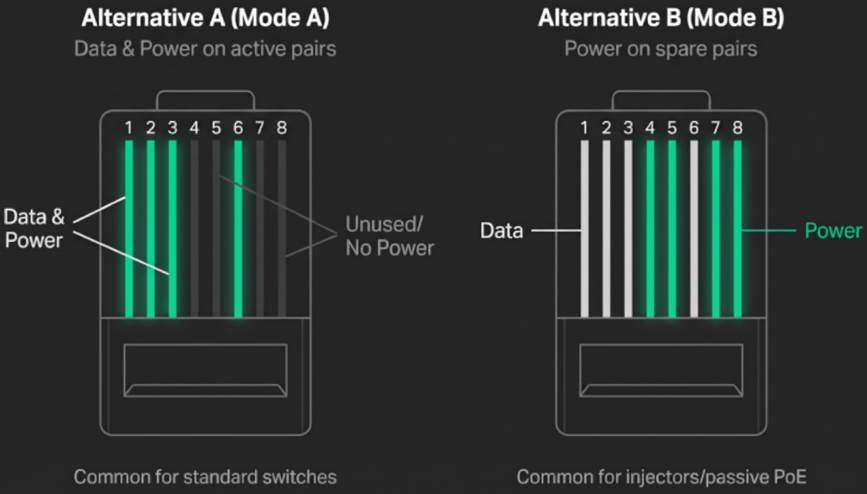
While standard-compliant PDs should accept both modes, proprietary PD designs could only be wired to Alternative B. In this case, if your PSE switch only supplies power via Alternative A the PD will never detect incoming voltage.
Note: Always check the hardware specifications to confirm supported voltages and pinouts before connecting your power source.
Note: At present, all Omada PoE switches are standard PSE and designed based on the Alternative A mode, and the line pair 1/2 is passive pole while the line pair 3/6 is the positive pole. \
5. Cable Distance and Voltage Drop
The fifth reason PoE devices won’t power on is due to excessive cable distance and voltage drop.
The IEEE standard specifies a maximum cable run of 100 meters (328 feet) for twisted-pair Ethernet. Copper wire introduces electrical resistance. Over long distances, the current flowing through the cable creates voltage drop. If a cable run is approaching or exceeding 100 meters, the voltage arriving at the PD side can fall below the required power needed to power on.
To fix this issue, ensure cable runs are under 100 meters. If a cable run needs to exceed 100 meters, a PoE extender can be used.
Note: The main caveat of a PoE extender is that it consumes a portion of the total power budget (~5 watts per extender) and can reduce data throughput (dropping to 10 Mbps on some long-range or extended modes.)
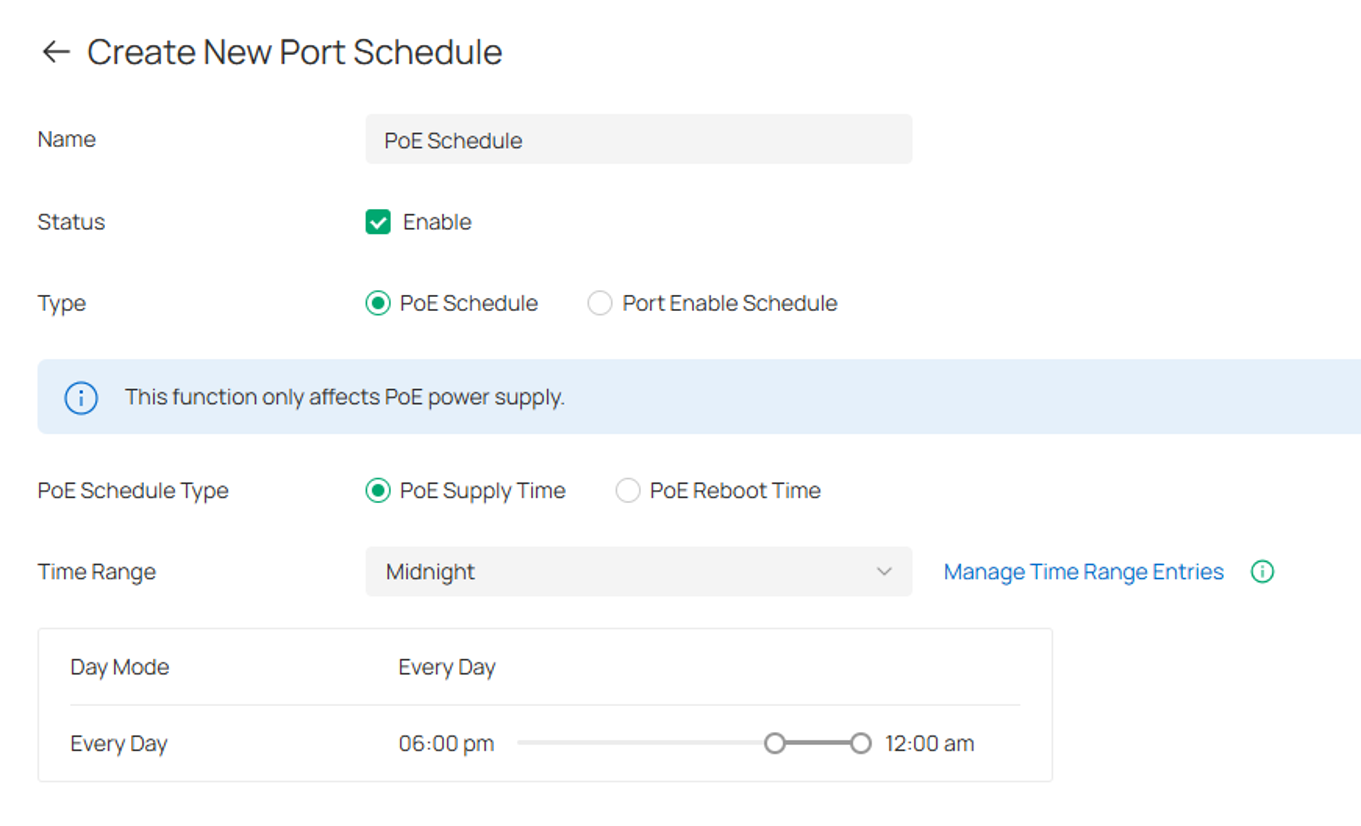
6. Administrative Port Settings and PoE Scheduling
The sixth reason PoE devices won’t power on is because of administrative port settings or PoE scheduling rules.
In modern managed environments, PoE can be controlled on a PSE such as a PoE switch by disabling the PoE output of certain ports. If a PD is connected to a port on a switch that has PoE off, it will not power on.
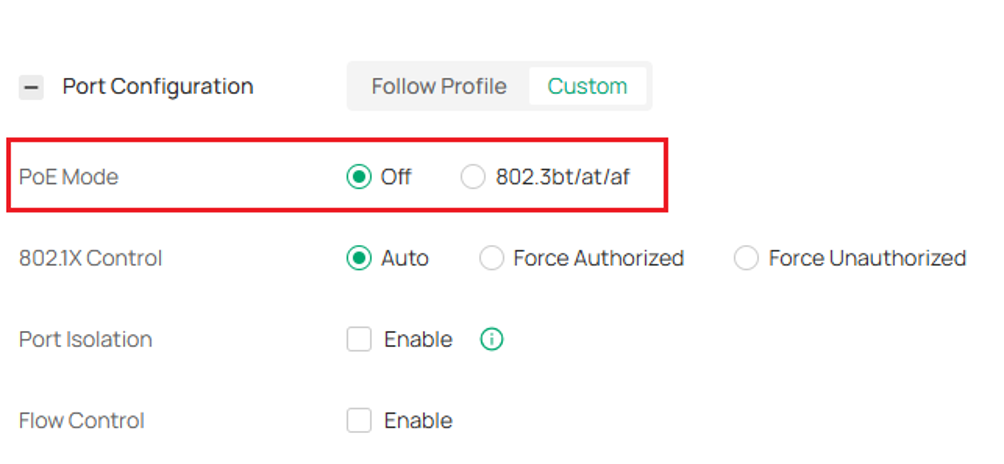
A PoE schedule can also be configured to allow or disallow PoE output from a port during a certain time window. If a PD tries to receive power outside of the time window, it will not power on:
7. Damaged Cable Pairs or Terminations (Physical Fault)
The seventh possible cause is damaged cable pairs or faulty terminations.
PoE requires proper electrical continuity through the Ethernet cable. If a conductor is broken or damaged, or if a connection is improperly terminated at an RJ45 connector, keystone jack, or patch panel, the Powered Device (PD) may fail to receive power.
If a cable or termination issue is suspected, connect the PD to a different PoE port or replace the Ethernet cable with a known-good cable to help isolate the issue.
Conclusion
When a PoE device won’t power on, resist the urge to immediately write it off as dead hardware. Because Power over Ethernet relies on a tightly orchestrated electrical handshake between the PSE and the PD, a failure anywhere along that chain, from an overlooked switch power budget, an Alternative A vs. Alternative B mismatch, or a single damaged copper conductor, can cause the power delivery negotiation to shut down before it even starts. The next time a PoE device refuses to boot, work your way through these 7 reasons.
To learn more about each function and configuration, please visit Support Home to download or check the manual for your product.
QA
Q1: Why does my PoE device power on with an injector but not directly from my switch?
A1: Check if your switch uses a different pinout mode (Alternative A vs. Alternative B) or has completely exhausted its total PoE power budget.
Q2: Will plugging a non-PoE computer into a PoE switch port damage it?
A2: No, standard active switches run a low-voltage handshake first and should never send high voltage to a device that lacks a PoE detection circuit.
Q3: Why does my PoE camera work on a short bench test but fail when installed at the actual location?
A3: Check whether the cable run exceeds 100 meters or has a damaged cable or pin termination.
Q4: What should I do if my switch port LED stays dark after connecting a PoE device?
A4: Log into the switch interface to confirm that the port's PoE setting is administratively enabled and not turned off by a scheduled power profile. If there is a PoE schedule, ensure the device is trying to receive power within the time schedule.
