


Contents
Objective
This article introduces how to configure through Omada Controller for configurations adapting several AVoIP protocols on Omada switches including AES67, Dante and Q-SYS, enhancing the experiment during network congestion.
Requirements
- Omada Smart, L2+ and L3 Switches
- Omada Controller (Software Controller / Hardware Controller / Cloud Based Controller, V5.9 and above)
Introduction
When using AVoIP protocols like AES67, Dante and Q-SYS, configuring QoS on network switches is essential to ensure that audio and video streams maintain high performance and reliability, even during network congestion. QoS prioritizes critical AVoIP traffic over less important data, preventing packet loss, jitter and latency issues that can degrade the quality of the AVoIP experience. By properly setting up QoS, you can guarantee that your AVoIP systems operate smoothly and deliver consistent, high-quality performance, even under heavy network loads.
Usually there will be a few switches connected to the AVoIP source, and then connects to some PCs and speakers. The configurations we recommend in this article will help improve the performance of these devices, preventing the lags of audio and video when network congestion happens.
Different AVoIP protocols have their own QoS setup, so we recommend setting the QoS on the switch according to the protocol you are using. On Omada controller, the QoS settings needs to be set through CLI template, not on GUI. Next we will introduce the detailed configuration.
Configuration
Overall Configuration
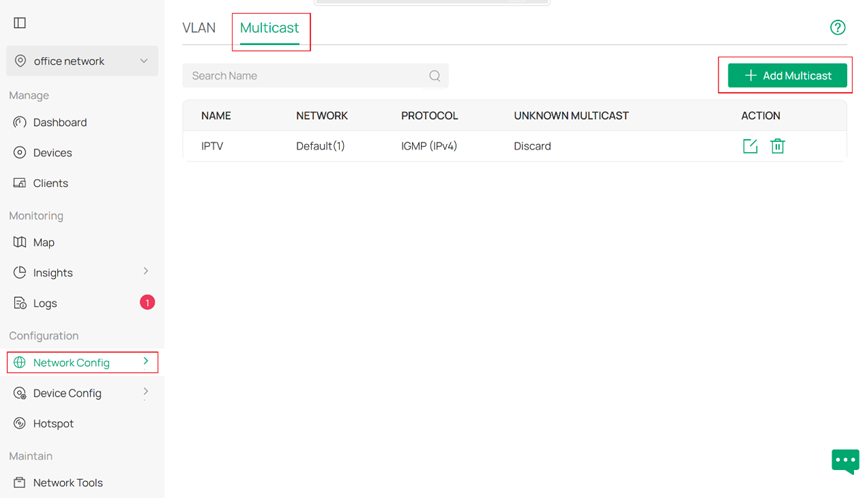
First we need a Network/VLAN for these AVoIP protocols, please enable IGMP snooping for it, go to Network Config > Network Settings > LAN > Multicast, click Add Multicast to create a new Multicast group for the use of AV protocols.
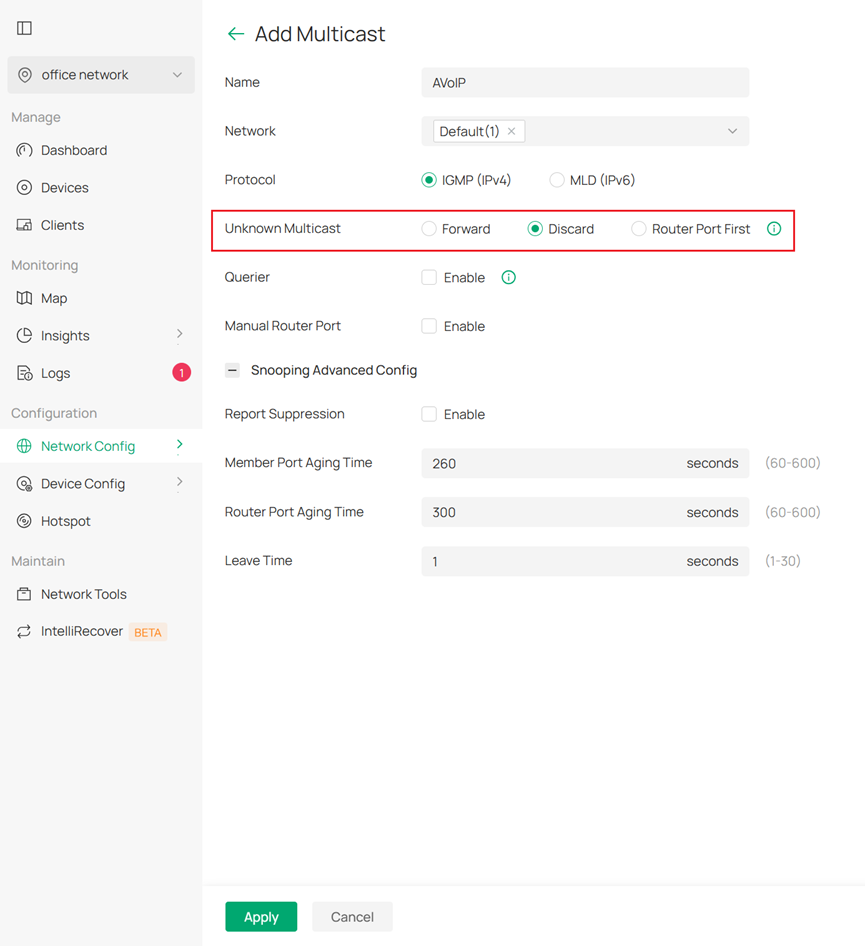
When creating this Multicast group, please set the Unknown Multicast Discard so unknown multicast packets will be dropped to grant you a rapid response. You may set the other configurations according to your needs.
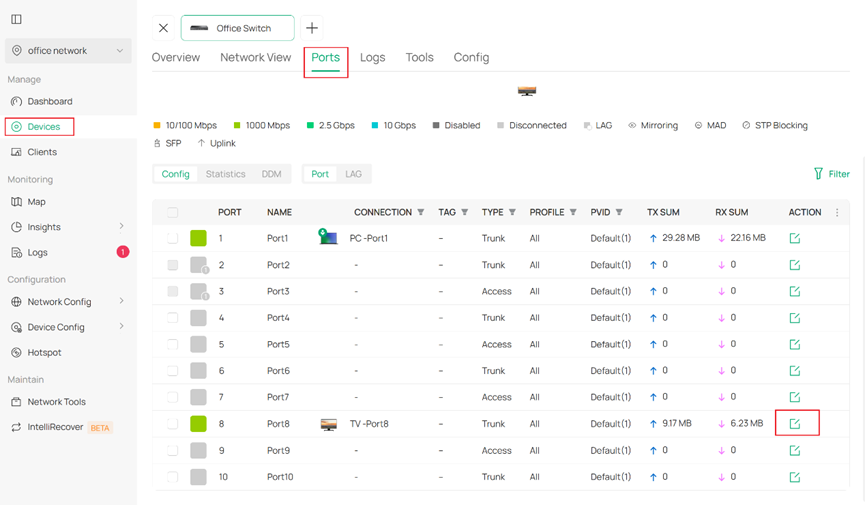
After that, we need to configure fast leave for IGMP snooping as well as the QoS settings, Go to Device and select the access device, then click Manage Device to open the Private configuration tab. Go to Ports and choose the access ports (ports that connected directly to clients) and to click the corresponding edit.
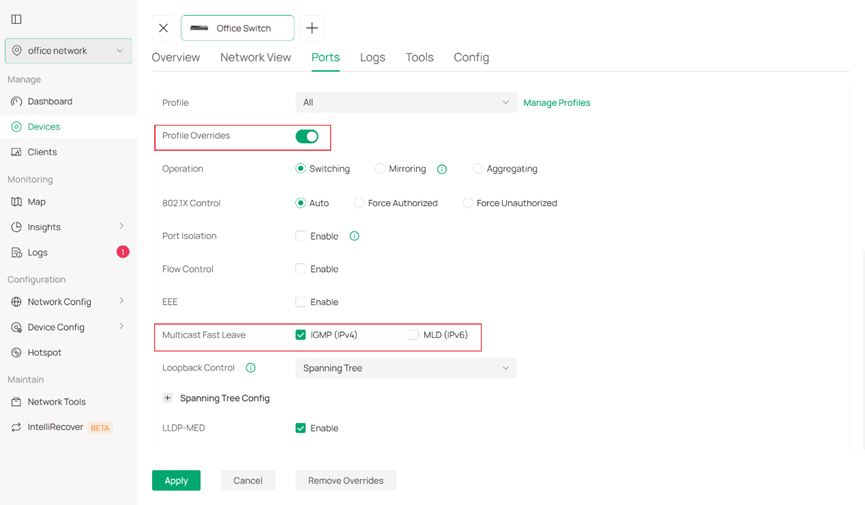
After you enter the port configuration view, enable the Profile Overrides to unlock the extended settings where you could enable Multicast Fast Leave for these access ports. This will increase the overall reaction speed for multicast service as well. You may modify multiple ports by selecting all the ports you need to configure first and then enable Multicast Fast Leave for all of them.
Configuration for AES67
AES67 uses DSCP priority 34, 46 and 56, and they needed to be mapped to 4, 5 and 6 802.1p priority respectively, and for the TC-5 queue, its scheduler mode should be SP.
For TL-SX3206HPP, SX3206HPP, TL-SX3008F, SX3008F, TL-SG3210XHP-M2, TL-SX3016F, SX3016F, TL-SG2428P V3, TL-SG3428, SG3428, TL-SG3428MP, SG3428MP, TL-SG3428X, SG3428X, TL-SG3428X-UPS, TL-SG3428XF, SG3428XF, TL-SG3428XMP, SG3428XMP, SG3428XMPP, SG6428X, SG6428XHP, SX6632YF, TL-SG3452X, SG3452X, TL-SG3452XP, SG3452XP, SG3452XMPP, SG6654X, SG6654XHP, the commands are:
qos dscp-map 34 4
qos dscp-map 46 5
qos dscp-map 56 6
qos queue 5 mode sp
ip igmp snooping drop-unknown
interface range gigabitEthernet 1/0/1-5 (choose the uplink and downlink ports)
qos trust mode dscp
#
interface range gigabitEthernet 1/0/2-5 (choose the ports connected directly to clients)
ip igmp snooping immediate-leave
For SG2005P-PD, TL-SG2008, SG2008, TL-SG2008P, SG2008P, TL-SG2210P, SG2210P, TL-SG2210MP, SG2210MP, SG2210XMP-M2, TL-SG3210, SG3210, SG3210X-M2, SG3210XHP-M2, TL-SG2016P, SG2016P, TL-SG2218, SG-2218, TL-SG2218P, SG2218P, SG3218XP-M2, TL-SL2428P, SL2428P, TL-SG2428P V1/V2/V4/V5, SG2428P, TL-SG3428X-M2, SG3428X-M2, TL-SG3428XPP-M2, SG3428XPP-M2, SG2452LP, TL-SG3452, SG3452, TL-SG3452P, SG3452P, the commands are:
qos dscp-map 34 4
qos dscp-map 46 5
qos dscp-map 56 6
ip igmp snooping drop-unknown
interface range gigabitEthernet 1/0/1-5 (choose the uplink and downlink ports)
qos trust mode dscp
qos queue 5 mode sp
#
interface range gigabitEthernet 1/0/2-5 (choose the ports connected directly to clients)
ip igmp snooping immediate-leave
Configuration for Dante
Dante uses DSCP priority 8, 46, 48 and 56, and they needed to be mapped to 2, 5, 5 and 6 802.1p priority respectively, and for the TC-5 and TC-6 queue, their scheduler mode should be SP.
For TL-SX3206HPP, SX3206HPP, TL-SX3008F, SX3008F, TL-SG3210XHP-M2, TL-SX3016F, SX3016F, TL-SG2428P V3, TL-SG3428, SG3428, TL-SG3428MP, SG3428MP, TL-SG3428X, SG3428X, TL-SG3428X-UPS, TL-SG3428XF, SG3428XF, TL-SG3428XMP, SG3428XMP, SG3428XMPP, SG6428X, SG6428XHP, SX6632YF, TL-SG3452X, SG3452X, TL-SG3452XP, SG3452XP, SG3452XMPP, SG6654X, SG6654XHP, the commands are:
qos dscp-map 8 2
qos dscp-map 46 5
qos dscp-map 48 5
qos dscp-map 56 6
qos queue 5 mode sp
qos queue 6 mode sp
ip igmp snooping drop-unknown
interface range gigabitEthernet 1/0/1-5 (choose the uplink and downlink ports)
qos trust mode dscp
#
interface range gigabitEthernet 1/0/2-5 (choose the ports connected directly to clients)
ip igmp snooping immediate-leave
For SG2005P-PD, TL-SG2008, SG2008, TL-SG2008P, SG2008P, TL-SG2210P, SG2210P, TL-SG2210MP, SG2210MP, SG2210XMP-M2, TL-SG3210, SG3210, SG3210X-M2, SG3210XHP-M2, TL-SG2016P, SG2016P, TL-SG2218, SG-2218, TL-SG2218P, SG2218P, SG3218XP-M2, TL-SL2428P, SL2428P, TL-SG2428P V1/V2/V4/V5, SG2428P, TL-SG3428X-M2, SG3428X-M2, TL-SG3428XPP-M2, SG3428XPP-M2, SG2452LP, TL-SG3452, SG3452, TL-SG3452P, SG3452P, the commands are:
qos dscp-map 8 2
qos dscp-map 46 5
qos dscp-map 48 5
qos dscp-map 56 6
ip igmp snooping drop-unknown
interface range gigabitEthernet 1/0/1-5 (choose the uplink and downlink ports)
qos trust mode dscp
qos queue 5 mode sp
qos queue 6 mode sp
#
interface range gigabitEthernet 1/0/2-5 (choose the ports connected directly to clients)
ip igmp snooping immediate-leave
Configuration for Q-SYS
Dante uses DSCP priority 26, 34 and 46, and they needed to be mapped to 3, 4 and 5 802.1p priority respectively, and for the TC-4 and TC-5 queue, their scheduler mode should be SP.
For TL-SX3206HPP, SX3206HPP, TL-SX3008F, SX3008F, TL-SG3210XHP-M2, TL-SX3016F, SX3016F, TL-SG2428P V3, TL-SG3428, SG3428, TL-SG3428MP, SG3428MP, TL-SG3428X, SG3428X, TL-SG3428X-UPS, TL-SG3428XF, SG3428XF, TL-SG3428XMP, SG3428XMP, SG3428XMPP, SG6428X, SG6428XHP, SX6632YF, TL-SG3452X, SG3452X, TL-SG3452XP, SG3452XP, SG3452XMPP, SG6654X, SG6654XHP, the commands are:
qos dscp-map 26 3
qos dscp-map 34 4
qos dscp-map 46 5
qos queue 4 mode sp
qos queue 5 mode sp
ip igmp snooping drop-unknown
interface range gigabitEthernet 1/0/1-5 (choose the uplink and downlink ports)
qos trust mode dscp
#
interface range gigabitEthernet 1/0/2-5 (choose the ports connected directly to clients)
ip igmp snooping immediate-leave
For SG2005P-PD, TL-SG2008, SG2008, TL-SG2008P, SG2008P, TL-SG2210P, SG2210P, TL-SG2210MP, SG2210MP, SG2210XMP-M2, TL-SG3210, SG3210, SG3210X-M2, SG3210XHP-M2, TL-SG2016P, SG2016P, TL-SG2218, SG-2218, TL-SG2218P, SG2218P, SG3218XP-M2, TL-SL2428P, SL2428P, TL-SG2428P V1/V2/V4/V5, SG2428P, TL-SG3428X-M2, SG3428X-M2, TL-SG3428XPP-M2, SG3428XPP-M2, SG2452LP, TL-SG3452, SG3452, TL-SG3452P, SG3452P, the commands are:
qos dscp-map 26 3
qos dscp-map 34 4
qos dscp-map 46 5
ip igmp snooping drop-unknown
interface range gigabitEthernet 1/0/1-5 (choose the uplink and downlink ports)
qos trust mode dscp
qos queue 4 mode sp
qos queue 5 mode sp
#
interface range gigabitEthernet 1/0/2-5 (choose the ports connected directly to clients)
ip igmp snooping immediate-leave
Conclusion
Till here, we have briefly introduced some configuration on IGMP snooping and QoS for Omada switches, which will help improve the performance working with these AVoIP protocols while network congestion happens.
Get to know more details of each function and configuration please go to Download Center to download the manual of your product.
