


What to Do When an Omada Switch Becomes Disconnected in the Omada Controller


Contents
Mechanism of Sx2xxx/Sx3xxx switches
Mechanism of Sx5xxx/Sx6xxx/S6500/S7500 switches
Introduction
Previously, when an Omada switch is adopted by the Omada Controller, all configuration changes must be made through the Controller. Direct configuration through the switch's WebUI or CLI is disabled to ensure centralized management and configuration consistency.
However, if the switch becomes disconnected from the Omada Controller due to an incorrect configuration or network issue, administrators may be unable to modify the configuration required to restore Controller connectivity. In such cases, resetting the switch to factory defaults was previously the only recovery option.
To address this limitation, newer Omada switch firmware versions introduce several recovery and management mechanisms that allow users to access and modify switch settings while the device is disconnected from the Controller. These features help administrators troubleshoot connectivity issues, restore communication with the Omada Controller, and return the switch to normal Controller-managed operation without requiring a factory reset.
Requirements
- All Omada Switches Excluding Agile/Industrial.
- Latest Firmware Released
Mechanism Detail
Mechanism of Sx2xxx/Sx3xxx switches
When a switch loses connectivity to the Omada Controller, several recovery mechanisms are available to help administrators regain management access and restore controller connectivity. The available recovery methods vary depending on the firmware version running on the switch.
- Firmware adapted to Omada Controller v5.14
Starting with firmware versions adapted to Omada Controller v5.14, if a switch has been adopted by the Omada Controller but becomes disconnected from it (the Controller information is still stored on the switch, but the ECS connection status is down), the switch provides limited local recovery capabilities.
SSH access recovery
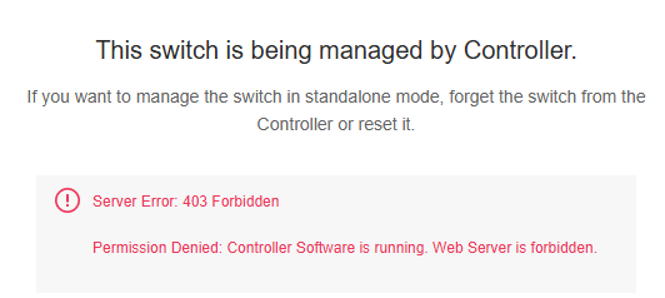
When the switch is properly connected to the Omada Controller, users can log in to the WebUI but cannot modify any configuration settings.
When the switch is disconnected from the Controller, the SSH Enable/Disable option becomes available in the WebUI.
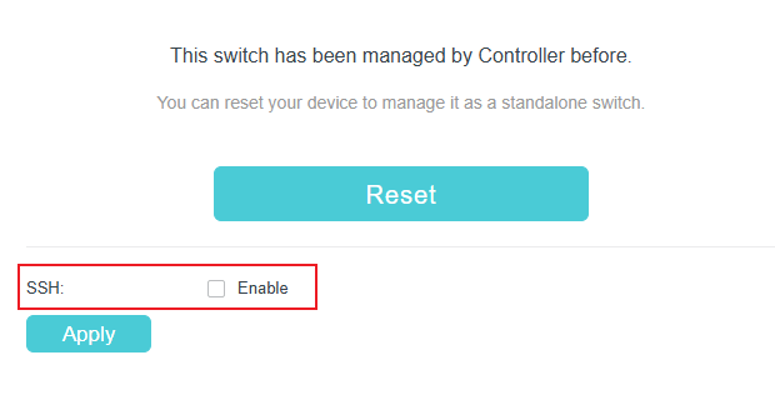
In this state, administrators can manually enable SSH through the WebUI, even if SSH was disabled by the Controller before the disconnection occurred.
After SSH is enabled, users can access the switch through either:
- SSH
- Console connection
Administrators can then enter global configuration mode and modify the switch configuration to restore connectivity to the Omada Controller. The standalone WebUI remains unavailable for configuration changes; only SSH enablement is permitted.
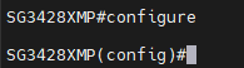
Note: Important: Before restoring Controller connectivity, ensure that any corrective configuration changes are also updated on the Controller. Otherwise, once the switch reconnects, the Controller may reapply the original configuration and cause the same issue to reoccur.
- Firmware adapted to Omada Controller v6.2
Starting with firmware versions adapted to Omada Controller v6.2, several enhancements have been introduced to simplify troubleshooting and improve automatic recovery.
WebUI accessibility during controller disconnection
The standalone WebUI remains accessible after the switch disconnects from the Controller. This allows administrators to restore connectivity using either WebUI or CLI without requiring additional recovery procedures.
Automatic SSH enablement
SSH is automatically enabled when the switch loses its connection to the Omada Controller for more than 30 minutes.
This eliminates the need to manually enable SSH through the WebUI before accessing the CLI.
NAT traversal and remote access
Firmware adapted to Omada Controller v6.2 supports NAT Traversal. If a switch becomes disconnected from the Controller, administrators can use the Remote Access feature to access the disconnected device through another online Omada device within the same site, including:
- Gateway
- Switch
- Access Point
The online device acts as a relay, allowing direct access to the disconnected switch's:
- WebUI
- CLI
This significantly improves remote troubleshooting by eliminating the need for:
- On-site access
- VPN deployment
- Custom network tunnels
For Remote Access configuration details, refer to: How to Configure Remote Access for Omada Devices Using Omada Controller and Omada App.
Smart monitoring and elf-healing features
Firmware adapted to Omada Controller v6.2 introduces several intelligent monitoring and self-recovery mechanisms, including:
- Management interface monitoring
- Critical process monitoring
- ECS connection monitoring
When an abnormal condition is detected, the switch automatically attempts to restore connectivity through recovery actions such as:
- Restarting the management interface
- Rebooting the system
If a disconnection occurs after a firmware upgrade, the switch will also be able to automatically activate the backup firmware image and roll back to the previous used firmware version in an effort to restore Controller connectivity. If a disconnection occurs after the switch reconnects to the Controller and receives the full configuration, the switch will automatically roll back to the previously used firmware version and configuration in an effort to restore Controller connectivity.
Future enhancement: configuration auto rollback
A complete configuration auto-rollback capability is currently under development. This feature is expected to become available in H1 2027 and will further enhance the switch's ability to recover automatically from configuration-related connectivity issues.
|
Feature |
Firmware Adapted to Controller v5.14 |
Firmware Adapted to Controller v6.2 |
|
WebUI accessible after Controller disconnection |
Limited (SSH enablement only) |
Yes |
|
Manual SSH enablement through WebUI |
Yes |
N/A |
|
Automatic SSH enablement |
No |
Yes |
|
CLI access for recovery |
Yes |
Yes |
|
WebUI-based recovery |
No |
Yes |
|
NAT Traversal / Remote Access |
No |
Yes |
|
Smart monitoring and self-healing |
No |
Yes |
|
Automatic firmware rollback after upgrade-related disconnection |
No |
Yes |
|
Configuration auto rollback |
Planned |
Planned (H1 2027) |
Mechanism of Sx5xxx/Sx6xxx/S6500/S7500 switches
- Current behavior (firmware adapted to Omada Controller v6.0)
Starting with firmware versions adapted to Omada Controller v6.0, if a switch has been adopted by the Omada Controller but becomes disconnected from it (the Controller information is retained, but the ECS connection status is down), limited local recovery access is available.
SSH access recovery
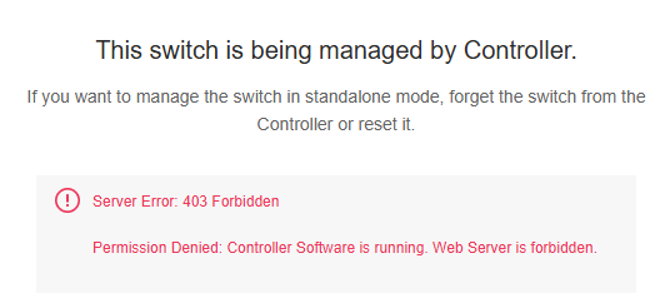
When the switch is operating normally and connected to the Omada Controller, users can log into the WebUI using their credentials; however, no configuration changes can be made.
When the switch is disconnected from the Controller, the SSH Enable/Disable option becomes available in the WebUI.
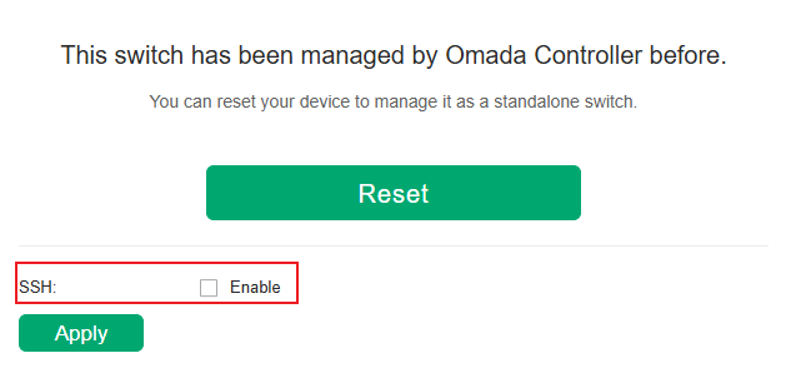
In this state, administrators can manually enable SSH through the WebUI, even if SSH was disabled by the Controller before the disconnection occurred.
After SSH is enabled, users can access the switch through SSH or the console port, enter global configuration mode, and modify the switch configuration to restore Controller connectivity.
If the disconnected state lasts for more than 30 minutes, SSH will be automatically enabled.
The standalone WebUI remains unavailable for configuration changes.
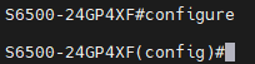
Note: Before restoring the switch's connection to the Controller, ensure that the corresponding configuration on the Controller is updated accordingly. Otherwise, the Controller may reapply the previous configuration after reconnection, causing the issue to recur.
- Planned enhancements (targeted for 2027)
The following features are currently under development and are planned for future releases:
Full WebUI accessibility during controller disconnection
The standalone WebUI will remain fully accessible when the switch is disconnected from the Controller, allowing administrators to modify switch configurations through either the WebUI or CLI to restore Controller connectivity.
Automatic SSH enablement
SSH will be automatically enabled when the switch loses its connection to the Omada Controller, eliminating the need for manual activation through the WebUI.
NAT traversal and remote access
Support for NAT Traversal and Remote Access will allow administrators to access a disconnected switch remotely through another online Omada device within the same site, such as:
- Gateway
- Switch
- Access Point
The online device will act as a relay, enabling direct access to the disconnected switch's WebUI or CLI without requiring on-site access, VPN deployment, or custom network tunnels.
Smart monitoring and self-healing mechanisms
The switches will incorporate intelligent monitoring and automatic recovery capabilities, including:
- Management interface monitoring
- Critical process monitoring
- ECS connection monitoring
When abnormalities are detected, the switch will attempt to restore connectivity through automated recovery actions, such as:
- Restarting the management interface
- Rebooting the system
If a disconnection occurs after a firmware upgrade, the switch will also be able to automatically activate the backup firmware image and roll back to the previous used firmware version in an effort to restore Controller connectivity.
Configuration auto rollback
A complete configuration auto-rollback mechanism is also under development. This feature will allow the switch to automatically recover from configuration changes that result in a loss of Controller connectivity.
|
Feature |
Current Firmware (Adapted to Controller v6.0) |
Planned Enhancement (Target 2027) |
|
SSH enablement through WebUI when disconnected |
Yes |
Yes |
|
CLI-based recovery |
Yes |
Yes |
|
Full WebUI access when disconnected |
No |
Yes |
|
Automatic SSH enablement |
No |
Yes |
Conclusion
This article describes the recovery and management features available on Omada switches when Controller connectivity is lost. With the latest firmware, administrators can use capabilities such as SSH access, standalone WebUI access, Remote Access, self-healing mechanisms, and firmware rollback to restore connectivity more easily and minimize the need for factory resets.
To learn more about each function and configuration, please visit Support Home to download or check the manual for your product.
