


How to Configure Port Triggering on Omada Gateway


Contents
Introduction
Port Triggering is a NAT feature that dynamically opens specified incoming ports when a LAN device sends traffic through a configured trigger port. The gateway then records the triggering client's IPv4 address and forwards matching incoming traffic to that client while the dynamic trigger state remains active.
This feature is commonly used for online games, VoIP, and other applications that require additional inbound connections. For services that must remain continuously accessible from the internet, use Port Forwarding instead.
Requirements
- Omada Gateway
Configuration
This example demonstrates how to configure Port Triggering for a VoIP application on WAN1. When a phone or softphone initiates SIP signaling through port 5060, the gateway creates a temporary dynamic mapping to UDP ports 10000–20000 for the corresponding RTP voice traffic and forwards the traffic to the device that initiated the connection.
Note: The ports and protocols required for VoIP services vary by application and service provider. Configure the trigger and incoming ports according to the actual requirements of the application or service.
Configure a Port Triggering rule
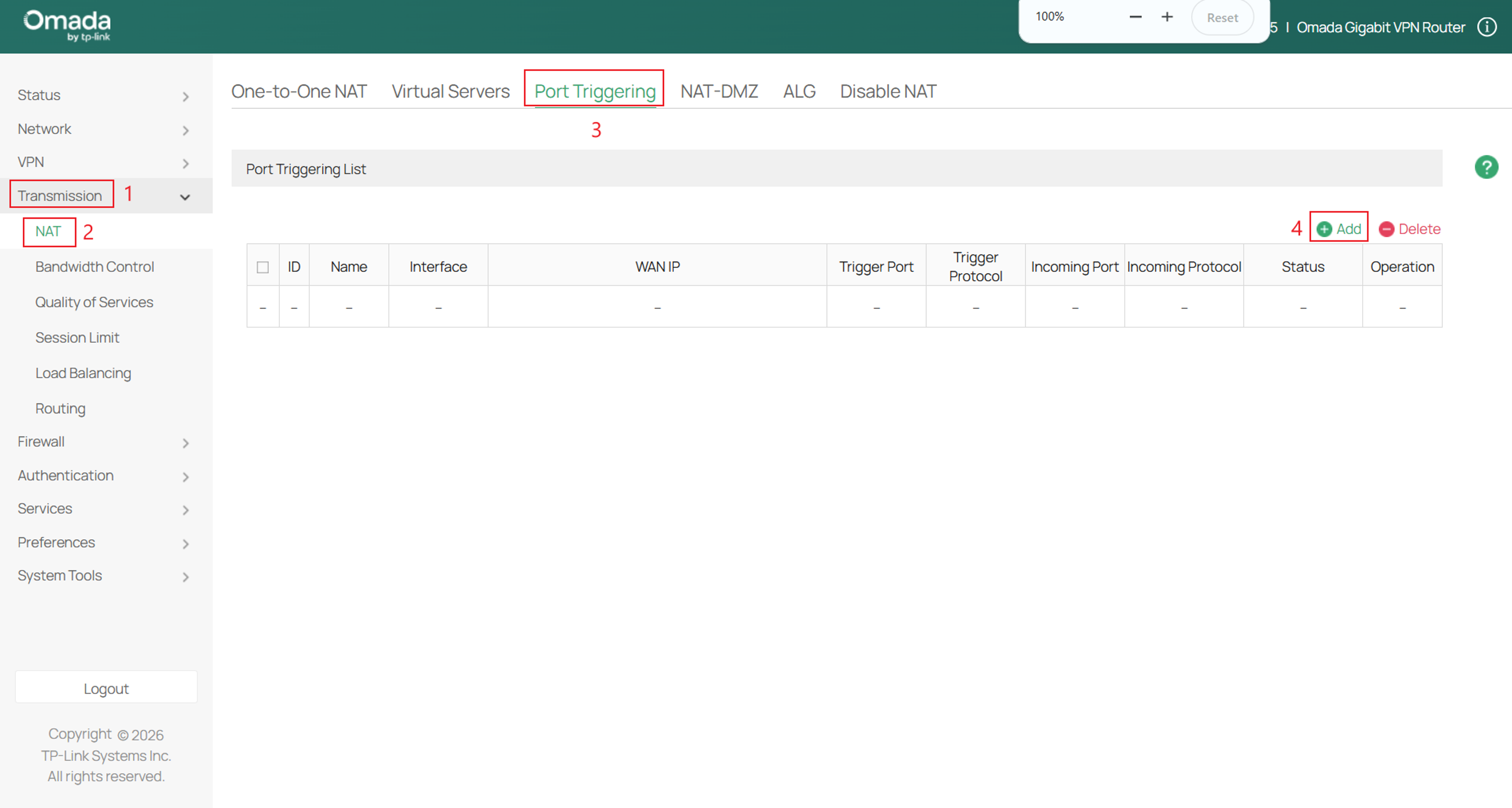
Step 1. Log in to the gateway and navigate to Transmission > NAT > Port Triggering. Click Add to create a new Port Trigger policy.
Step 2. Configure the Port Triggering rule using the following settings, and click OK to apply the configuration.
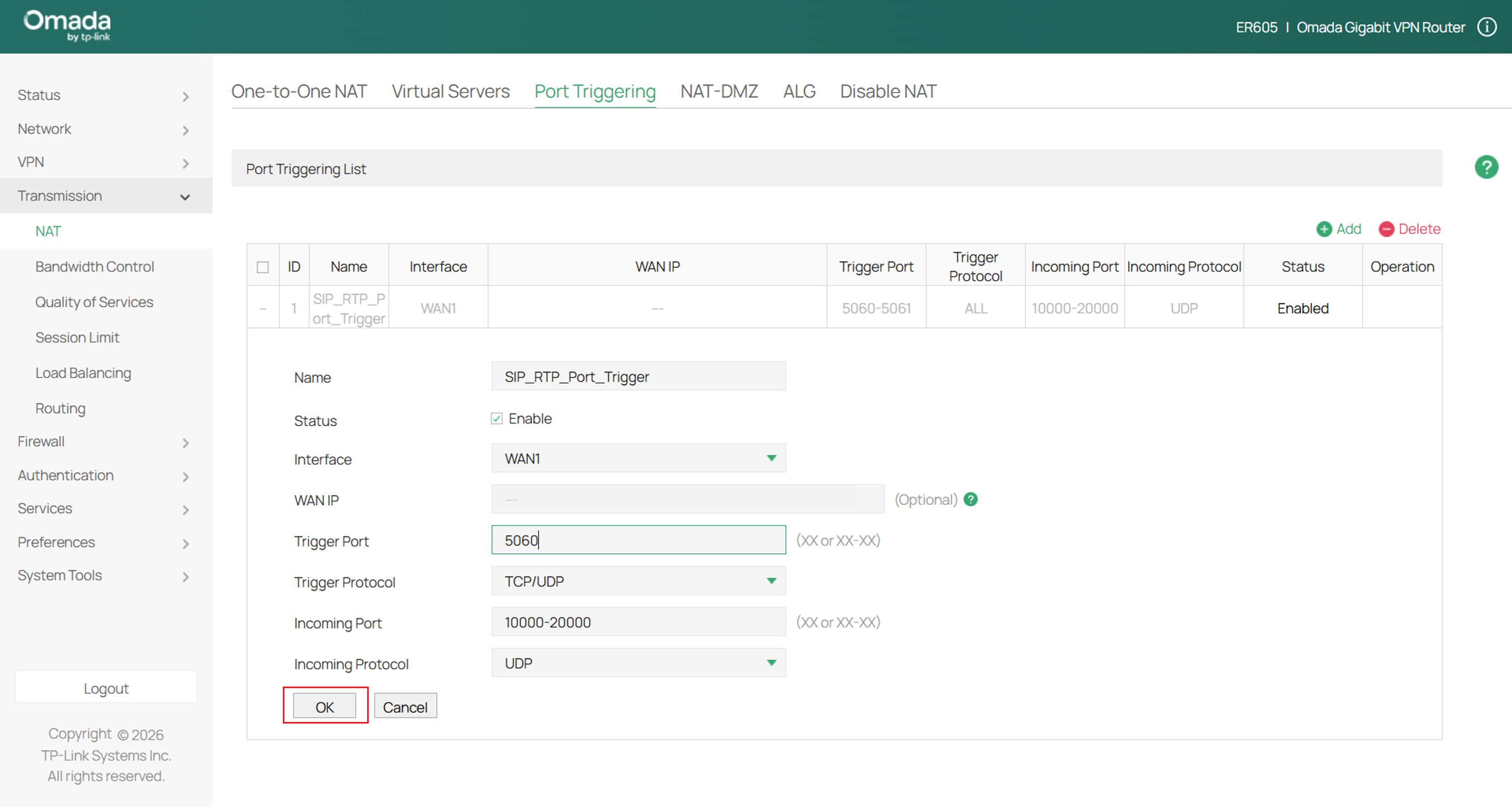
Name: Enter a name to identify the rule.
Status: Check the box to enable the rule.
Interface: Select one or more WAN interfaces on which incoming traffic can match the dynamic mapping. The selected interfaces limit matching inbound traffic; they do not determine whether a LAN client can create the trigger state.
WAN IP: Specifies the WAN Alias IP to which the rule applies. If multiple WAN IP addresses are selected, the rule applies to all selected addresses.
Trigger Port: Specifies the outbound destination port or port range that triggers the rule. Each rule supports up to five groups of trigger ports. The configured ports or port ranges cannot overlap with those of other Port Triggering rules.
Trigger Protocol: Specifies the protocol used by the trigger traffic:
- ALL: Data packets are transmitted based on TCP or UDP protocols.
- TCP: Data packets are transmitted based on TCP protocol.
- UDP: Data packets are transmitted based on UDP protocol.
Incoming Port: Specifies the incoming port or port range to open dynamically after the trigger condition is met. Each rule supports up to five groups of incoming ports. The configured ports or port ranges cannot overlap with those of other Port Triggering rules.
Note: Within the same rule, Trigger Port and Incoming Port are independent and may overlap. Multiple groups in the same field may partially overlap, but duplicate groups should not be entered.
Incoming Protocol: Specifies the protocol used by the incoming traffic:
- ALL: Data packets are transmitted based on TCP or UDP protocols.
- TCP: Data packets are transmitted based on TCP protocol.
- UDP: Data packets are transmitted based on UDP protocol.
Conclusion
Port Triggering allows an Omada Gateway to open incoming ports dynamically after a LAN device initiates the configured outbound connection. By using the correct trigger ports, incoming ports, and protocols specified by the application provider, services such as VoIP and online games can communicate through NAT without permanently forwarding the ports to one device.
To learn more about each function and configuration, please visit Support Home to download or check the manual for your product.
QA
Q1: What is the difference between Port Triggering and Port Forwarding?
A1: Port Triggering: Creates a temporary mapping after a LAN client sends traffic to the configured outbound trigger destination port. The mapping forwards matching incoming TCP and/or UDP traffic to the client that triggered the rule and expires after a period without matching traffic.
Port Forwarding: Continuously forwards a configured external port to a specified LAN host and port. To use it, you can assign the LAN host a reserved or static IP address so that the rule continues to reach the intended device.
Q2: Why is my Port Triggering rule not working?
A2: Check the following:
Confirm that the gateway has a public, internet-reachable IPv4 address. A gateway behind another NAT device, CGNAT, or an ISP firewall may not receive incoming connections.
- Confirm that the Port Triggering rule is enabled and that the correct WAN interface and, when applicable, WAN Alias IP are selected.
- Confirm that the LAN client’s outbound traffic uses the configured trigger destination port and protocol.
- Confirm that the incoming port and protocol match the application’s requirements and do not conflict with another NAT rule.
- Confirm that the application is running and that the LAN client’s firewall permits the incoming traffic.
