


Contents
Requirements
- EAP775-Wall 1.0
- Decorative shell included within the package
- Spray painting tools and paints
Introduction
For some new Wi-Fi 7 models in the Omada product line, such as the EAP775-Wall 1.0, a decorative shell is included in the package. The decorative shell primarily enhances the surface temperature experience and, while covering the device’s security lock hole, also allows users to customize the product’s appearance.
- For the EAP775-Wall 1.0, the decorative shell is shown in the image below, indicated by the red arrow. To spray paint the decorative shell, please be sure to remove the decorative shell from the product and apply the coating to the outer shell separately. If the product has been installed on the wall, it can be disassembled by simply grasping the decorative shell and the back of the product, applying a force away from the device (as shown by the black arrow).
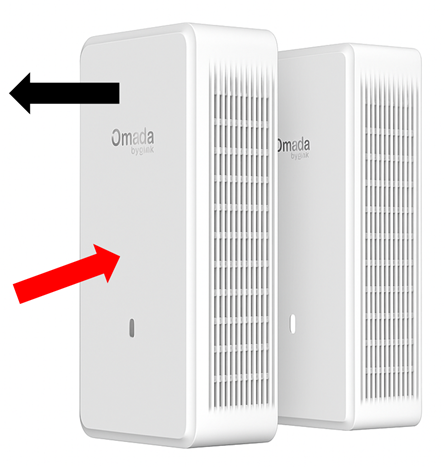
- When you are spray coating, please avoid coating onto the inside of the decorative shell.
Conclusion
You can customize the decorative shell of the EAP775-Wall to match the backgrounds. Please be sure to remove the decorative shell from the device before spray coating and avoid coating onto the inside of the decorative shell.
Get to know more details of each function and configuration please go to Download Center to download the manual of your product.
Please Rate this Document
