


Contents
Introduction
IPv6 Protocol Independent Multicast (PIM), also named PIMv6, is an intra-domain multicast routing protocol. It is mainly used to bring multicast data streams from the network to the devices connected to group members who have requested multicast traffic, thereby enabling multicast stream route lookup and forwarding. PIMv6 uses IPv6 unicast routing information to perform RPF checks on multicast messages and create IPv6 multicast routing entries. The protocol that provides routing information for IPv6 multicast can be any unicast routing protocol, such as IPv6 static routing, RIPng, OSPFv3, IS-ISv6, and MP-BGP. Multicast generates multicast routing entries based on the unicast routing table, regardless of the type of unicast routing protocol.
Omada Campus switches support IPv6 PIM-DM and PIM-SM. Where IPv6 PIM-DM suits the network with smaller size and concentrated group members. IPv6 PIM-SM suits the network with larger size and dispersed group members.
The Multicast Listener Discovery (MLD) protocol is used to manage IPv6 multicast members. It sets up and maintains member relationships between IPv6 hosts and their directly connected multicast devices. It operates at the final section of multicast network, where the subnet on Layer3 multicast device connected to multicast user hosts. The MLD protocol on user host side controls the multicast member joining or leaving the groups, while on the Layer3 multicast device side, maintains and manages the relationship of groups and members, supporting the interaction with multicast routing protocol at the same time.
Requirements
- Omada Campus Switches with latest firmware
Configuration
We will make a simple demo on the configuration of PIMv6 and MLD base on the topology below:
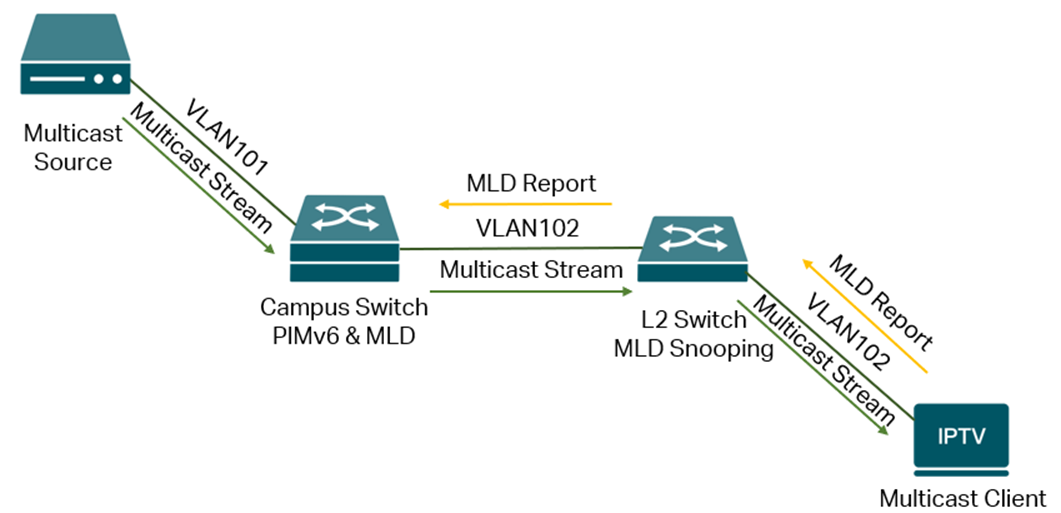
The multicast client and related L2 switches sit in VLAN 102 network, then connect to the campus switch and go to multicast source in VLAN 101 network. The campus switch will be responsible for forwarding the multicast traffic from VLAN 101 to 102 network to deliver the multicast traffic to clients in need through PIMv6 and MLD. The L2 switch sits in VLAN 102 then running the Layer2 multicast feature like MLD Snooping to optimize the multicast traffic.
Currently, PIMv6 and MLD only support to be configured via CLI.
The following configuration steps will be introduced on the campus switch shown in the example topology, based on all VLANs and switchport VLAN status configured correctly.
Step 1. Enabled multicast routing, PIM and MLD globally. Command as follows:
ipv6 multicast-routing
ipv6 pim sparse mode (Use ipv6 pim dense-mode if needs to use PIM-DM)
ipv6 mld
#
Step 2. Configure the PIM and MLD status under corresponding interfaces. Commands as follows:
interface loopback 1
ipv6 pim
#
interface vlan 101
ipv6 pim
#
interface vlan 102
ipv6 pim
ipv6 mld
#
Step 3. Configure the static RP address, dynamic RP and dynamic BSR. Commands as follows:
ipv6 pim rp-address 2001:db8:3001::2 ff1e::1/96
ipv6 pim rp-candidate interface loopback 1 ff1e::1/96
ipv6 pim bsr-candidate interface loopback1
Conclusion
This article gives a brief introduction of PIMv6 and MLD configuration.
Get to know more details of each function and configuration please go to Download Center to download the manual of your product.
