


Contents
Introduction
Copper SFP modules generally consume more power and generate more heat than optical modules. Due to their higher operating temperature, copper modules should be installed according to the recommended port placement guidelines to ensure adequate thermal dissipation and stable operation.
Typically, when setting up all-fiber switches, a bunch of copper SFP modules may be put into use. This article will introduce the recommended copper SFP modules when setting up Omada all-fiber-ports switches.
Requirements
- Omada All-fiber switches
- Copper SFP modules
Configuration
When deploying copper modules, it is recommended to leave sufficient spacing between adjacent modules whenever possible and follow the hardware installation recommendations provided in the product documentation. Failure to do so may result in elevated temperatures, which could affect module performance, reliability, or lifespan.
For instructions on arranging the copper module to prevent overheating, please refer to the illustration below.
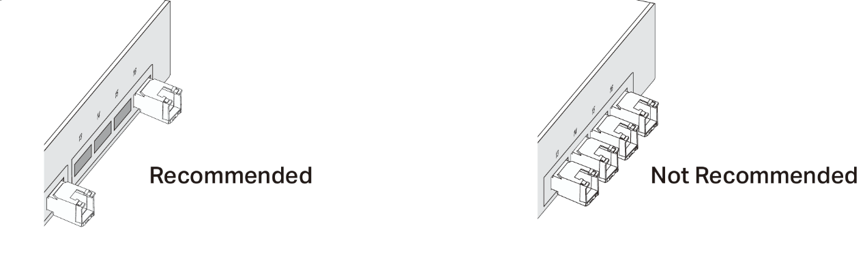
Scenario 1: When using switches owning a single line of fiber slots (SX3016F), it is recommended to use a single copper module for each group of SFP+ ports. Plugging copper modules adjacent to each other is not recommended.
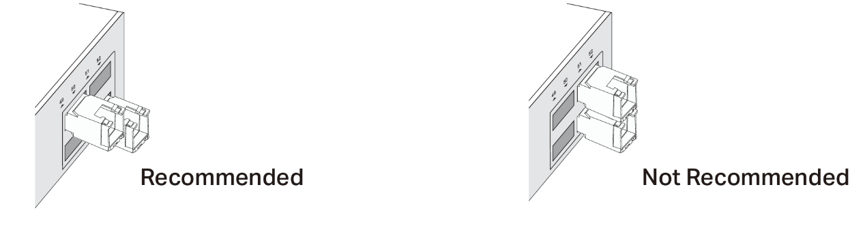
Scenario 2: When using switches owning multiple lines of fiber slots (SX6632YF for example), it is recommended to use copper modules in slashes. Plugging copper modules adjacent to each other in line or row is not recommended.
As we have just talked about how to arrange copper modules in slots, next we are going to discuss the number of actual modules recommended to plug in. That depends on environmental altitude and temperature.
Taking SX6632YF as an example, the primary factor limiting the number of supported copper transceiver modules is the operating ambient temperature. If the maximum ambient temperature in the actual deployment environment is lower than 50°C, which is highest operating temperature in datasheet of SX6632YF, more copper transceiver modules can be installed per degree of subtraction.
Operating Temperature Range: -5°C to 50°C
No more than six 10G RJ45 SFP+ modules are supported. And it is recommended to have one column interval between every two 10G RJ45 SFP+ modules.
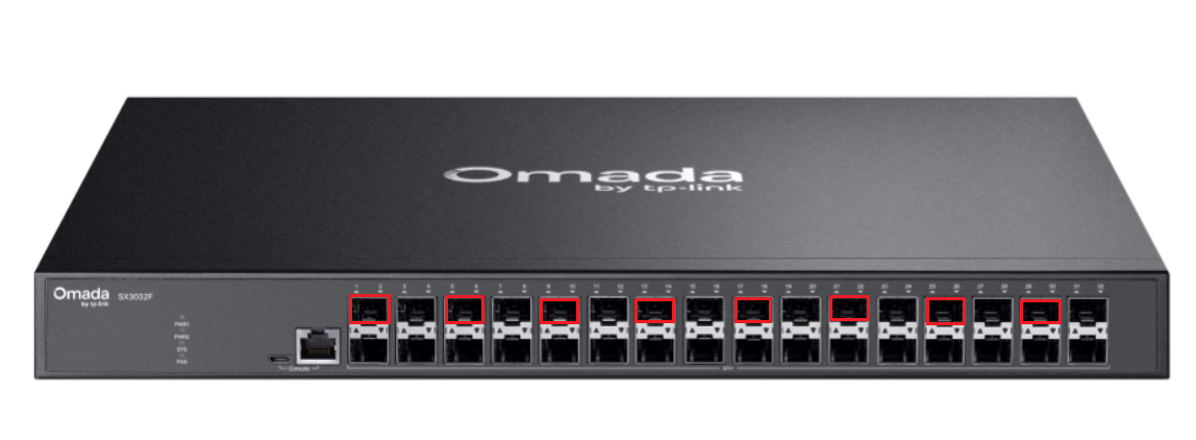
The red boxes in the figure below indicate the positions where 10G copper transceiver modules may be installed.

Operating Temperature Range: -5°C to 35°C
At an operating temperature of -5°C to 35°C and an altitude of up to 2,000 meters, up to 16 copper transceiver modules are supported when installed in alternating ports. The red boxes in the figure below indicate the recommended positions for the 10G copper transceiver modules.

Operating Temperature Range: -5°C to 25°C
At an operating temperature of -5°C to 25°C and an altitude of up to 2,000 meters, theoretically, all optical ports support copper transceiver modules. Up to 32 copper transceiver modules can be installed simultaneously.
Note that SX3008F, SG3428XF, and SG5428XF, however, only have their recommended maximum capacity only one copper module, due to its hardware design.
SX3032F has its recommended maximum capacity 8 copper modules at most. These modules should be spread out as much as possible when being plugged into.
Conclusion
By following the guidelines above, you can properly determine the recommended quantity and placement of copper SFP modules on Omada all-fiber switches, helping to prevent overheating and ensure stable device performance.
To learn more about each function and configuration, please visit Support Home to download or check the manual for your product.
