


Overview:
Multicast is a network communication method used to efficiently deliver data from one source to multiple receivers simultaneously using a single stream. Instead of sending separate unicast streams to each client, multicast uses a special range of IP addresses (224.0.0.0 to 239.255.255.255) to optimize bandwidth usage, making it ideal for applications like IPTV, live streaming, and real-time data distribution.
IGMP (Internet Group Management Protocol) is used by hosts to join or leave multicast groups. When a client wants to receive multicast traffic, it sends an IGMP membership report to indicate interest in a specific multicast group.
IGMP Snooping is a Layer 2 switch feature that listens to IGMP messages and intelligently forwards multicast traffic only to the ports where interested clients are connected. Without IGMP Snooping, multicast traffic is flooded to all ports (similar to broadcast), which can lead to unnecessary bandwidth consumption.
By using IGMP Snooping along with an IGMP Querier, switches can efficiently control multicast traffic, reduce network load, and ensure that multicast streams are delivered only to intended receivers.
To test and validate multicast functionality within the same VLAN using two clients and a TP-Link Omada SX6632YF switch via VLC player.
Test Topology
- Switch: TP-Link Omada SX6632YF (Core switch)
- VLAN: 1 (Default VLAN)
- Client A: Multicast Sender (VLC)
- Client B: Multicast Receiver (VLC)
- Both clients connected to same VLAN
Switch Configuration
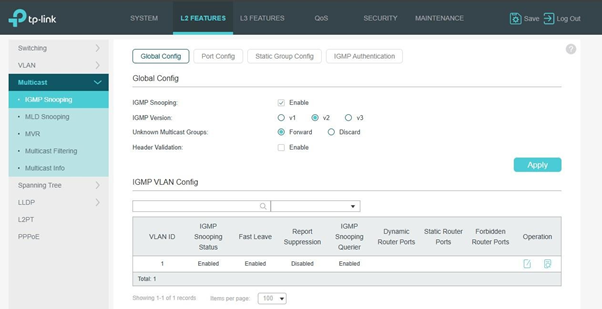
- Enable IGMP Snooping (Global)
- Navigate to:
L2 Features → Multicast → IGMP Snooping → Global Config
-
- Configure:
- IGMP Snooping: Enable
- IGMP Version: v2
- Unknown Multicast Groups: Forward
- Header Validation: Disable
- Configure:
2. VLAN IGMP Configuration
- Navigate to:
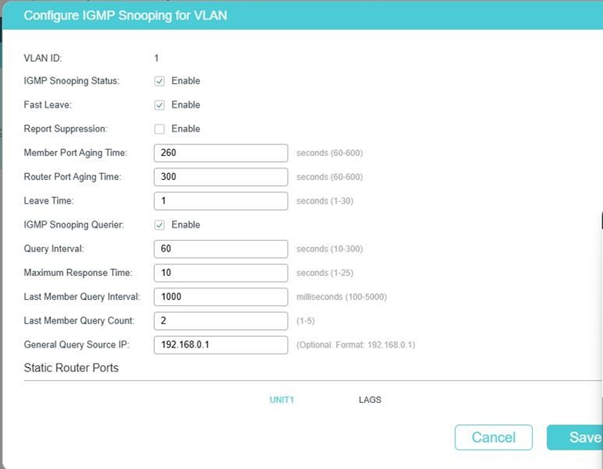
IGMP Snooping → VLAN Config
-
- Configure VLAN 1:
- IGMP Snooping Status: Enable
- Configure VLAN 1:
-
-
- Fast Leave: Enable
- Report Suppression: Disable
- IGMP Querier: Enable
- Query Interval: 60 sec
- General Query Source IP: 192.168.0.1
-
3. Port Configuration
- Navigate to:
IGMP Snooping → Port Config
-
- Ensure:
- IGMP Snooping: Enabled on all relevant ports
- Fast Leave: Disabled (default)
- Ensure:
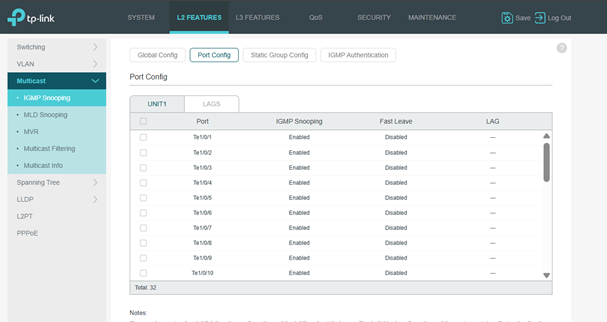
Note: There is no need to enable IGMP snooping on the Distribution and Access Switches.
4. Verification
- Navigate to:
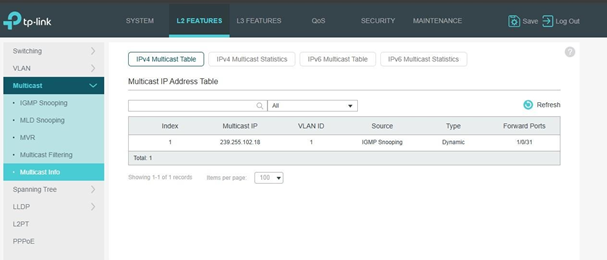
Multicast → Multicast Info
-
- Expected:
- Multicast IP should appear dynamically
- Forward port should show receiver port
- Expected:
VLC Configuration Sender (Client A)
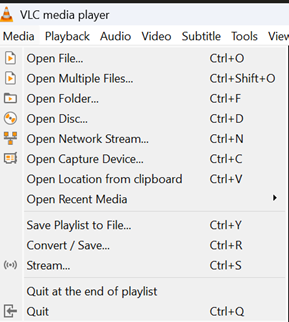
- Open VLC
- Go to:
Media → Stream
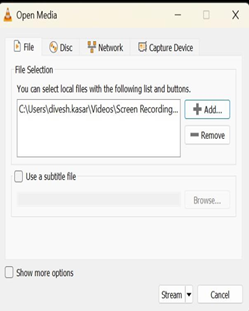
- Add video file
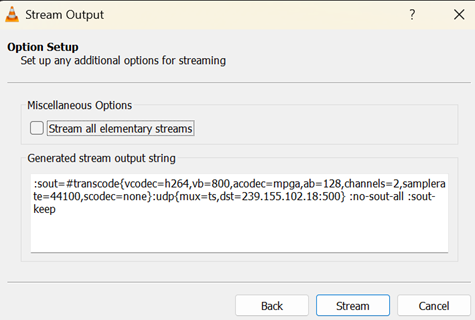
- Click Stream → Next
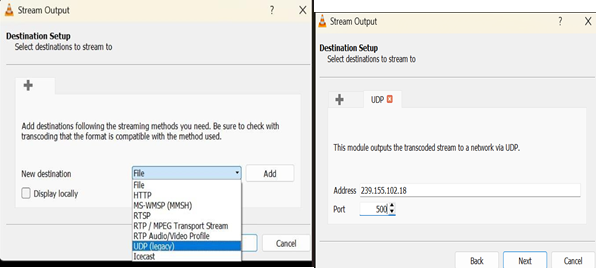
Destination Setup
-
- Select: UDP (legacy)
- Click Add and configure:
o Address: 239.255.102.18
-
-
- Port: 5000
-
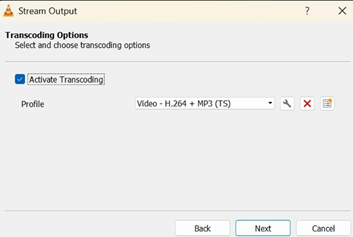
Transcoding
-
- Enable: Activate Transcoding
- Profile:
Video - H.264 + MP3 (TS)
Start Streaming
-
- Click Stream
Receiver (Client B)
- Open VLC
- Go to:
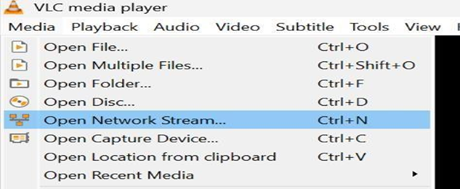
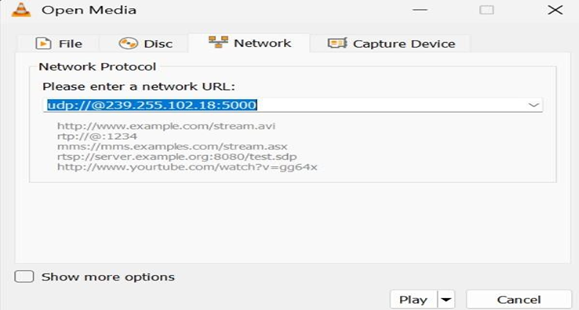
Media → Open Network Stream
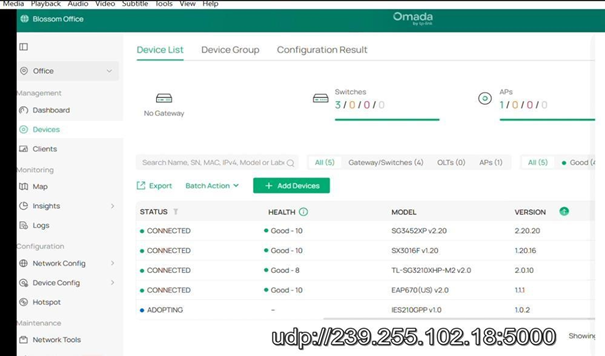
- Enter: udp://@239.255.102.18:5000
Click Play
Verification Using Wireshark (Optional) On Sender (Client A)
Filter:
ip.dst == 239.255.102.18
Expected:
-
- Continuous UDP packets
Verification Using Wireshark (Optional) On Sender (Client A)
Filter:
ip.dst == 239.255.102.18
Expected:
-
- Continuous UDP packets
In case the Server and client are in different VLAN enable IGMP snooping and IGMP querier on the VLAN on which the server is connected and enable IGMP snooping and disable IGMP querier on the VLANs on which the clients are connected.
- No Multicast Traffic
Check on sender:
-
- Wireshark → verify UDP packets If not present:
- Issue = VLC / application
- IGMP Working but No Traffic
Check:
-
- Multicast table entry
- Forward ports
3. No Video on Receiver
Check:
-
- IGMP Snooping enabled
- Query enabled
- Same VLAN
⚠️ Important Observation
-
- Multicast IP 239.1.1.1 did NOT work
Reason:
-
- Multicast IP → MAC mapping uses only 23 bits
- Some addresses may collide or be filtered
- 239.255.x.x range is more reliable for testing
✅ Final Conclusion
-
- Multicast functionality on switch is working correctly
- IGMP Snooping and Querier operate as expected
- Recommended to use 239.255.x.x range for testing
