


Contents
Troubleshooting Scenario 1: Troubleshooting and Resolution Procedure for SG6428XHP and SG6654XHP
Latest Firmware Download Links
Introduction
If you are using an SG6428XHP(UN) v1, SG6654XHP(UN) v1, S6500-24GP4XF(UN) v1, or S6500-48GP6XF(UN) v1, certain firmware versions may incorrectly identify IEEE 802.3at PDs as IEEE 802.3af PDs, resulting in insufficient PoE power. For some legacy firmware versions, a single upgrade to a fixed firmware version does not resolve the issue. This article explains the recommended resolution procedure.
Requirements
- SG6428XHP(UN) v1, SG6654XHP(UN) v1, S6500-24GP4XF(UN) v1, S6500-48GP6XF(UN) v1
Troubleshooting Steps
Troubleshooting Scenario 1: Troubleshooting and Resolution Procedure for SG6428XHP and SG6654XHP
Step 1. Run the following CLI command to check the device's MCU version:
mcu-firmware type pse version
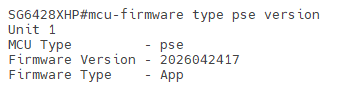
CLI commands can be executed through Serial Console, SSH, Telnet, or the Controller's built-in Terminal.
Step 2. If the PSE MCU version date on your device is 2024121310 or later, your device is not affected by this PSE power supply issue. However, we also recommend verifying that the device is running the latest firmware version (the latest firmware available for V1.x models is v1.20.x). If not, please upgrade to the latest firmware at your convenience.
Step 3. If the PSE MCU version date on your device is earlier than 2024121310, your device may be affected by this PSE power supply issue. In this case, we recommend following the steps below as soon as possible to resolve the issue.
Step 4. Run the show system-info command to check the firmware version of your device. If the firmware version is 1.0.4 Build 20240308 Rel.36585 or later, proceed to Step 5. If the firmware version is 1.0.3 or earlier, proceed to Step 6.
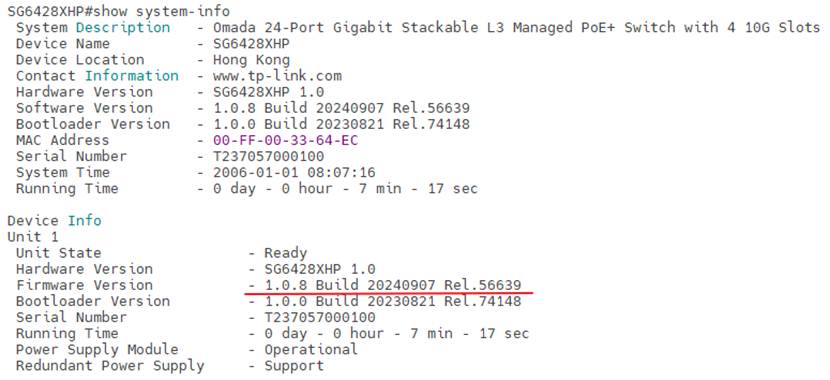
Step 5. Download and upgrade to the latest firmware (the latest firmware available for V1.x models is v1.20.x) to resolve the issue. If the device is managed by the controller and both the switch and the controller have internet access, you can check for updates and perform the online upgrade directly through the Controller.
Step 6. Download and upgrade to the latest firmware (the latest firmware available for V1.x models is v1.20.x). After the upgrade is completed, perform a second upgrade using the same latest firmware version to resolve the issue. If you prefer not to perform a second firmware upgrade, you can continue by running the following CLI command to upgrade the PSE MCU after the first upgrade: mcu-firmware unit 1 type pse upgrade.
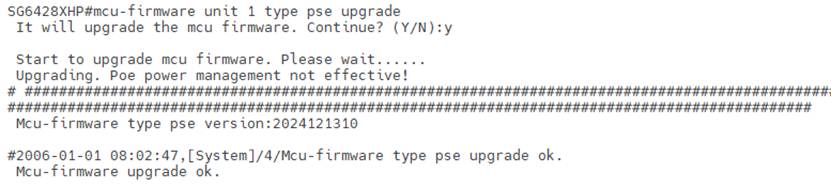
If the device is operating in a stack, replace the unit ID in the following command with the target unit's corresponding unit ID to upgrade the PSE MCU:
mcu-firmware unit 1 type pse upgrade
After the upgrade is complete, verify that the PSE MCU version has been updated and confirm that the Firmware Type is App using the following command:
mcu-firmware type pse version
Troubleshooting Scenario 2: Troubleshooting and Resolution Procedure for S6500-24GP4XF and S6500-48GP6XF
Step 1. If the firmware version on your device is 1.0.0 Build 20240531 or 1.0.1 Build 20240801, your device may be affected by this PSE power supply issue. We recommend upgrading to the latest firmware version (the latest firmware available for V1.x models is v1.20.x) to resolve the issue. If the device is managed by the controller and both the switch and the controller have internet access, you can check for updates and perform the online upgrade directly through the Controller.
Step 2. If the firmware version on your device is 1.0.2 Build 20241213 or later, your device is not affected by this PSE power supply issue. However, we also recommend verifying that the device is running the latest firmware version (the latest firmware available for V1.x models is v1.20.x). If not, please upgrade to the latest firmware at your convenience.
Latest Firmware Download Links
The following are the latest firmware download links for these four switch models and may be useful when resolving this issue.
1. SG6428XHP: SG6428XHP | Omada 24-Port Gigabit Stackable L3 Managed Switch with 4× 10G Slots | Omada Network Support
2. SG6654XHP: SG6654XHP | Omada 48-Port Gigabit Stackable L3 Managed PoE+ Switch with 6× 10G Slots | Omada Network Support
3. S6500-24GP4XF: S6500-24GP4XF | Omada Campus 24-Port Gigabit Stackable L3 Managed PoE+ Switch with 4× 10G Slots | Omada Network Support
4. S6500-48GP6XF: S6500-48GP6XF | Omada Campus 48-Port Gigabit Stackable L3 Managed PoE+ Switch with 6× 10G Slots | Omada Network Support
Conclusion
This article describes how to troubleshoot and resolve an issue that causes 802.3bt-compliant PDs with active power management to be detected as 802.3af devices on SG6428XHP(UN) v1, SG6654XHP(UN) v1, S6500-24GP4XF(UN) v1, and S6500-48GP6XF(UN) v1. If you need more assistance, please contact TP-Link Support.
QA
Q1: Why can't I find the latest firmware for my V1 device on the V1 download page?
A1: The latest firmware available for V1.x models is v1.20.x. Firmware released for the V1.20 model is also compatible with V1 devices. If you download firmware from our official website, please check the V1.20 firmware page for future firmware releases.
To learn more about each function and configuration, please visit Support Home to download or check the manual for your product.
