


TP-Link Canada Inc. (“TP-Link CA”) offers two shipping methods to process an RMA replacement request. All replacement requests are processed through our product registration system at https://myproducts.tp-link.com/
Standard
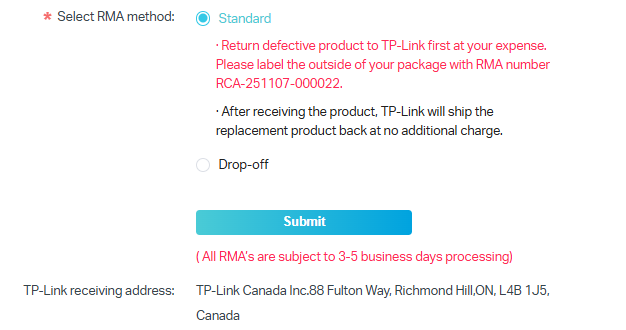
Step 1. You need to return the defective product to TP-Link at your own cost, along with the RMA number.
Please label the outside of the package with the RMA number in the format RCA-XXXXXX-XXXXX.
TP-Link receiving address for defective device:
TP-Link Canada Inc.
88 Fulton Way,
Richmond Hill,
ON, L4B 1J5, Canada
Step 2. The TP-Link CA RMA Team will ship a replacement within 3-5 business days of receiving the defective product at no charge.
Note: The postage for returning a defective product for replacement will not be reimbursed because TP-Link CA, as the manufacturer, does not sell directly to end users. TP-Link CA is responsible for the one-way shipping fee for the replacement.
Drop-off
Customers can also drop off the defective product at our RMA office during the operation hours for exchange. Please note that the Drop-off service is by APPOINTMENT ONLY.
Operation Hours: Mon-Fri 10:00-12:00 & 14:00-16:00.
Step 1. Select Drop-off and click Contact TP-Link to make an appointment.
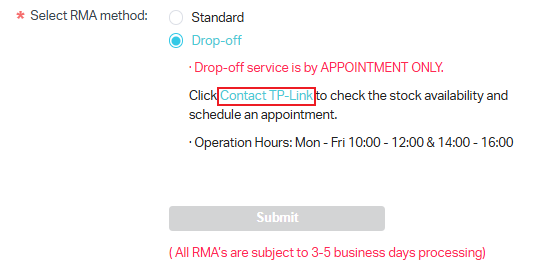
Step 2. Submit your preferred date and time for drop-off, preferably 3-5 business days later, as our RMA team needs time to check the inventory and prepare the replacement.
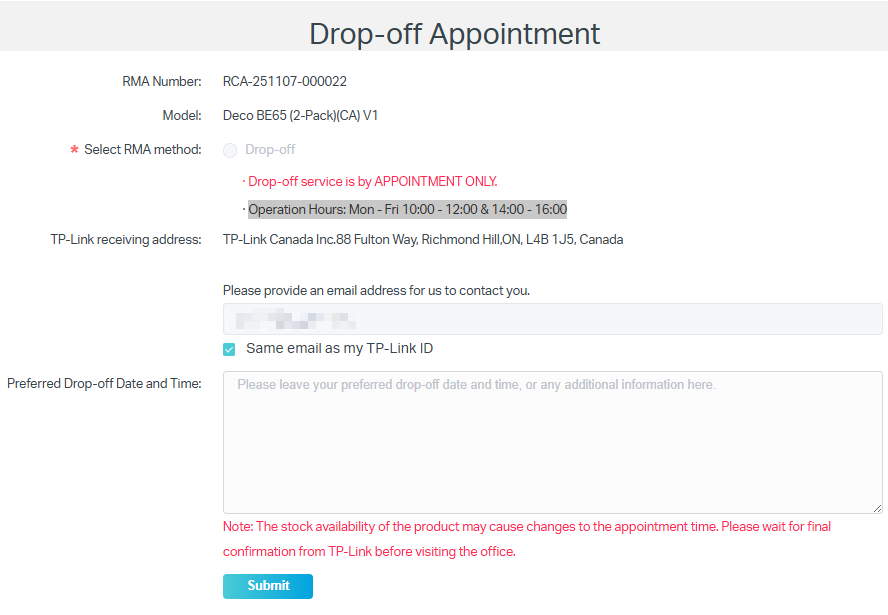
Step 3. After you submit the drop-off appointment, please wait for TP-Link's final confirmation email before visiting the office.
Product stock availability may change the appointment time.
