


Beam Bridge 7 Dual-Band MLO Bridging: Benefits, Common Behaviors, and Recovery


Contents
Understanding Beam Bridge 7 Dual-Band Bridging
Key Advantages of Beam Bridge 7 Dual-Band Bridging
Why Does Beam Bridge 7 Temporarily Disconnect or Switch to Single-Band Operation?
Common Events That Trigger Link Reconstruction
Typical Behaviors During Reconstruction
Introduction
Traditional wireless bridge products typically establish a backhaul connection using a single wireless band. Beam Bridge 7 introduces a new dual-band bridge architecture that simultaneously utilizes both 5 GHz and 6 GHz links through MLO (Multi-Link Operation) technology.
By leveraging two wireless bands at the same time, Beam Bridge 7 provides higher throughput, improved reliability, and greater resilience to interference compared with conventional single-band bridge solutions.
Certain configuration changes require Beam Bridge 7 to reconfigure its wireless radios and rebuild the bridge link. During this process, the Client AP may temporarily go offline, traffic may be interrupted, or the bridge may temporarily operate on a single band. Dual-band operation can be restored only after both the 5 GHz and 6 GHz links become available again.
Requirements
- Beam Bridge 7 devices running firmware that supports 5 GHz + 6 GHz MLO Bridge.
- One Beam Bridge 7 operating as Main AP and another Beam Bridge 7 operating as Client AP.
- 6 GHz spectrum available in the local regulatory domain.
- AFC service available where required by local regulations.
|
Model |
Hardware Version |
Firmware Version |
|
Beam Bridge 7 |
1.6 |
1.0.0 Build 20260709 Rel.08110 |
Understanding Beam Bridge 7 Dual-Band Bridging
Beam Bridge 7 introduces a dual-band point-to-point bridge architecture that simultaneously establishes wireless backhaul connections over both the 5 GHz and 6 GHz bands.
Unlike traditional single-band bridge products that rely on a single wireless link, when both 5 GHz and 6 GHz are available, Beam Bridge 7 can establish active bridge links on both bands between the Main AP and Client AP.
Key Advantages of Beam Bridge 7 Dual-Band Bridging
- Higher Throughput
Both 5 GHz and 6 GHz links can carry traffic simultaneously, providing significantly greater wireless backhaul capacity compared with traditional single-band bridge deployments.
- Better Reliability Through Link Redundancy
When one wireless band experiences interference or becomes temporarily unavailable, traffic can continue through the remaining available band, helping maintain connectivity.
- Automatic Band Expansion
If only one wireless band is temporarily available, Beam Bridge 7 can automatically restore dual-band operation once additional spectrum resources become available again.
- Greater Resistance to DFS Events
When DFS-related events affect the 5 GHz band, the 6 GHz link can continue operating, reducing service interruption and improving overall network availability.
- Easy Monitoring Across Different Management Modes
You can easily verify dual-band bridge status from multiple management platforms including Omada Controller, Standalone Mode and Omada App.
Scenario #1: Controller Mode
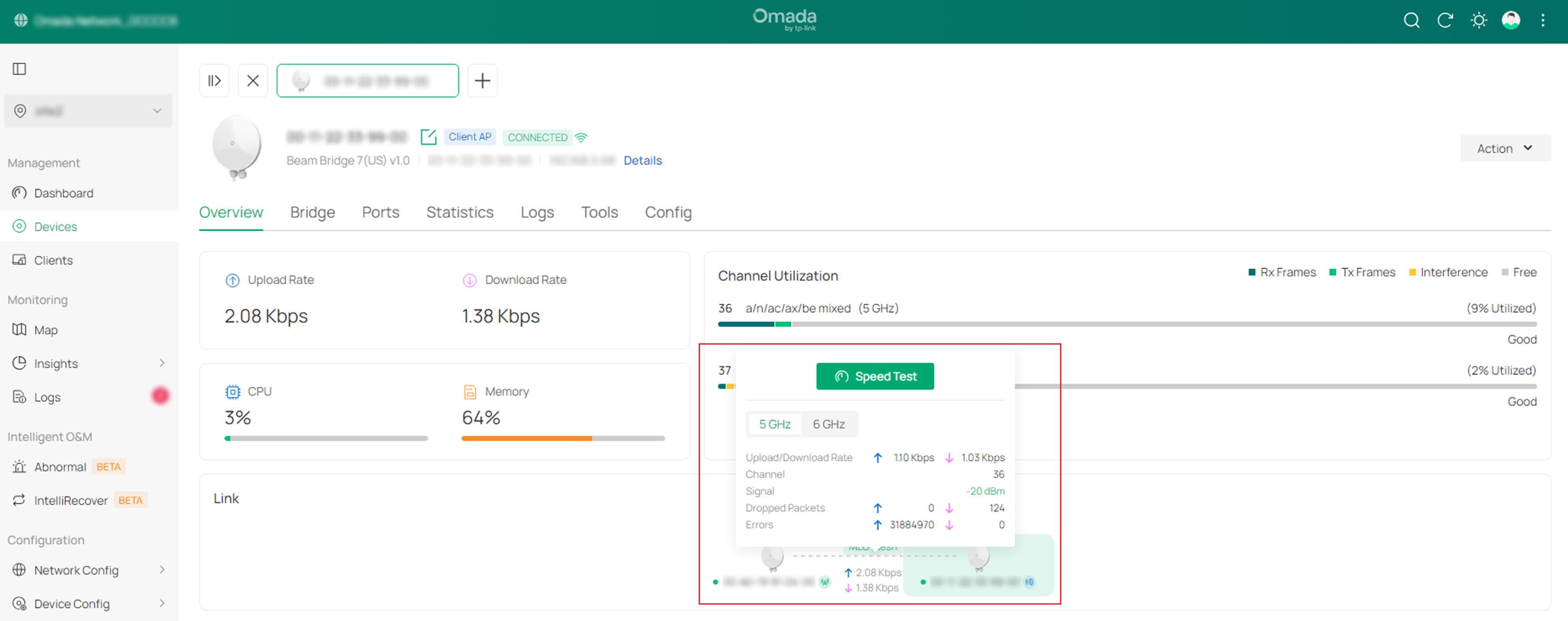
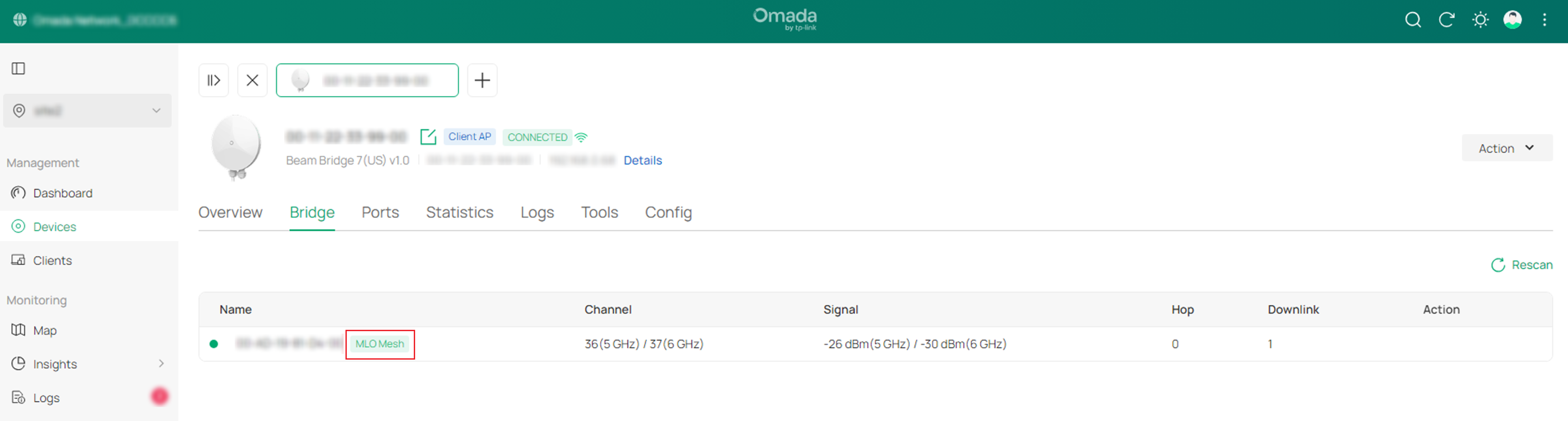
In Omada Controller, the bridge topology displays both 5 GHz and 6 GHz links. When dual-band bridging is active, the MLO status is displayed between the Main AP and Client AP.
Scenario #2: Standalone Mode
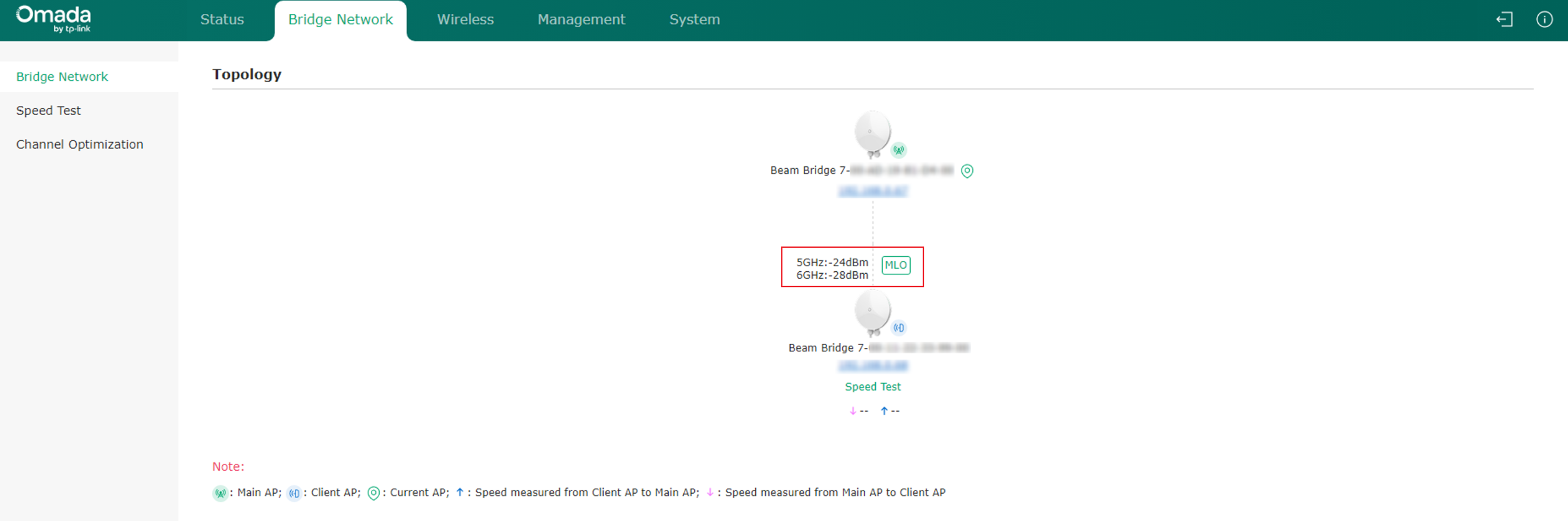
In Standalone mode, the Bridge Network page displays the wireless topology and signal information for both bridge links.
Scenario #3: Omada App
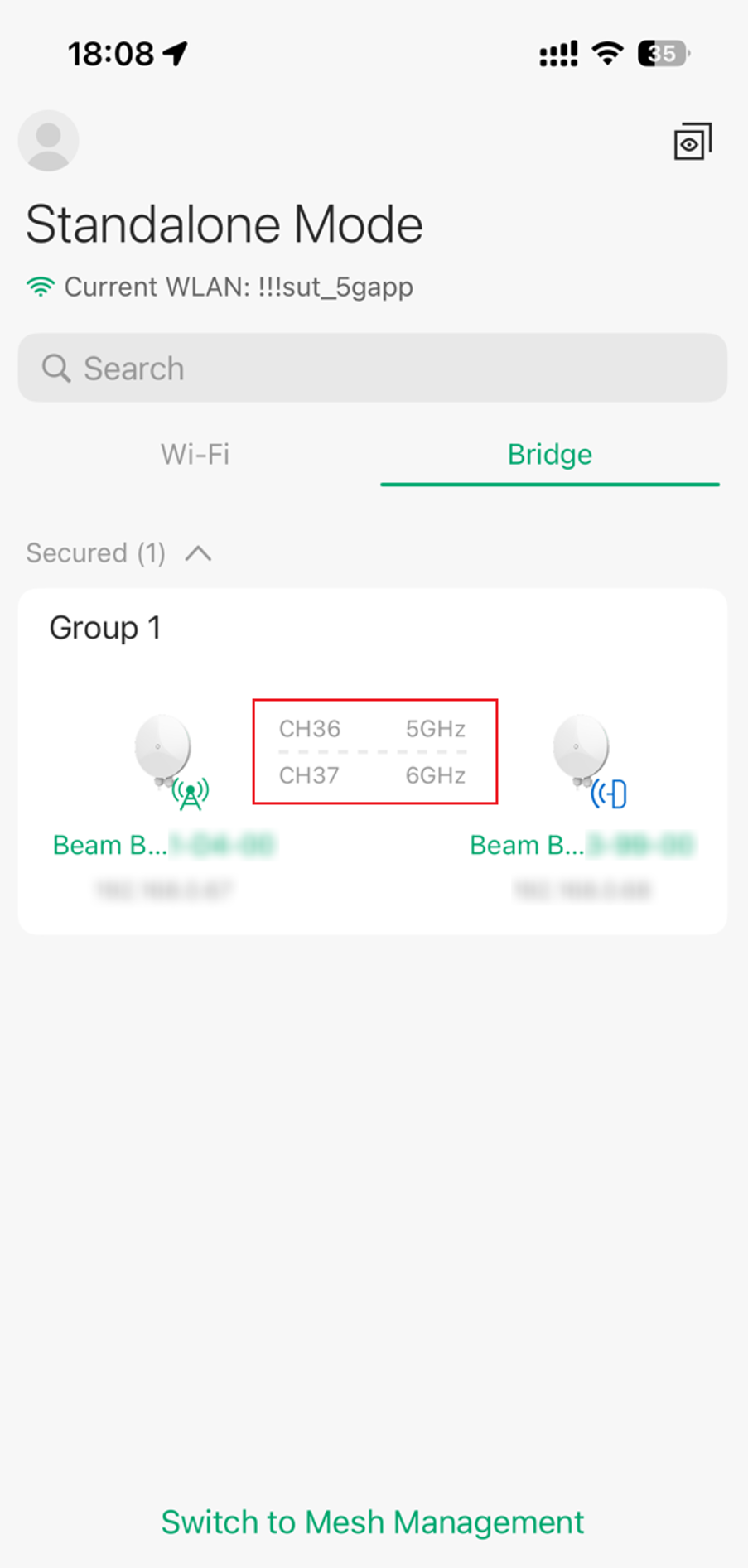
In the Omada App, the Bridge page displays both operating channels when dual-band bridging is active.
Why Does Beam Bridge 7 Temporarily Disconnect or Switch to Single-Band Operation?
To optimize wireless performance and maintain link stability, Beam Bridge 7 may rebuild the wireless bridge connection after certain configuration changes.
Common Events That Trigger Link Reconstruction
- Configuring DFS channels
- Adding or modifying SSIDs
- Enabling or disabling a wireless radio
- Modifying radio parameters
- Enabling or disabling AFC
- Performing an AFC re-query
- Switching bridge roles
- Running channel optimization
Typical Behaviors During Reconstruction
- Client AP temporarily goes offline
- Wireless bridge connection temporarily disconnects
- Dual-band operation switches to single-band operation
- Traffic forwarding is briefly interrupted
These behaviors can be expected during bridge reconstruction and do not necessarily indicate a fault if the bridge recovers within the expected time. If it does not recover, further troubleshooting is required.
Recovery Time Reference
The bridge automatically restores connectivity after the configuration process is completed.
|
Event |
Typical Recovery Time |
|
Common configuration changes |
Within 2 minutes |
|
Switching 5 GHz to a DFS channel |
Approximately 2 minutes (1 minute CAC on Main AP + 1 minute CAC on Client AP) |
|
AFC disabled |
6 GHz link unavailable, bridge remains on 5 GHz |
|
AFC query failure |
6 GHz link unavailable, bridge remains on 5 GHz |
|
Automatic restoration from single-band to dual-band bridging |
Within 4 minutes |
If the device temporarily operates using only one band, Beam Bridge 7 continuously monitors spectrum availability and automatically restores dual-band operation when an additional wireless band becomes available
Note: Recovery time may vary depending on the wireless environment and regulatory requirements.
Conclusion
Beam Bridge 7 is the first TP-Link outdoor bridge product to support simultaneous 5 GHz and 6 GHz dual-band bridging through MLO technology, delivering higher throughput and improved reliability compared with traditional single-band bridge deployments.
During certain configuration changes, temporary bridge disconnections or transitions to single-band operation may occur as part of the normal link reconstruction process. In most cases, Beam Bridge 7 automatically restores dual-band connectivity within a few minutes without requiring manual intervention.
To learn more about each function and configuration, please visit Support Home to download or check the manual for your product.
QA
Q1: Besides dual-band MLO bridging, what other key features does Beam Bridge 7 provide?
A1: In addition to its 5 GHz + 6 GHz dual-band MLO bridge architecture, Beam Bridge 7 includes several features designed to simplify deployment and maximize backhaul performance:
- 2.5 Gigabit Ethernet Connectivity
The integrated 2.5G Ethernet port helps eliminate wired bottlenecks and allows wired devices to take advantage of high-capacity wireless backhaul links.
- Plug-and-Play Deployment
Beam Bridge 7 supports factory pairing and simplified bridge deployment, reducing installation time and minimizing manual configuration.
