


Contents
Why Do Devices Disconnect After Upgrades, and How Can They Be Fixed?
What is Perpetual PoE, and what are its benefits?
What is Fast PoE, and what are its benefits?
Why do enterprises need advanced PoE capabilities?
Requirements
- Omada Switches (Supported models are continuously being added. Please refer to the device datasheet for authoritative information):
- SG2206MP V1, SG2008P V3.3, SG2210P V5.3, SG2210MP V5.2, SG2016P V1.3, SG2218P V2.2, SG2428LP V1.2, SG2428P V5.4, SG2452LP V1.2,
- SG3452P V3.4, SG3428MP V6.3, SG3452XMPP V1.2, SG3452XP V2.3, SG3428XMPP V1.2, SG3428XMP V3.3, SG2210XMP‑M2 V1.2, SG3210XHP‑M2 V3.2, SG3218XP‑M2 V2, SG3428XPP‑M2 V2, SX3832MPP V1, SX3206HPP V2,
- SG5428XMPP V1, SG5452XMPP V1, SG6428XHP V1, SG6654XHP V1
Introduction
Why Do Devices Disconnect After Upgrades, and How Can It Be Fixed?
Firmware updates and unexpected power events often create unavoidable downtime for network‑connected devices. With Perpetual PoE and Fast PoE technologies, Omada PoE switches are designed to keep IP cameras and VoIP phones continuously powered—minimizing security gaps even during reboots and outages.
For IT managers and security integrators, the "maintenance window" is often a source of anxiety. You know you need to patch your core PoE switches to fix bugs or patch security vulnerabilities. But you also know that hitting "Reboot" means cutting power to the entire building's IP surveillance system or Wi-Fi network. This creates a dangerous security blind spot. For hospitals, banks, and 24-hour facilities, losing camera feeds for 5 minutes during a reboot is simply not an option.
Fortunately, modern enterprise switches have evolved. With High PoE Capability of Omada PoE Switches, specifically Perpetual PoE and Fast PoE, you no longer have to choose between network security and physical security.
What is Perpetual PoE and what are its benefits?
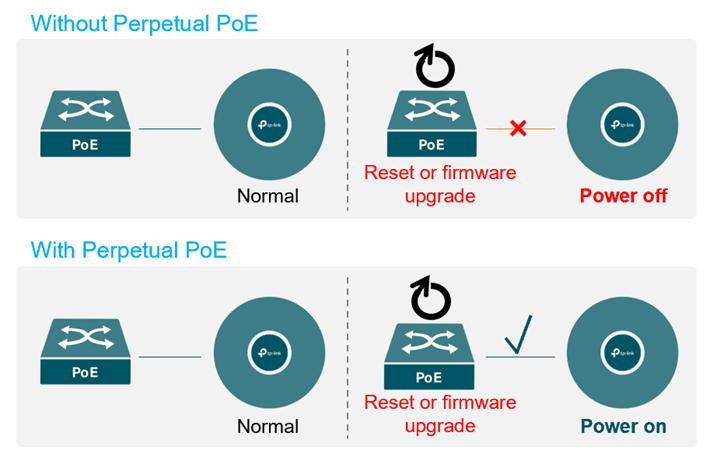
One of the most common user queries is: "How to keep PoE cameras on during switch reboot?" The answer is Perpetual PoE.
The Problem: On a standard switch, a "Soft Reboot" (triggered by a firmware upgrade or manual command) shuts down the entire system, including the power supply to the ports.
The Solution: Perpetual PoE technology of Omada PoE Switches maintains the power delivery to the PoE ports even when the switch software is reloading.
1. The Switch: Reboots and installs updates in the background.
2. The Devices (PDs): Cameras continue recording; Wi-Fi APs stay powered.
3. The Benefit: You can perform maintenance during business hours without disrupting mission-critical services.
Note: This feature ensures Zero Downtime for the powered devices, completely eliminating the "reboot gap."
What is Fast PoE and what are its benefits?
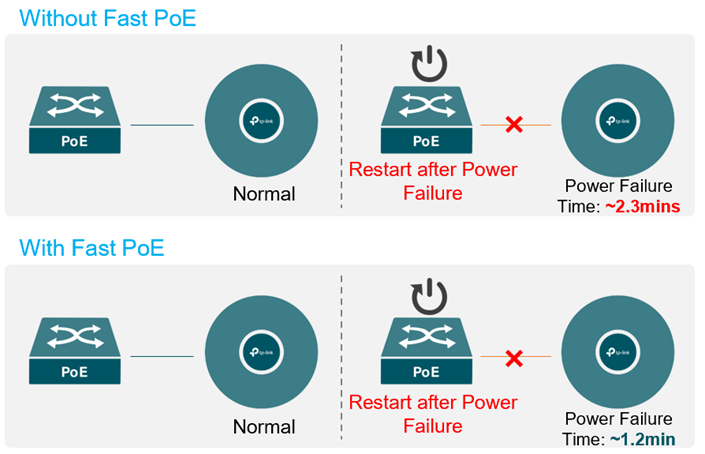
While Perpetual PoE handles planned maintenance, Fast PoE is your safety net for unplanned disasters, such as a power outage.
The Problem: When power is restored after a blackout, a standard switch takes a long time to boot. It must load the bootloader, kernel, and operating system before it turns on the PoE ports. This delay can leave your facility vulnerable for minutes.
The Solution: Fast PoE of Omada PoE Switches prioritizes power delivery hardware above software.
1. Instant Power: Within seconds of connecting to power, the switch activates the PoE ports.
2. Parallel Boot: The switch OS loads in the background while your cameras are already booting up.
The Data: According to lab tests, Fast PoE significantly reduces recovery time:
1. Standard Switch Recovery: ~2.3 minutes (Cameras offline)
2. Fast PoE Switch Recovery: ~1.2 minutes
Why do enterprises need advanced PoE capabilities?
If you are managing a Mission-Critical Network, upgrading to Omada PoE switches with these features offers three distinct ROI points:
1. Uncompromised Security: Eliminate video loss during maintenance windows.
2. Business Continuity: VoIP phones and Wi-Fi networks stay online, keeping employees productive while IT works in the background.
3. Operational Efficiency: IT teams can schedule firmware updates flexibly, rather than waiting for "after-hours" overtime shifts.
Conclusion
In the modern digital infrastructure, power continuity is just as important as bandwidth. Whether it's for surveillance, access control, or wireless coverage, ensuring your devices stay online is non-negotiable.
When selecting your next switch, look for High PoE Capability of Omada PoE switches with Perpetual and Fast PoE. It’s the smartest way to keep your network secure, resilient, and always on.
To learn more about each function and configuration, please visit Support Home to download or check the manual for your product.
QA
Q1: When Perpetual PoE is active, what will I see on the switch LEDs during reboot, upgrade, or management disconnection?
A1: When you use Perpetual PoE, your PoE devices stay powered on during reboot, upgrade, or management disconnection. However, LED behavior may not accurately reflect this. On most models, LEDs are driven by the switch chip or PHY, so during reboot or upgrade, port LEDs and PoE LEDs may turn off or behave unexpectedly, depending on the hardware design. On ES models, management disconnection does not affect LEDs, and during soft reboot or upgrade restart, all LEDs turn off and then turn back on after initialization, without interrupting PoE power.
Q2: How does Fast PoE behave after a switch reboot, and what happens to the port LEDs?
A2: Fast PoE works when the switch experiences a full power‑off reboot. PoE power still drops briefly, but it is restored much faster than on a standard switch. From your perspective, LED behavior looks the same as normal models, because PoE power delivery and port communication are independent. Fast PoE does not apply to soft reboots or firmware upgrades—those are handled by Perpetual PoE instead.
Q3: Is Fast PoE also a hardware‑level feature like Perpetual PoE, and can I enable or disable it by configuration?
A3: Yes. Fast PoE is also a hardware‑level feature, just like Perpetual PoE. It is only supported on specific models with the right hardware design. You cannot add it through firmware, and you cannot enable or disable it by configuration. If your switch supports Fast PoE, it is enabled by default.
