


Contents
Introduction
Omada Controller currently supports seven types of portal authentication:
No Authentication, Simple Password, Hotspot, RADIUS Server, External LDAP Server, External Portal Server, and Google Authentication. For all portal‑based authentication types, the Omada Controller must remain running and accessible to the EAP and Gateway devices throughout the authentication process.
Requirements
- Hardware Controller/Software Controller /Cloud-Based Controller
- Omada EAP/Gateway
Configuration
Available portal authentication methods in Omada Controller include No Authentication, Simple Password, Hotspot, RADIUS Server, External LDAP Server, External Portal Server, and Google Authentication. If you are not familiar with the configuration, please refer to How to configure Portal Authentication on Omada Controller (v6.2 and above) | Omada Network Support
After the configuration, you may raise the question whether you should keep the Omada Controller running.
- The simple answer is yes. To make the most use of portal authentication, you should keep it running.
- If the Controller goes offline, it will no longer be able to provide portal authentication services.
- It is important to note that clients which have already successfully authenticated before the Controller goes offline will retain their existing authentication state. These clients can continue to access the internet normally. However, any client that has not yet completed authentication (or needs to re‑authenticate) will be unable to do so, and therefore will not be granted internet access.
The table below lists the behaviors of each authentication type when Controller is online and offline.
|
Authentication Type |
Controller Online |
Controller Offline |
|
No Authentication |
|
|
|
Simple Password |
|
|
|
Hotspot |
RADIUS is authenticated by RADIUS Server |
|
|
RADIUS Server/ |
Authenticated by RADIUS server/LDAP server |
|
|
External Portal Server |
Portal page and authentication both provided by portal server |
|
|
|
|
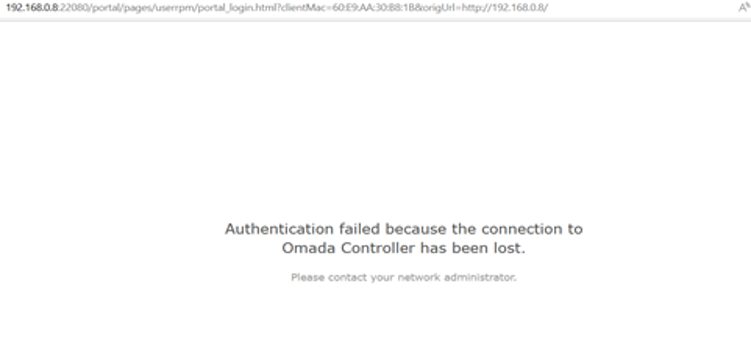
When EAPs/Gateways are disconnected from the Omada Controller, or Controller is offline, the following authentication page will be response from EAP to notify customer the EAP disconnected now.
Conclusion
To ensure that all clients can pass portal authentication and connect to the network, the Omada Controller must be kept running at all times when portal authentication is in use.
To learn more about each function and configuration, please visit Support Home to download or check the manual for your product.
