


How to Use OpenVPN Data Channel Offload (DCO) on Omada Gateways


Contents
Introduction
OpenVPN Data Channel Offload (DCO) is a high-performance acceleration technology that moves OpenVPN data channel processing from user space into the kernel. By reducing context switching between the OpenVPN process and the operating system kernel, DCO significantly improves VPN throughput, lowers CPU utilization, and enhances overall VPN performance.
With DCO enabled, OpenVPN continues to handle authentication, TLS negotiation, and key management, while encrypted data traffic is processed directly by the ovpn-dco kernel module. In addition, DCO can leverage kernel cryptographic frameworks and hardware acceleration capabilities to further improve performance.
Note: DCO does not change the OpenVPN protocol itself. It only changes how encrypted traffic is processed on an endpoint. Performance improvements can be observed even when DCO is enabled on only one side of a tunnel, though the greatest gains are achieved when both client and server support DCO.
Requirements
- A supported Omada gateway with OpenVPN Data Channel Offload (DCO) support
- Firmware version that supports OpenVPN DCO
DCO Limitations
The current DCO implementation supports only a subset of OpenVPN features. Before enabling High-Performance Mode, verify that your VPN deployment complies with the following requirements.
|
Feature Category |
Supported |
Not Supported |
Notes |
|
Tunnel Mode |
TUN |
TAP |
DCO supports routed VPN deployments using TUN interfaces only. |
|
Encryption Algorithms |
AES-128-GCM, AES-192-GCM, AES-256-GCM, ChaCha20-Poly1305 |
AES-CBC, BF-CBC, and other non-AEAD ciphers |
DCO supports AEAD encryption algorithms only. |
|
Topology |
Subnet |
Net30, P2P |
Subnet topology is required for DCO operation. |
|
Compression |
None |
Comp-LZO, LZO, LZ4, LZ4-v2 |
Compression features are not compatible with DCO. |
|
Fragmentation |
Not Required |
fragment |
OpenVPN packet fragmentation is not supported by DCO. |
|
MSS Optimization |
Not Required |
mssfix |
Native OpenVPN MSS fixing is not supported. |
|
Packet Format |
P_DATA_V2 |
P_DATA_V1 |
DCO requires the P_DATA_V2 packet format with Peer-ID support. |
|
OpenVPN Versions |
OpenVPN versions supporting AEAD ciphers and P_DATA_V2 |
OpenVPN 2.3 and earlier legacy deployments |
Older versions may not support GCM encryption or DCO requirements. |
Platform Compatibility Note: OpenVPN DCO is currently supported on Omada Fusion Gateway G+ 1.0 and Omada Fusion Gateway 2.5G models. Additional platform support may be introduced in future firmware releases. DPDK-based implementations currently require additional adaptation for full P_DATA_V2 compatibility.
Configuration
This section describes how to enable DCO (High-Performance Mode) for an OpenVPN server in Omada Controller.
Step 1. Navigate to Devices > Network Config > VPN Server.
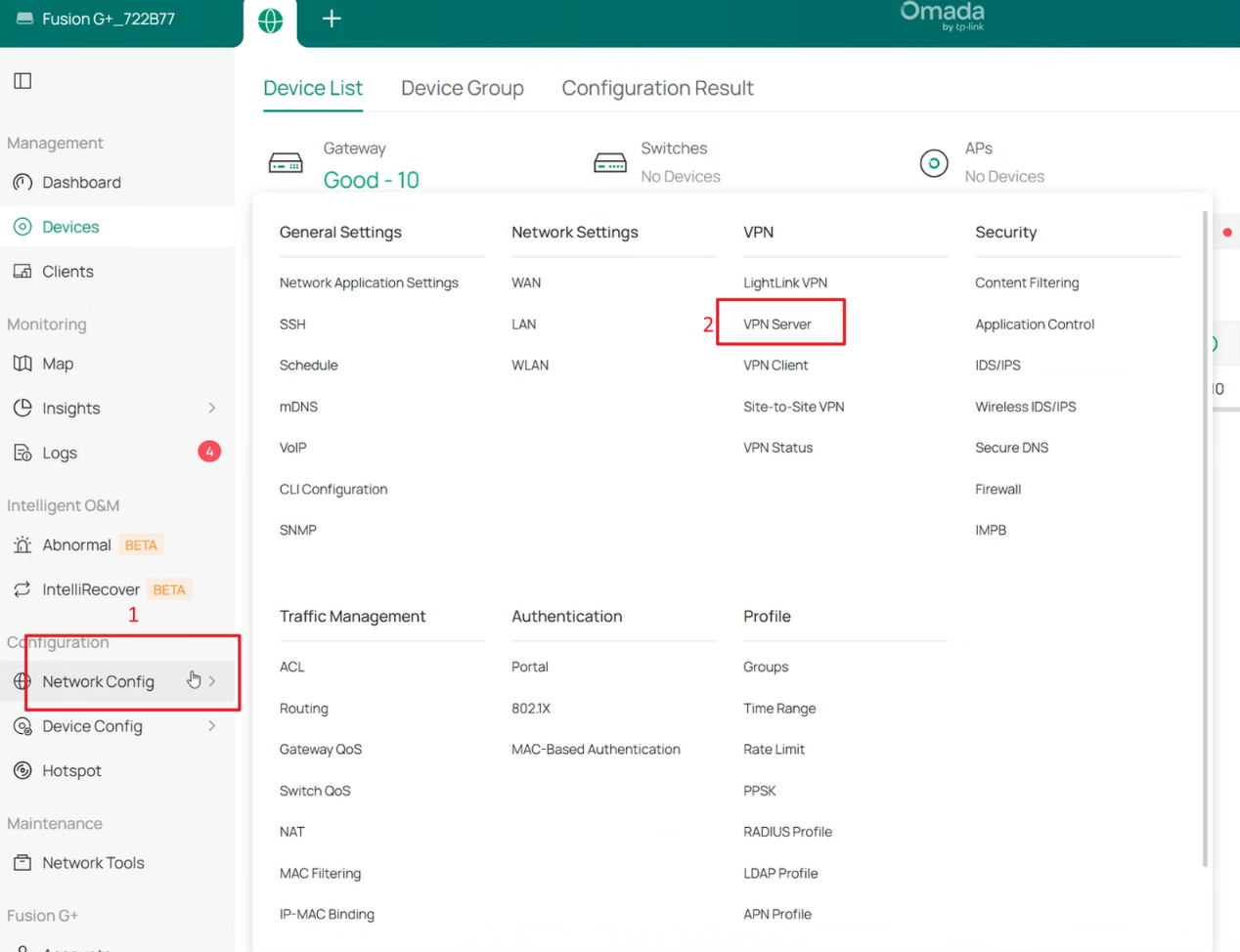
Step 2. Click Create New VPN Server to create a new OpenVPN server, or edit an existing OpenVPN server profile.

Step 3. Expand Advanced settings and enable High-Performance Mode.
This option enables OpenVPN Data Channel Offload (DCO) and allows VPN traffic to be processed in the kernel for improved performance.
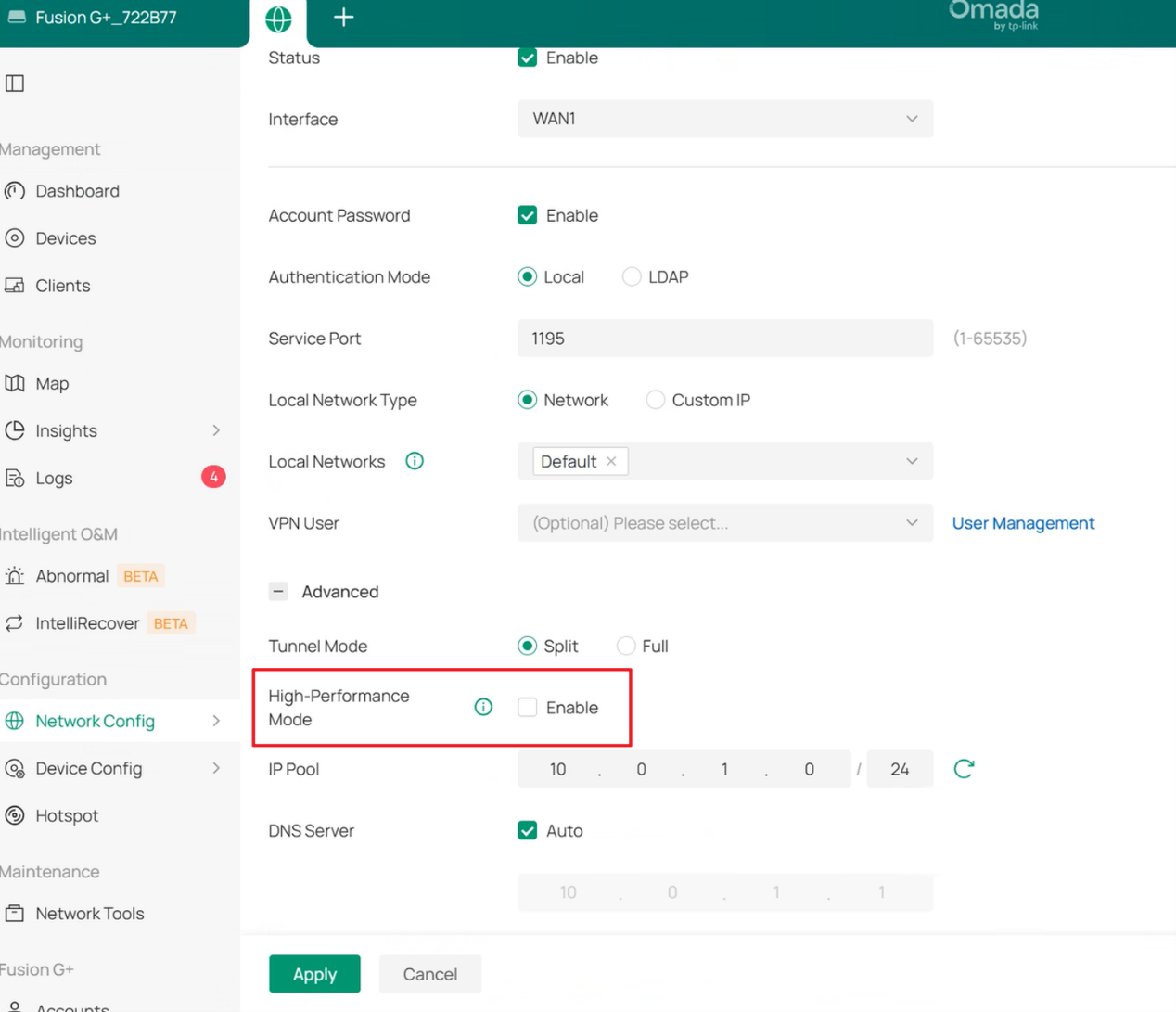
Step 4. Click Apply to save the configuration.
The OpenVPN server will begin using DCO acceleration once the configuration becomes effective and all compatibility requirements are satisfied.
Note: If unsupported features such as compression, TAP mode, or unsupported encryption algorithms are configured, DCO may not be activated successfully.
Conclusion
You have now successfully enabled OpenVPN Data Channel Offload (DCO) on an Omada gateway. By processing encrypted VPN traffic directly in the kernel, DCO can significantly improve VPN throughput, reduce CPU utilization, and deliver a better remote access or site-to-site VPN experience. Ensure that your VPN configuration uses supported encryption algorithms, subnet topology, and compatible OpenVPN features to achieve the best results.
To learn more about each function and configuration, please visit Support Home to download or check the manual for your product.
QA
Q1: Why is the High-Performance Mode option unavailable or not activated?
A1: DCO requires supported encryption algorithms, TUN mode, subnet topology, and compatible OpenVPN features. If unsupported options such as compression, TAP mode, fragment, or mssfix are configured, DCO may not be activated.
Q2: Which encryption algorithms can be used with DCO?
A2: DCO supports AES-128-GCM, AES-192-GCM, AES-256-GCM, and ChaCha20-Poly1305. Non-AEAD algorithms such as AES-CBC are not supported.
Q3: Does DCO support OpenVPN compression?
A3: No. Compression features such as Comp-LZO, LZO, LZ4, and LZ4-v2 are not compatible with DCO.
Q4: Does DCO require both VPN endpoints to support DCO?
A4: No. DCO can provide performance improvements even when enabled on only one endpoint. However, the greatest performance gains are typically achieved when both VPN peers support DCO.
Q5: Does DCO support legacy OpenVPN deployments?
A5: Some older OpenVPN versions may not support the required GCM encryption algorithms or packet formats. Compatibility should be verified before enabling DCO.
Q6: Should I use UDP or TCP when DCO is enabled?
A6: For the best performance, UDP is recommended when using DCO. Although DCO can operate with both UDP and TCP, performance improvements are typically more significant when UDP is used.
