How to configure Omada EAP in Repeater mode

Cơ sở kiến thức
Hướng dẫn cấu hình
10-29-2024
22442

Topology before starting configuration:

Topology of how to set up wireless bridge.

Note:

Before configuring the RE mode, please ensure that your device is set to factory default and connected to the router via an Ethernet cable. Once the configuration is complete, you can disconnect the Omada EAP from the router.

Method One. Via Standalone management page

1. Get your PC to connect EAP’s SSID and login to EAP’s management page: How do I login to the web management page of the EAP Series products (Standalone mode)?

Show login page under standalone mode.

2. Set up a new account then choose to enter RE mode.

Go through quick setup process.

The first step of quick setup is setting up a new account.

Select operation mode as Repeater Mode.

3. Choose your preferred band, click Scan button to find available SSID to join and repeat signal.

Click scan to find available SSID.

Display available SSID list.

4. Join the target SSID then customize repeater SSID of EAP610-Outdoor.

Join the target SSID by entering its password.

Successful connected to the target SSID.

Configure wireless settings of your outdoor EAP.

Check the summary settings from the previous steps.

5. Finish setup and enjoy Wi-Fi with the extended coverage.

Finish quick setup process by clicking Done button.

Display the completion interface.

Method Two. Via Omada APP

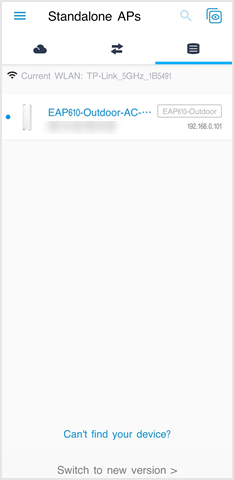
1. Get your wireless device connected to default SSID of EAP610-Outdoor, open Omada APP, go to Standalone APs page and click the EAP610-Outdoor.

Connect to default SSID of EAP610-outdoor.Show EAP appearing in the APP.

2. Set up a new account then choose to enter RE mode.

Go through Quick Setup process on phone. Set up a new account first.Select operation mode as Repeater Mode.

3. Choose your preferred band, click SSID item in the below to start scanning to find and join available SSID for repeating.

Choose a preferred band to extend.Choose a network and enter the password.Show connection success page.

4. Customize repeater SSID of EAP610-Outdoor.

Customize repeater SSID of EAP610-outdoor.Displays the summary information of the previous steps of configuration

5. Finish setup and enjoy Wi-Fi with the extended coverage.

After clicking confirm, the settings will be applied to your EAP unit.Display Omada APP pages when you wait for applying settings.

Please Rate this Document

Related Documents

Troubleshooting guide for mDNS Repeater cannot work on the Omada Gateway

Hướng dẫn khắc phục sự cố
11-06-2024
14976

How to Setup Omada EAP in Standalone Mode

Hướng dẫn cấu hình
12-18-2025
7552

How to configure Link Aggregation for EAP

Hướng dẫn cấu hình
10-02-2025
5856

How to configure an EAP Mesh Network in Standalone Mode via Omada App

Hướng dẫn cấu hình
Mesh
App
Standalone
04-05-2024
21124

How to configure MAC filtering for EAP in Controller mode

Hướng dẫn cấu hình
Controller
02-21-2023
17335