


How to configure FEC for managed Omada Switches


Contents
Introduction
FEC (Forward Error Correction) is a technology used to enhance the reliability of data transmission by adding redundant information to the data being sent. This allows the receiver to detect and correct errors that may have occurred during transmission. FEC is commonly used in environments requiring high reliability, particularly in long-distance fiber optic transmissions or networks with high bit error rates. It helps ensure a stable network and high data transmission quality.
When to Use FEC:
FEC is particularly suitable for scenarios where network latency is not as critical, but high transmission quality is essential. Typical use cases include:
Long-Distance Fiber Optic Transmission: In long-distance data transmission, signal attenuation can cause errors. Enabling FEC helps correct these errors, ensuring stable and reliable data transmission.
High Bit Error Rate Environments: In environments with significant interference, noise, or poor link quality, FEC improves the tolerance to errors and enhances data reliability.
Note: FEC is supported only on 25G or 100G ports for Managed Omada Switches.
Requirements
- Managed Omada Switch With 25G or 100G Ports
Configuration
Go to device details page > Ports > FEC config to choose FEC Mode.
By default, the port supporting the FEC function would have FEC Mode as AUTO.
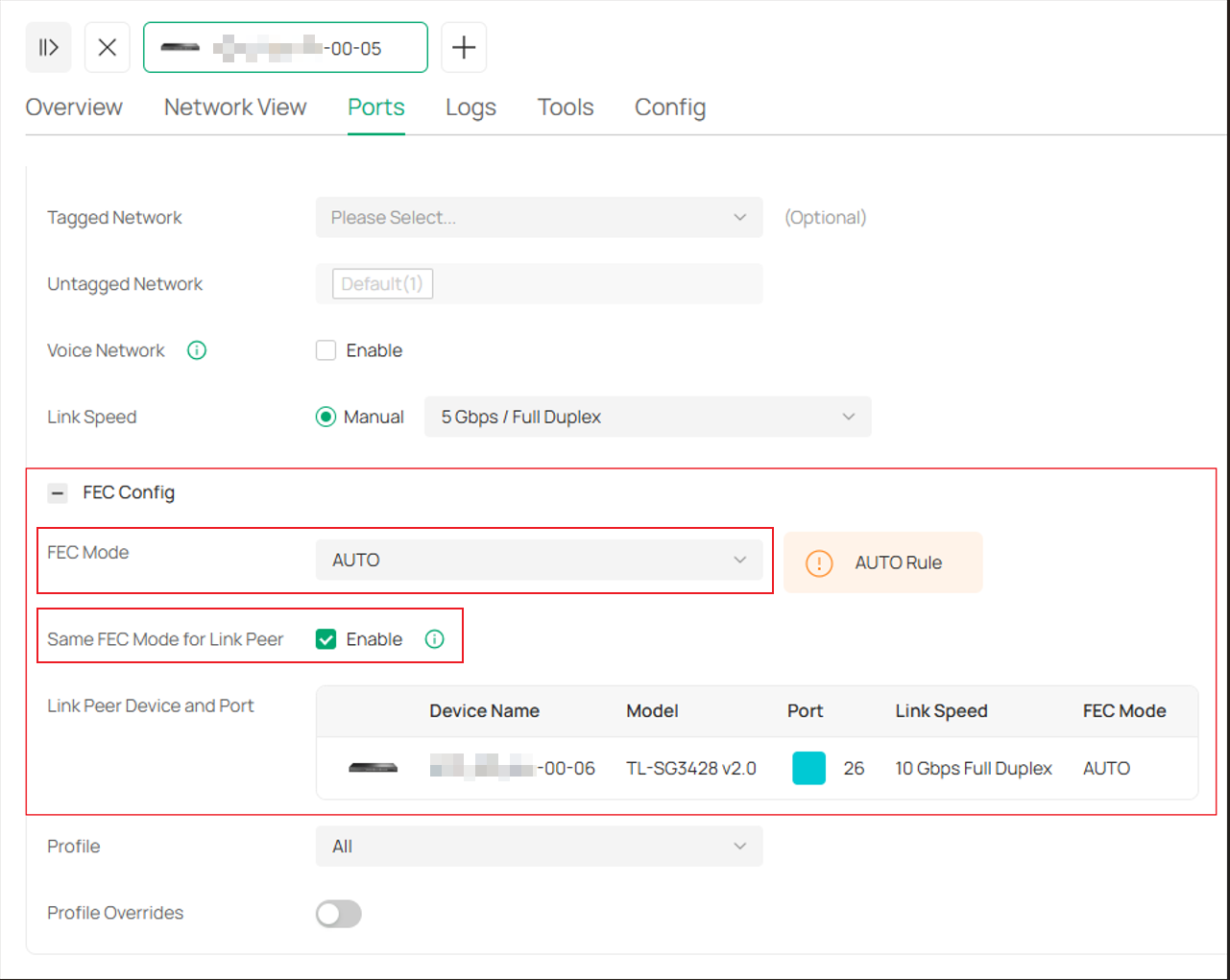
1. The function requires both sides using the same FEC mode, otherwise the Link cannot be established.
2. Each Link Speed has a different list of configurable FEC modes, please try changing the link speed manually if can’t find desired FEC mode.
3. Ports in the LAG group do not support configuring the FEC mode.
If “Same FEC Mode for Link Peer” is enabled, and the peer is also a managed Omada Switch with firmware supporting FEC report function, it would synchronize local Link speed & FEC configuration to the peer port, show the peer’s FEC configuration, and the available options are limited to those supported by both ends for your convenience to adjust accordingly.
Conclusion
The function of FEC is to improve data transmission reliability, especially in environments where transmission quality is crucial. When configuring FEC, you can select the most suitable FEC mode based on your network conditions and requirements, ensuring the stability and quality of the network.
Get to know more details of each function and configuration please go to Download Center to download the manual of your product.
